PesaMail
4.0star
29 reviews
5K+
Downloads

Everyone
info

About this app
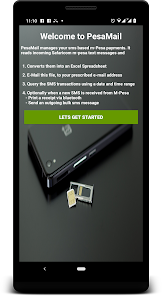
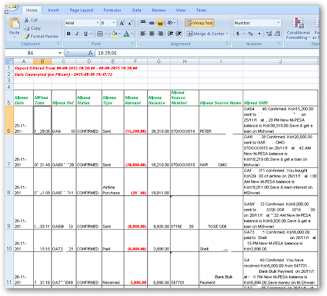
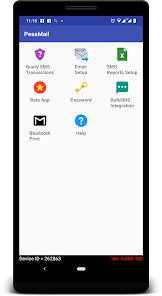
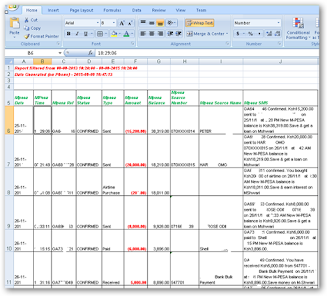
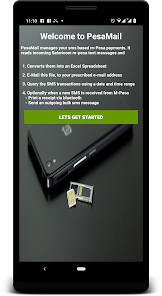
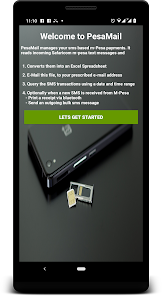
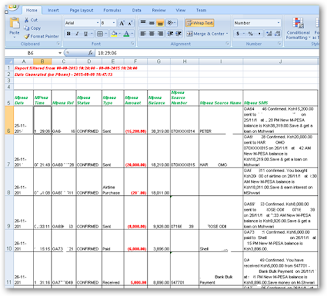
PesaMail is an SMS based money management app with integrations to Bulk SMS. It converts your text messages involving mobile money transactions e.g. M-PESA transactions into an excel spread sheet which can then be sent to your e-mail or previewed on the mobile device.
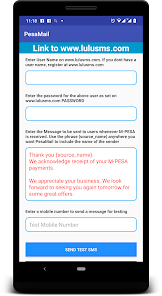
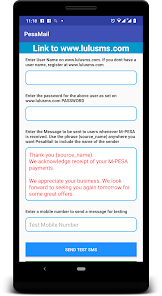
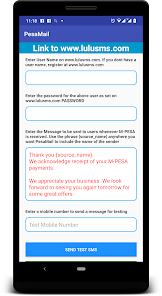
It also allows integrations to bulk SMS from www.lulusms.com such that a bulk SMS message is triggered back to the customer when, mobile payments are received.
Pesamail can also print an M-PESA receipt to a blue tooth printer as well as save the data to a local or remote server database
N.B Some of the options are not enabled by default
Features
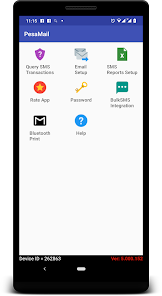
- Converts your mobile money transaction short messages into an excel spreadsheet which is then sent to you via e-mail on a schedule i.e hourly, daily or monthly
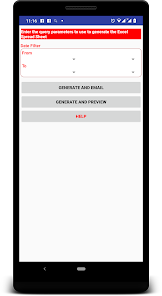
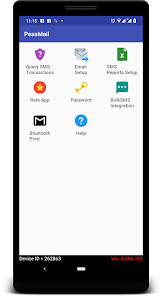
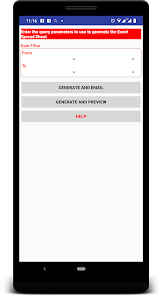
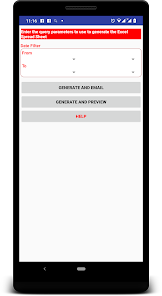
- Query your mobile money transactions on the device using a date range. The results are output to an Excel file format which you can preview on the device or send to the e-mail address configured on the device.
Ad hoc generation of M-PESA transaction in excel format reports based on given time period
- Bulk SMS Alerts to customer upon receipt of M-Pesa payments
You can use this to, Thank the customer, Request for customer satisfaction survey and view real-time analytics, Market your products or other companies products, Automatically collect the customers contacts into a database.
- Customer satisfaction survey Sent upon payment of Lipa na M-Pesa with real-time results in form of graph and raw data.
You can use this to, Get to customer feedback, Analyze and evaluate feedback, Call Unhappy customers and any issues arising.
- Automatic birthday management - Automatic Collection of Birthdates, sending of Pre birth day SMS, sending of Happy Birthday SMS. You can use this to, target the customer a week before their birthday and offer your customers discounts or gifts on their special day, Surprise and Delight your customers and make them feel appreciated.
- Automatic Customer Contacts Data Mining From Lipa na M-Pesa. You can then use these contacts for, Bulk SMS marketing, Satisfaction Surveys etc.
- Bulk SMS Marketing. Send to individual, group or list. Mail Merge outgoing message so that everyone receives a personalized message when you send SMS to a group. Schedule message for a future date and time
- Real time Printing of Lipa na M-Pesa receipt. You can use this to avoid looking at customer phones to confirm payments as well as avoid fraud by customers who show you messages on their phone for payments already redeemed
Who can use PESAMAIL
M-Pesa users
This would typically be by those people who use M-Pesa to make lots of M-Pesa transactions including receiving, withdrawals, payments etc.
They can auto filter the excel report generated by PesaMail to know how much has been paid or received from a particular entity within a time period of interest.
They can easily reconcile their M-Pesa payments.
LIPA NA M-PESA MERCHANTS
This will help in easy reconciliation of M-Pesa payments received. They can auto filter the excel report generated by PesaMail to know amounts eceived from a particular entity within a time period of interest.
M-Pesa Agents
PesaMail will help them get their report sent to them automatically instead of rely on the aggregator to send them reports which might not be forthcoming when needed
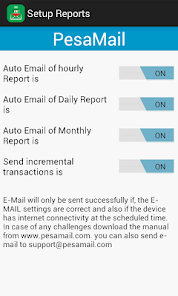
The extracted report is sent on a predefined schedule which the user can enable or disable
1. Hourly - On top of the hour, PesaMail will generate report extract of all transactions that have occurred in the last one hour and send it via e-mail
2.Daily - At midnight, PesaMail will generate report extract of all transactions that have occurred in the last one day
3. Monthly - On first day of every month, PesaMail will generate report extract of transactions that have occurred in the last one month
It also allows integrations to bulk SMS from www.lulusms.com such that a bulk SMS message is triggered back to the customer when, mobile payments are received.
Pesamail can also print an M-PESA receipt to a blue tooth printer as well as save the data to a local or remote server database
N.B Some of the options are not enabled by default
Features
- Converts your mobile money transaction short messages into an excel spreadsheet which is then sent to you via e-mail on a schedule i.e hourly, daily or monthly
- Query your mobile money transactions on the device using a date range. The results are output to an Excel file format which you can preview on the device or send to the e-mail address configured on the device.
Ad hoc generation of M-PESA transaction in excel format reports based on given time period
- Bulk SMS Alerts to customer upon receipt of M-Pesa payments
You can use this to, Thank the customer, Request for customer satisfaction survey and view real-time analytics, Market your products or other companies products, Automatically collect the customers contacts into a database.
- Customer satisfaction survey Sent upon payment of Lipa na M-Pesa with real-time results in form of graph and raw data.
You can use this to, Get to customer feedback, Analyze and evaluate feedback, Call Unhappy customers and any issues arising.
- Automatic birthday management - Automatic Collection of Birthdates, sending of Pre birth day SMS, sending of Happy Birthday SMS. You can use this to, target the customer a week before their birthday and offer your customers discounts or gifts on their special day, Surprise and Delight your customers and make them feel appreciated.
- Automatic Customer Contacts Data Mining From Lipa na M-Pesa. You can then use these contacts for, Bulk SMS marketing, Satisfaction Surveys etc.
- Bulk SMS Marketing. Send to individual, group or list. Mail Merge outgoing message so that everyone receives a personalized message when you send SMS to a group. Schedule message for a future date and time
- Real time Printing of Lipa na M-Pesa receipt. You can use this to avoid looking at customer phones to confirm payments as well as avoid fraud by customers who show you messages on their phone for payments already redeemed
Who can use PESAMAIL
M-Pesa users
This would typically be by those people who use M-Pesa to make lots of M-Pesa transactions including receiving, withdrawals, payments etc.
They can auto filter the excel report generated by PesaMail to know how much has been paid or received from a particular entity within a time period of interest.
They can easily reconcile their M-Pesa payments.
LIPA NA M-PESA MERCHANTS
This will help in easy reconciliation of M-Pesa payments received. They can auto filter the excel report generated by PesaMail to know amounts eceived from a particular entity within a time period of interest.
M-Pesa Agents
PesaMail will help them get their report sent to them automatically instead of rely on the aggregator to send them reports which might not be forthcoming when needed
The extracted report is sent on a predefined schedule which the user can enable or disable
1. Hourly - On top of the hour, PesaMail will generate report extract of all transactions that have occurred in the last one hour and send it via e-mail
2.Daily - At midnight, PesaMail will generate report extract of all transactions that have occurred in the last one day
3. Monthly - On first day of every month, PesaMail will generate report extract of transactions that have occurred in the last one month
Updated on
Safety starts with understanding how developers collect and share your data. Data privacy and security practices may vary based on your use, region, and age. The developer provided this information and may update it over time.

No data shared with third parties
Learn more about how developers declare sharing

This app may collect these data types
Personal info, Financial info and 3 others

Data is encrypted in transit
Ratings and reviews
4.0
29 reviews

solmax kenya
- Flag inappropriate
May 8, 2021
Keeps crashing.cannot activate account.cant sent code .
5 people found this review helpful
Lulu Technologies
May 27, 2021
Could you please upgrade the app to the current version. As for the activate code, kindly dial *456# and navigate the menus to make sure you have not blacklisted all Bulk SMS marketing messages. Please reach out to us pesamail@lulu-com.com if the issue persists.

Victor Ngetich
- Flag inappropriate
May 16, 2021
I needed to generate a report of Mpesa transctions. This app helped me achieve that.
4 people found this review helpful
Lulu Technologies
May 27, 2021
Thank you for providing your valuable feedback. Please reach out to us at pesamail@lulu-com.com, if you have other suggestions.

Amos Nganga
- Flag inappropriate
January 18, 2023
Good. Is it available on till number?
Lulu Technologies
January 18, 2023
Yes. It is available.
App support
phone
Phone number
+254721499435