
iLock Screen - Phone Lock
Contains adsIn-app purchases

star
16.9K reviews

Everyone
info
1M+
Downloads


About this app
iLock Screen - Experience OS 17 on Your Android!
Love your Android device but miss the sleek lock screen of OS 17? Look no further!
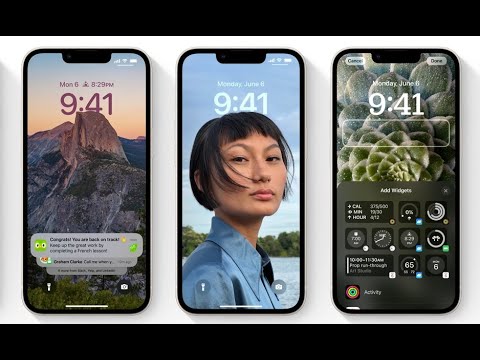
Introducing iLock Screen – a personalized lock screen replacement that transforms your Android phone into the latest Phone's screen with ease. Protect your phone from unwanted access quickly and simply. Enjoy OS 17 lock screen style notifications, music player, and security passcode right on your Android device.
Features of iLock Screen - Phone Lock:
⎯ Transform your Android phone lock screen into the exact latest Phone's screen
⎯ Lock screen with notifications
⎯ No ads - completely free with no premium version
⎯ Supports both Dark & Light Mode
⎯ Simulate Phone Lock Screen style OS 17
⎯ Long press on Flash to turn on/off Flash
⎯ Long press on Camera to open Camera
⎯ iLock screen pattern
⎯ Swipe to unlock screen
⎯ Press home to unlock style OS 17
⎯ Show all notifications on lock screen
⎯ Control center style with the latest OS 17
⎯ Clearly shows the battery percentage on your Home screen
⎯ Quick access to Camera like iCamera
⎯ Supports 12-Hour or 24-Hour time format
⎯ Change color of date/time
⎯ No internet connection needed
⎯ Easy to use with a nice user interface
⎯ Displays missed calls and unread messages on the notification panel
⎯ Unlock sound enable/disable
⎯ Unlock vibration enable/disable
⎯ Small size application
⎯ Consumes less memory and battery with a simple and clean design
⎯ Lightweight and quick to download and install
⎯ 100+ unique OS wallpapers available
⎯ Free for everyone
Permissions Required by App:
+ CAMERA: To open the camera from the lock screen
+ READ_PHONE_STATE: To turn off the lock screen while calling
+ NOTIFICATION ACCESS: To get notifications on your phone
+ READ/WRITE_EXTERNAL_STORAGE: To download and save more wallpapers
+ DRAW OVER SCREEN: To show Lock Screen & Notification over all apps
+ QUERY_ALL_PACKAGES: To search for all apps on the device within permitted uses
+ BIND_ACCESSIBILITY_SERVICE: To allow apps to draw on the phone's lock screen and status bar. The app needs this permission to open the app by swiping from the top left edge of the screen and commits not to collect any other information. This app requires the accessibility service permission for:
- Detecting screen on/off changes to show lock screen.
- Detecting and controlling current media session from lock screen.
We do not collect or share any sensitive or personal information.
Unlock the Best Lock Screen Experience!
Download iLock Screen - Phone Lock now and enjoy the ultimate OS 17 lock screen experience on your Android device. Elevate your phone’s security and aesthetics today! 🚀🔒
Secure and Stylish!
Get iLock Screen - Phone Lock App and transform your Android phone’s lock screen into a sleek, secure, and stylish interface with OS 17 features. Don’t wait – download now! 🌟📲
Applock with smart OS Lock screen with notification
Updated on
Safety starts with understanding how developers collect and share your data. Data privacy and security practices may vary based on your use, region, and age. The developer provided this information and may update it over time.
- This app may share these data types with third partiesDevice or other IDs
- No data collectedLearn more about how developers declare collection
- Data is encrypted in transit
- Data can’t be deleted


Ratings and reviews
16.6K reviews

harderPlaysX
- Flag inappropriate
- Show review history
August 27, 2026
It's a very good app, but there's ONE problem, it doesn't let your phone's timeout happen, when it happens, the app opens again which ALSO removes the AOD if added. Please fix this. Also, it would be great if you, the developers added a fingerprint button for quick launching. I guess I'll stop using this app until the issue is fixed, then I'll get back to use it again.
3 people found this review helpful
GeniusTools Labs
August 28, 2026
Hello! We appreciate your suggestion very much and have shared it with our Developers so that they can have a look and proceed accordingly. We appreciate your feedback and hope you keep enjoying the App for your purposes! For any questions or issues, please contact our support team by email so we can advise you accordingly.

Aljoscha Schubert
- Flag inappropriate
- Show review history
November 24, 2024
This app is a good app. Except, I would like it if there was either touch ID or face ID. And I would also like this app more, if it would use the same wallpaper as the actual wallpaper without this app. Another thing that I would change is the ability too see how much percent the phone has. Because I can only see grey bot the number. I would give this app 4.0/ stars. Please tell me once the Developers have changed it. Thank you!
131 people found this review helpful
GeniusTools Labs
November 25, 2024
Hello!
If you wish to get notified of any new features, drop us a line at support.ilockscreen@geniustoolslabs.com and we will make sure to get back to you if the feature gets released in the future.
Thank you!

Doeunnie
- Flag inappropriate
January 4, 2026
honest review ^^ It's good! I don't know about the ads because I didn't pay much attention to them. And no, you can't change the font of your clock. ^^ It's easy too use🩷 4-stars, too much ads for me❤️🩹 Overall, this is a good app, perfect for people who doesn't have an Iphone 🫶
43 people found this review helpful
GeniusTools Labs
January 4, 2026
Hello! Thank you for your review. We are sorry to hear that the ads caused inconveniences. Ads are usually part of the free version of the app. The free trial and Premium version have no ads. We appreciate your feedback and hope you keep enjoying the App for your purposes!
App support
About the developer
ROUNDS AI LTD
support@geniustoolslabs.com
18/7 Yechezkel
TEL AVIV-JAFFA, 6259524
Israel
+1 740-754-0716


