
Veya: NAS Video & Music Player
In-app purchases


Everyone
info
50+
Downloads


About this app
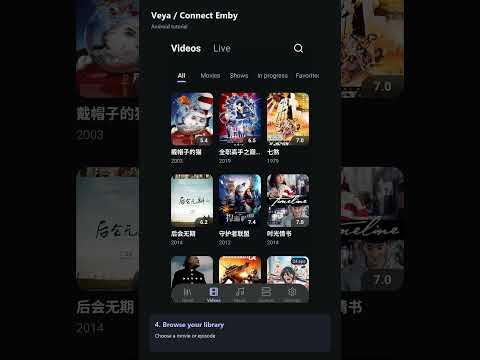
Veya is a video and music player for your own media library. Connect your Jellyfin, Emby or Plex media server, open your NAS over SMB or WebDAV, or play local files, then browse your collection and continue watching right where you left off.
Veya does not include any movies, shows, music or channels. Bring your own media server, NAS or files, and Veya plays them.
WORKS WITH YOUR MEDIA
• Jellyfin, Emby and Plex media servers
• NAS and network shares over SMB and WebDAV
• Local video and audio files on your phone or tablet
• Direct media links and your own live channel sources
• Movies, TV shows and music from several sources in one app
BROWSE YOUR LIBRARY
• Posters, artwork, descriptions, ratings and episode details from your server
• Seasons, episodes, albums and playlists
• Favorites, continue watching and automatic next episode
• Search your media server
PLAY IT YOUR WAY
• Choose audio tracks and subtitles
• Adjust playback speed and display options
• Dedicated controls for video, music and live playback
• Music sleep timer with 15, 30 and 60 minute shortcuts
• Clean dark interface with clear navigation
FREE FEATURES
No sign-in needed. The free version includes:
• Up to 3 media server connections in total across video and music servers
• Up to 3 cloud storage sources
• Local media and supported network storage playback
• Search within the currently selected media server
• Audio track selection and standard subtitle selection
• Playback speed controls, resume playback and automatic next episode
VEYA PRO
Upgrade to Pro for:
• More media server and cloud storage connections beyond the free limits
• Search across all your media servers at once
• Import local subtitle files and show dual subtitles
• Synced lyrics for supported music sources
• Advanced playback engines, including MPV and MDK where available
• Playback disk caching and next-episode preloading on supported playback paths
• Downloads from supported media servers for offline viewing
An account is required to purchase Pro and manage your purchase records and access. Available plans, prices and billing terms are shown in the app and on Google Play. Subscriptions renew automatically unless cancelled through Google Play. Pro does not include third-party content subscriptions.
BRING YOUR OWN CONTENT
Veya is a media player. It does not provide movies, music, live channels or media server accounts. Add your own files, media links or compatible sources to get started.
Source support and playback features depend on your device, app build, media format, server configuration, network conditions and access permissions. Artwork, metadata, subtitles, lyrics and downloads are available only when supported by the connected source.
Jellyfin, Emby and Plex are trademarks of their respective owners. Veya is an independent app and is not affiliated with or endorsed by them.
Only access media you own or are authorized to use.
Veya does not include any movies, shows, music or channels. Bring your own media server, NAS or files, and Veya plays them.
WORKS WITH YOUR MEDIA
• Jellyfin, Emby and Plex media servers
• NAS and network shares over SMB and WebDAV
• Local video and audio files on your phone or tablet
• Direct media links and your own live channel sources
• Movies, TV shows and music from several sources in one app
BROWSE YOUR LIBRARY
• Posters, artwork, descriptions, ratings and episode details from your server
• Seasons, episodes, albums and playlists
• Favorites, continue watching and automatic next episode
• Search your media server
PLAY IT YOUR WAY
• Choose audio tracks and subtitles
• Adjust playback speed and display options
• Dedicated controls for video, music and live playback
• Music sleep timer with 15, 30 and 60 minute shortcuts
• Clean dark interface with clear navigation
FREE FEATURES
No sign-in needed. The free version includes:
• Up to 3 media server connections in total across video and music servers
• Up to 3 cloud storage sources
• Local media and supported network storage playback
• Search within the currently selected media server
• Audio track selection and standard subtitle selection
• Playback speed controls, resume playback and automatic next episode
VEYA PRO
Upgrade to Pro for:
• More media server and cloud storage connections beyond the free limits
• Search across all your media servers at once
• Import local subtitle files and show dual subtitles
• Synced lyrics for supported music sources
• Advanced playback engines, including MPV and MDK where available
• Playback disk caching and next-episode preloading on supported playback paths
• Downloads from supported media servers for offline viewing
An account is required to purchase Pro and manage your purchase records and access. Available plans, prices and billing terms are shown in the app and on Google Play. Subscriptions renew automatically unless cancelled through Google Play. Pro does not include third-party content subscriptions.
BRING YOUR OWN CONTENT
Veya is a media player. It does not provide movies, music, live channels or media server accounts. Add your own files, media links or compatible sources to get started.
Source support and playback features depend on your device, app build, media format, server configuration, network conditions and access permissions. Artwork, metadata, subtitles, lyrics and downloads are available only when supported by the connected source.
Jellyfin, Emby and Plex are trademarks of their respective owners. Veya is an independent app and is not affiliated with or endorsed by them.
Only access media you own or are authorized to use.
Play movies & music from your own NAS, Jellyfin, Emby or Plex, with subtitles.
Updated on
Safety starts with understanding how developers collect and share your data. Data privacy and security practices may vary based on your use, region, and age. The developer provided this information and may update it over time.
- No data shared with third partiesLearn more about how developers declare sharing
- This app may collect these data typesPersonal info and Device or other IDs
- Data is encrypted in transit
- You can request that data be deleted


What’s new
1. Added an in-app volume popup for quick volume adjustments during music playback.
2. Added animated bars to highlight the currently playing track in the playlist.
3. Improved the More menu and added a sleep timer shortcut with 15, 30, and 60-minute options.
4. Fixed a crash when opening the player and improved playback stability.
2. Added animated bars to highlight the currently playing track in the playlist.
3. Improved the More menu and added a sleep timer shortcut with 15, 30, and 60-minute options.
4. Fixed a crash when opening the player and improved playback stability.
App support
About the developer
YANG FEI PTE. LTD.
info@yangfeien.com
101 Thomson Road
#28-03A United Square
Singapore 307591
+65 8068 7699


