
Guard Watch Face
Contains adsIn-app purchases

star
1.91K reviews

Everyone
info
100K+
Downloads


About this app
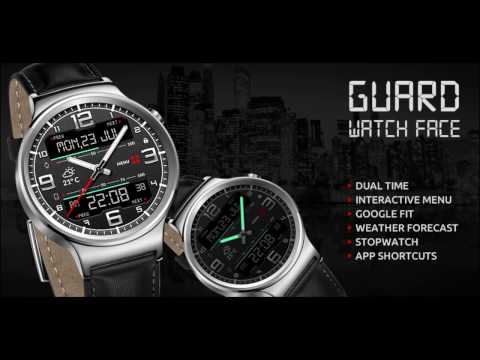
Guard Watch Face is the ultimate tactical instrument for your wrist. Built exclusively for Wear OS 6, this rugged hybrid watch face combines precision analog mechanics with a high-information digital dashboard.
Designed for those who need data at a glance, Guard features 2 unique display modes (Top & Bottom) to keep you organized without the clutter. Whether you are tracking the market, checking the forecast, or monitoring your vitals, Guard keeps you mission-ready.
🔥 exclusive Features:
★ Dual Display Modes: Switch between layouts to prioritize Time, Calendar, Daily Forecast, or Hourly Weather.
★ Hybrid Design: Bold analog hands with a high-contrast digital overlay.
★ Health Command Center: Live heart rate monitoring ❤️ and accurate step counter 👟 with progress bars.
★ Market Ready: Custom complication slots perfect for Crypto ₿ and Stock Market 📈 tickers.
★ Live Weather: Real-time temperature and cloud conditions 🌤️ directly on your dial.
★ Battery Efficient: Optimized for Wear OS 6 to extend your daily charge.
🚀 Customization & Complications:
★ 2x Customizable Text Slots (Perfect for Next Event, Stocks, or World Clock)
★ Top & Bottom Information Bars
★ Multiple Color Themes for Tactical Operations
✅ Compatibility:
Exclusively designed for Wear OS 6 API 35+ devices.
Compatible with Pixel Watch, Galaxy Watch, and other premium smartwatches.
Installation: Ensure your watch is running the latest Wear OS 6 update. Tap "Install" on your phone or search specifically on the watch Play Store.
★ DISCLAIMER ★
The free version doesn't have a tap functionality. It just shows data and the user is not able to change anything until unlock the paid version.
The phone battery indicator works only if you connect the smartwatch to Android phone device and install companion app. It is not required feature and the app will work normally without the companion app.
★ FAQ
!! Please contact us if you have any trouble with the app !!
richface.watch@gmail.com
★ PERMISSIONS Explained
https://www.richface.watch/privacy
Designed for those who need data at a glance, Guard features 2 unique display modes (Top & Bottom) to keep you organized without the clutter. Whether you are tracking the market, checking the forecast, or monitoring your vitals, Guard keeps you mission-ready.
🔥 exclusive Features:
★ Dual Display Modes: Switch between layouts to prioritize Time, Calendar, Daily Forecast, or Hourly Weather.
★ Hybrid Design: Bold analog hands with a high-contrast digital overlay.
★ Health Command Center: Live heart rate monitoring ❤️ and accurate step counter 👟 with progress bars.
★ Market Ready: Custom complication slots perfect for Crypto ₿ and Stock Market 📈 tickers.
★ Live Weather: Real-time temperature and cloud conditions 🌤️ directly on your dial.
★ Battery Efficient: Optimized for Wear OS 6 to extend your daily charge.
🚀 Customization & Complications:
★ 2x Customizable Text Slots (Perfect for Next Event, Stocks, or World Clock)
★ Top & Bottom Information Bars
★ Multiple Color Themes for Tactical Operations
✅ Compatibility:
Exclusively designed for Wear OS 6 API 35+ devices.
Compatible with Pixel Watch, Galaxy Watch, and other premium smartwatches.
Installation: Ensure your watch is running the latest Wear OS 6 update. Tap "Install" on your phone or search specifically on the watch Play Store.
★ DISCLAIMER ★
The free version doesn't have a tap functionality. It just shows data and the user is not able to change anything until unlock the paid version.
The phone battery indicator works only if you connect the smartwatch to Android phone device and install companion app. It is not required feature and the app will work normally without the companion app.
★ FAQ
!! Please contact us if you have any trouble with the app !!
richface.watch@gmail.com
★ PERMISSIONS Explained
https://www.richface.watch/privacy
Dual watch face with 2 display modes and lot of features for Wear OS
Updated on
Featured stories

Safety starts with understanding how developers collect and share your data. Data privacy and security practices may vary based on your use, region, and age. The developer provided this information and may update it over time.
- This app may share these data types with third partiesLocation
- No data collectedLearn more about how developers declare collection
- Data is encrypted in transit
- Data can’t be deleted


Ratings and reviews
1.43K reviews

Bien Agiter
- Flag inappropriate
- Show review history
May 9, 2026
Change log?????? Meh, it's okay but I noticed that the dev doesn't let you use the "complications suite" to get a wide range of choices for complications. Other watch faces on the Play Store allow for this and that makes them much more bang for your buck in comparison to this face. Also there's some glaring typos in the app setup on your phone, so it makes me wonder if anyone checked before they uploaded it to the Play Store.
2 people found this review helpful
RichFace
May 18, 2026
The phone app is used for the installation only. All the settings now are done on the watch itself. You can choose all the complications you have in the complications suite but you have to find it on your watch in the list of complications when setting up the complication slot.

A Google user
- Flag inappropriate
- Show review history
April 25, 2019
The 'on watch' settings worked fine on my LG R watch but now I have changed to a Ticwatch Pro I found that the on watch settings no longer work so I can't see health data and I can only make config changes using the phone app. One other thing, the support on RichFace website is useless. You send an email and get no reply
25 people found this review helpful

Larry Watts
- Flag inappropriate
July 25, 2025
Bought the premium features because I fly and need UTC zone. I selected it but cannot get anything but a digital version of CDST even though the setting say selecting the time zone only applies to digital screen
2 people found this review helpful
What’s new
Wear OS 6 Support
App support
About the developer
NoviSmart OG
richface.developer@gmail.com
Zentagasse 6/20
1050 Wien
Austria
+387 66 445-577


