
Tactical Watch Face: DIGI 2

Everyone
info
100+
Downloads

Everyone
Learn more


About this app
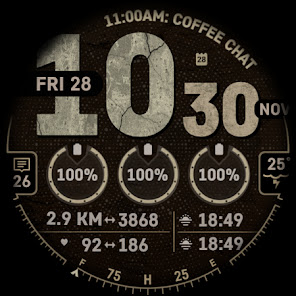
DIGI 2 – Tactical Digital Watch Face for Wear OS
Designed for users who prefer a bold, easy-to-read display, DIGI 2 combines a rugged tactical style with the everyday convenience of modern Wear OS features.
Whether you're commuting, working outdoors, travelling, or exercising, DIGI 2 keeps your most important information clearly visible while maintaining a clean, high-contrast layout.
Built for Samsung Galaxy Watch, Google Pixel Watch, and other compatible Wear OS smartwatches, DIGI 2 delivers a practical digital dashboard that works in almost any environment.
Built for Readability
A digital watch face should be easy to read at a glance.
DIGI 2 features a high-contrast layout with bold typography and organized complication areas, making it simple to check the information you need in bright sunlight, indoors, or during outdoor activities.
The tactical-inspired design focuses on clarity without unnecessary clutter.
Personalise Your Dashboard
DIGI 2 includes flexible customisation options so your watch face works the way you want.
Features include:
6 customisable complications
2 app shortcuts
High-contrast digital display
Multiple Always-On Display brightness levels
Clean tactical-rugged inspired design
Display useful information such as:
Heart rate
Weather
Battery level
Step count
Calendar events
Compass
Sunrise and sunset
Other compatible Wear OS complications
Designed for Everyday Use
DIGI 2 is suitable for a wide range of activities, including:
Daily commuting
Outdoor adventures
Hiking
Cycling
Fitness training
Travel
Office use
Its organized layout makes it easy to view essential information throughout the day.
Battery-Friendly Performance
DIGI 2 is built using the latest Watch Face Format (WFF) to provide efficient performance on modern Wear OS smartwatches.
Benefits include:
Efficient battery usage
Smooth performance
Reliable compatibility
Optimised Always-On Display
Choose your preferred Always-On Display brightness level to balance visibility with battery life.
Why Choose DIGI 2?
✔ Tactical digital design
✔ High-contrast display
✔ 6 customisable complications
✔ 2 customisable shortcuts
✔ Multiple AOD brightness levels
✔ Built using the latest Watch Face Format
✔ Efficient battery usage
✔ Designed for Wear OS
Device Compatibility
DIGI 2 is compatible with Wear OS smartwatches and has been optimised for:
Samsung Galaxy Watch
Galaxy Watch Ultra
Galaxy Watch 8
Galaxy Watch 7
Galaxy Watch 6
Galaxy Watch 5
Galaxy Watch 4
Google Pixel Watch
Pixel Watch 1
Pixel Watch 2
Pixel Watch 3
Pixel Watch 4
Other compatible Wear OS devices.
Easy to Customise
- Touch and hold your current watch face.
- Tap Customize.
- Select your preferred complications.
- Choose your Always-On Display brightness.
- Enjoy a dashboard built around your lifestyle.
Email simplewf25@gmail.com for support.
More premium watch faces on https://simplewf.com.
Designed for users who prefer a bold, easy-to-read display, DIGI 2 combines a rugged tactical style with the everyday convenience of modern Wear OS features.
Whether you're commuting, working outdoors, travelling, or exercising, DIGI 2 keeps your most important information clearly visible while maintaining a clean, high-contrast layout.
Built for Samsung Galaxy Watch, Google Pixel Watch, and other compatible Wear OS smartwatches, DIGI 2 delivers a practical digital dashboard that works in almost any environment.
Built for Readability
A digital watch face should be easy to read at a glance.
DIGI 2 features a high-contrast layout with bold typography and organized complication areas, making it simple to check the information you need in bright sunlight, indoors, or during outdoor activities.
The tactical-inspired design focuses on clarity without unnecessary clutter.
Personalise Your Dashboard
DIGI 2 includes flexible customisation options so your watch face works the way you want.
Features include:
6 customisable complications
2 app shortcuts
High-contrast digital display
Multiple Always-On Display brightness levels
Clean tactical-rugged inspired design
Display useful information such as:
Heart rate
Weather
Battery level
Step count
Calendar events
Compass
Sunrise and sunset
Other compatible Wear OS complications
Designed for Everyday Use
DIGI 2 is suitable for a wide range of activities, including:
Daily commuting
Outdoor adventures
Hiking
Cycling
Fitness training
Travel
Office use
Its organized layout makes it easy to view essential information throughout the day.
Battery-Friendly Performance
DIGI 2 is built using the latest Watch Face Format (WFF) to provide efficient performance on modern Wear OS smartwatches.
Benefits include:
Efficient battery usage
Smooth performance
Reliable compatibility
Optimised Always-On Display
Choose your preferred Always-On Display brightness level to balance visibility with battery life.
Why Choose DIGI 2?
✔ Tactical digital design
✔ High-contrast display
✔ 6 customisable complications
✔ 2 customisable shortcuts
✔ Multiple AOD brightness levels
✔ Built using the latest Watch Face Format
✔ Efficient battery usage
✔ Designed for Wear OS
Device Compatibility
DIGI 2 is compatible with Wear OS smartwatches and has been optimised for:
Samsung Galaxy Watch
Galaxy Watch Ultra
Galaxy Watch 8
Galaxy Watch 7
Galaxy Watch 6
Galaxy Watch 5
Galaxy Watch 4
Google Pixel Watch
Pixel Watch 1
Pixel Watch 2
Pixel Watch 3
Pixel Watch 4
Other compatible Wear OS devices.
Easy to Customise
- Touch and hold your current watch face.
- Tap Customize.
- Select your preferred complications.
- Choose your Always-On Display brightness.
- Enjoy a dashboard built around your lifestyle.
Email simplewf25@gmail.com for support.
More premium watch faces on https://simplewf.com.
Rugged digital watch face with 6 customizable complications for Wear OS
Updated on
Safety starts with understanding how developers collect and share your data. Data privacy and security practices may vary based on your use, region, and age. The developer provided this information and may update it over time.
- No data shared with third partiesLearn more about how developers declare sharing
- No data collectedLearn more about how developers declare collection


What’s new
- Added 2 more AOD brightness levels.
- Fine tuned colors.
- Fine tuned colors.
Everyone
Learn moreApp support
About the developer
Liew Wah Eng
simplewf25@gmail.com
Blk 445A New Punggol Rd
Singapore 821445


