
Watch Face Daisy for Wear OS
3.6star
85 reviews
5K+
Downloads

Everyone
info


About this app
Wear OS watch face — install to your watch from the Play Store. On phone: Play Store → Available on more devices → your watch → Install.
To apply: the watch face should appear automatically; if it doesn’t, long-press the current watch face and select the new one (you can also find it under Library → Downloads in the watch’s Play Store).
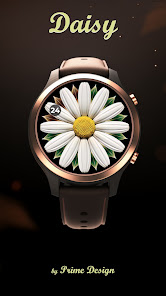
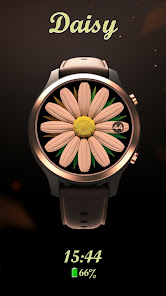
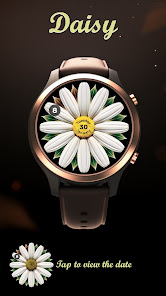
A minimal watch face that elegantly displays the time and battery status. The minutes orbit the daisy flower with twelve petals, each representing an hour. The battery level is indicated by leaves discreetly placed behind the flower.
Please note that our watch faces are exclusively tailored for Wear OS smartwatches.
Features
• Analogue design with optional hybrid (digital) time
• 3 complications — great for battery, steps, heart rate, calendar, weather
• Centre info modes: date, heart rate, steps, or seconds
• Tap the centre to show/hide the centre information while using the face
• Seconds style options: ticking or sweep
• Always-on display (AOD) optimised for battery life
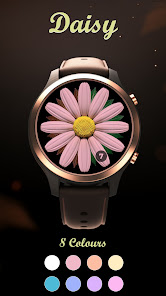
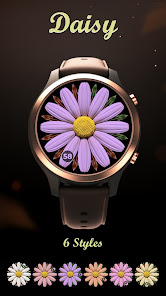
• Customisation: colour themes, leaves/battery styles, seconds styles, optional digital time, flower-centre information, and a polished complication layout
• 12/24-hour support
• No phone companion required — standalone on Wear OS
How to customise
Long-press the face → Customise →
• Complications: choose providers (Battery, Steps, Calendar, Weather, etc.)
• Centre info: pick date / heart rate / steps / seconds; tap the centre to show or hide it at any time
• Style: choose colour themes, centre style, leaves style, seconds style, and bottom panel style
Note: the bottom panel provides quick access to the heart-rate monitor even when the centre info is hidden.
Not sure about compatibility?
If you’re uncertain about compatibility or what to expect, we recommend starting with our Free Watch Face. Rest assured that the watch faces available in the Prime Design Store operate in the same manner.
Free Watch Face: https://play.google.com/store/apps/details?id=com.primedesign.galaxywatchface
Support & feedback
If you appreciate our watch faces, please consider rating the app.
In case of any issues, the best way is to contact us via the email under App support — we value and appreciate your feedback.
To apply: the watch face should appear automatically; if it doesn’t, long-press the current watch face and select the new one (you can also find it under Library → Downloads in the watch’s Play Store).
A minimal watch face that elegantly displays the time and battery status. The minutes orbit the daisy flower with twelve petals, each representing an hour. The battery level is indicated by leaves discreetly placed behind the flower.
Please note that our watch faces are exclusively tailored for Wear OS smartwatches.
Features
• Analogue design with optional hybrid (digital) time
• 3 complications — great for battery, steps, heart rate, calendar, weather
• Centre info modes: date, heart rate, steps, or seconds
• Tap the centre to show/hide the centre information while using the face
• Seconds style options: ticking or sweep
• Always-on display (AOD) optimised for battery life
• Customisation: colour themes, leaves/battery styles, seconds styles, optional digital time, flower-centre information, and a polished complication layout
• 12/24-hour support
• No phone companion required — standalone on Wear OS
How to customise
Long-press the face → Customise →
• Complications: choose providers (Battery, Steps, Calendar, Weather, etc.)
• Centre info: pick date / heart rate / steps / seconds; tap the centre to show or hide it at any time
• Style: choose colour themes, centre style, leaves style, seconds style, and bottom panel style
Note: the bottom panel provides quick access to the heart-rate monitor even when the centre info is hidden.
Not sure about compatibility?
If you’re uncertain about compatibility or what to expect, we recommend starting with our Free Watch Face. Rest assured that the watch faces available in the Prime Design Store operate in the same manner.
Free Watch Face: https://play.google.com/store/apps/details?id=com.primedesign.galaxywatchface
Support & feedback
If you appreciate our watch faces, please consider rating the app.
In case of any issues, the best way is to contact us via the email under App support — we value and appreciate your feedback.
Updated on
Safety starts with understanding how developers collect and share your data. Data privacy and security practices may vary based on your use, region, and age. The developer provided this information and may update it over time.

No data shared with third parties
Learn more about how developers declare sharing

No data collected
Learn more about how developers declare collection
Ratings and reviews
3.1
17 reviews

Daisy Majano
- Flag inappropriate
November 2, 2024
Cute but you can't even see the time cause everything is so small. There should be a bold/color option for the words.
3 people found this review helpful
Prime Design
November 5, 2024
Thank you for your feedback. Due to the nature of the design, there is limited space to improve the visibility of the time and date. However, we have reviewed the visibility of the complications and made adjustments to enhance their clarity and make more effective use of the available space. An update is now available on the Play Store.

Telling Tales
- Flag inappropriate
- Show review history
May 3, 2024
Downloaded but it is not compatible with my watch. Tic watch E3 3048.Other watch faces say if they are not compatible in Google play. I don't know why this one didn't. Such a shame as I thought it was pretty. I was refunded.
2 people found this review helpful
Prime Design
May 13, 2024
Apologies for any inconvenience caused. While we don't have the exact model of the watch you mentioned available for testing, rest assured that the chipset is supported and the screen resolution has been tested. If you could kindly share any specific details about the issue you're experiencing, please contact us via email primedesignideas@gmail.com

Teresa Brewer
- Flag inappropriate
August 23, 2024
I absolutely love this watch face it's so unique and different, good job guys
1 person found this review helpful
Prime Design
August 26, 2024
Thank you so much! We put a lot of effort into creating something different, so it means a lot to us. Thanks for the support!
What’s new
More customization options
Optional digital time display
New centre info modes
Improved complication readability
Minor fixes and refinements
Optional digital time display
New centre info modes
Improved complication readability
Minor fixes and refinements
App support
About the developer
Peter Krupa
primedesignideas@gmail.com
210A FRANCIS ROAD
LONDON
E10 6PR
United Kingdom


