
WiFiHorizon: AI WiFi Analyzer
In-app purchases


Everyone
info
100+
Downloads


About this app
WiFiHorizon: AI WiFi Analyzer
Smarter WiFi insights, stronger connections.
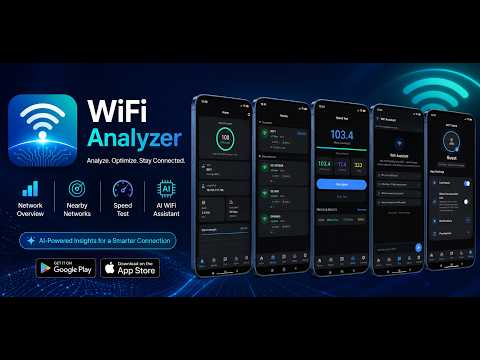
WiFiHorizon is an all-in-one WiFi analysis app that helps you test, understand, and improve your wireless network with practical tools and AI-powered guidance.
Whether your internet feels slow, the signal drops in certain rooms, or you want to improve router placement, WiFiHorizon presents useful network information in a clear and easy-to-understand format.
WHY CHOOSE WIFIHORIZON?
WiFiHorizon goes beyond raw technical numbers. It turns WiFi data into simple insights that help you understand signal quality, internet speed, weak coverage areas, network congestion, connected devices, and potential security risks.
KEY FEATURES
• Monitor live WiFi signal strength in dBm and percentage
• View signal quality with clear labels and real-time graphs
• Scan nearby WiFi networks
• Check SSID, BSSID, IP address, frequency band, and network details
• Test download speed, upload speed, and ping
• Review your WiFi health score
• Find weak areas and WiFi dead zones using walk mode
• Create visual WiFi heatmaps for rooms and floors
• Analyze channel congestion and interference
• Detect open or potentially insecure networks
• View devices connected to your local network
• Check who is using your WiFi
• Identify unfamiliar connected devices
• Get AI-powered WiFi recommendations
WHO IS USING MY WIFI?
Use the connected-device scanner to view devices detected on your local WiFi network. Review available device information and identify smartphones, computers, tablets, smart TVs, routers, and other connected devices.
This feature can help you notice unfamiliar devices and improve awareness of network activity. Device information may vary depending on router settings, privacy controls, permissions, network configuration, and Android restrictions.
AI WIFI ASSISTANT
The AI WiFi Assistant explains network information in simple language and provides practical guidance. It can help you:
• Understand weak signal readings
• Improve router placement
• Troubleshoot slow internet
• Understand congestion and interference
• Find possible causes of dead zones
• Improve WiFi coverage
• Review network health results
New users receive up to 5 free AI chats. After the free chat allowance is used, a subscription is required to continue using the AI WiFi Assistant. Subscription pricing and renewal terms are shown before purchase.
AVAILABLE IN MULTIPLE LANGUAGES
WiFiHorizon supports:
• English
• Mandarin Chinese
• Spanish
• French
• Portuguese
• Japanese
• Arabic
• German
• Indonesian
• Russian
• Swedish
• Hindi
Language availability may vary by app version, device settings, and feature.
PERFECT FOR
• Home WiFi troubleshooting
• Office network checks
• Router placement improvement
• WiFi dead-zone detection
• Internet speed and signal testing
• Checking connected devices
• Network security awareness
• Streaming, gaming, and video calls
• Remote work and online learning
SIMPLE, SMART, AND EASY TO USE
WiFiHorizon brings signal monitoring, speed testing, WiFi heatmaps, connected-device detection, security checks, channel analysis, and AI-powered recommendations together in one clean experience.
Download WiFiHorizon for FREE: AI WiFi Analyzer and take control of your WiFi signal, speed, coverage, connected devices, and network health.
Smarter WiFi insights, stronger connections.
WiFiHorizon is an all-in-one WiFi analysis app that helps you test, understand, and improve your wireless network with practical tools and AI-powered guidance.
Whether your internet feels slow, the signal drops in certain rooms, or you want to improve router placement, WiFiHorizon presents useful network information in a clear and easy-to-understand format.
WHY CHOOSE WIFIHORIZON?
WiFiHorizon goes beyond raw technical numbers. It turns WiFi data into simple insights that help you understand signal quality, internet speed, weak coverage areas, network congestion, connected devices, and potential security risks.
KEY FEATURES
• Monitor live WiFi signal strength in dBm and percentage
• View signal quality with clear labels and real-time graphs
• Scan nearby WiFi networks
• Check SSID, BSSID, IP address, frequency band, and network details
• Test download speed, upload speed, and ping
• Review your WiFi health score
• Find weak areas and WiFi dead zones using walk mode
• Create visual WiFi heatmaps for rooms and floors
• Analyze channel congestion and interference
• Detect open or potentially insecure networks
• View devices connected to your local network
• Check who is using your WiFi
• Identify unfamiliar connected devices
• Get AI-powered WiFi recommendations
WHO IS USING MY WIFI?
Use the connected-device scanner to view devices detected on your local WiFi network. Review available device information and identify smartphones, computers, tablets, smart TVs, routers, and other connected devices.
This feature can help you notice unfamiliar devices and improve awareness of network activity. Device information may vary depending on router settings, privacy controls, permissions, network configuration, and Android restrictions.
AI WIFI ASSISTANT
The AI WiFi Assistant explains network information in simple language and provides practical guidance. It can help you:
• Understand weak signal readings
• Improve router placement
• Troubleshoot slow internet
• Understand congestion and interference
• Find possible causes of dead zones
• Improve WiFi coverage
• Review network health results
New users receive up to 5 free AI chats. After the free chat allowance is used, a subscription is required to continue using the AI WiFi Assistant. Subscription pricing and renewal terms are shown before purchase.
AVAILABLE IN MULTIPLE LANGUAGES
WiFiHorizon supports:
• English
• Mandarin Chinese
• Spanish
• French
• Portuguese
• Japanese
• Arabic
• German
• Indonesian
• Russian
• Swedish
• Hindi
Language availability may vary by app version, device settings, and feature.
PERFECT FOR
• Home WiFi troubleshooting
• Office network checks
• Router placement improvement
• WiFi dead-zone detection
• Internet speed and signal testing
• Checking connected devices
• Network security awareness
• Streaming, gaming, and video calls
• Remote work and online learning
SIMPLE, SMART, AND EASY TO USE
WiFiHorizon brings signal monitoring, speed testing, WiFi heatmaps, connected-device detection, security checks, channel analysis, and AI-powered recommendations together in one clean experience.
Download WiFiHorizon for FREE: AI WiFi Analyzer and take control of your WiFi signal, speed, coverage, connected devices, and network health.
Measure WiFi signal, speed, dead zones, and network health with AI.
Updated on
Safety starts with understanding how developers collect and share your data. Data privacy and security practices may vary based on your use, region, and age. The developer provided this information and may update it over time.
- No data shared with third partiesLearn more about how developers declare sharing
- No data collectedLearn more about how developers declare collection
- Data isn’t encrypted
- You can request that data be deleted


App support
About the developer
Rida Fawad
speckpro@gmail.com
House 1140, Main Double Road
G-15/1
Islamabad, 44000
Pakistan


