
Shadow Lattice - GPS strategy

Everyone
info
10+
Downloads

Everyone
Learn more



About this game
You can use the DEMO ACCOUNT button to automatically log in to a test account and quickly test the game. Alternatively, you can create your own new account by entering:
Player Name (1-15 chars, alphanumeric)
Password (1-15 chars)
Player Color (Blue or Green)
Then click CONNECT & PLAY.
Requirements:
The game requires an active Internet connection and GPS location enabled (please turn both on before launching the game).
Get Moving:
To play this game, you must go outside (no more sitting on the couch!). You will improve your health by moving around and get to know your neighborhood better.
How to Play:
Standing anywhere outside, click the Home icon at the bottom of the screen to access the following menu options:
LOG OUT
HOW TO PLAY
CHANGE MAP (OPEN/GOOGLE)
SHOW MAP (OFF/ON)
TOP 10
ACTION AREA (SMALL/MEDIUM/BIG/HUGE)
DELETE POINT
Game Features & Actions:
CREATE POINT (C):
Creates a game point on the map at your current location. Next, move as far as you can from this point (minimum 1 meter). Once you place the second point, you can choose to delete or link.
DELETE POINT:
Deletes a point, line, or triangle belonging to you or the enemy (you receive the same amount of points for deleting as you do for creating).
LINK 2 POINTS (L):
Connects two points with a straight line. If you move further away (at least 1 meter), you can create a third point and connect it to the previous ones, creating a triangle.
When you click LINK 2 POINTS, you get a list of all points of your color (sorted from nearest to furthest) that you can connect to (provided the connecting line does not cross other lines or triangles—yours or the opponent's).
This list includes the name of the player who created the point and the point number on your map (points on the map do not show player names for clarity).
Smart Linking: You can link points you created earlier without creating a new one if you are standing far enough away. This is very convenient when playing on a bus, train, or car, allowing you to link your last created point with any other point of your color.
ACTION AREA (SMALL/MEDIUM/BIG/HUGE):
Since game points can be very close to each other (1 meter), you can select the accuracy required to interact with a point.
If points are far apart, choose ACTION AREA (HUGE) to delete or link them from a greater distance.
If there are many points close together, choose ACTION AREA (SMALL) for precision.
Goal of the Game:
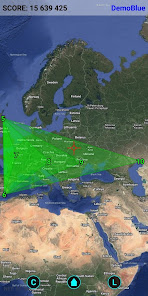
The goal is to create triangles with the largest possible surface area. This determines which group (Green or Blue) is currently leading and winning the game.
TOP 10:
Displays a list of players and their scores (who is leading individually) and which group (color) is leading the global competition. The group score is calculated based on the total surface area of all active triangles.
SHOW MAP (OFF/ON):
Allows you to temporarily disable position tracking so you can zoom out and see what is happening in the game area across your district, city, country, or the world. Clicking OFF returns the map view to your current location.
CHANGE MAP (OPEN/GOOGLE):
Changes the map source used for the background:
OPEN: Open Street Map
GOOGLE: Google Satellite map combined with map object labels.
HOW TO PLAY:
Opens the game’s homepage containing a detailed description of gameplay.
LOG OUT:
Logs the current player out of the game and returns to the start screen, where you can log in or create a new account (useful if you share your phone with a partner or child).
Player Name (1-15 chars, alphanumeric)
Password (1-15 chars)
Player Color (Blue or Green)
Then click CONNECT & PLAY.
Requirements:
The game requires an active Internet connection and GPS location enabled (please turn both on before launching the game).
Get Moving:
To play this game, you must go outside (no more sitting on the couch!). You will improve your health by moving around and get to know your neighborhood better.
How to Play:
Standing anywhere outside, click the Home icon at the bottom of the screen to access the following menu options:
LOG OUT
HOW TO PLAY
CHANGE MAP (OPEN/GOOGLE)
SHOW MAP (OFF/ON)
TOP 10
ACTION AREA (SMALL/MEDIUM/BIG/HUGE)
DELETE POINT
Game Features & Actions:
CREATE POINT (C):
Creates a game point on the map at your current location. Next, move as far as you can from this point (minimum 1 meter). Once you place the second point, you can choose to delete or link.
DELETE POINT:
Deletes a point, line, or triangle belonging to you or the enemy (you receive the same amount of points for deleting as you do for creating).
LINK 2 POINTS (L):
Connects two points with a straight line. If you move further away (at least 1 meter), you can create a third point and connect it to the previous ones, creating a triangle.
When you click LINK 2 POINTS, you get a list of all points of your color (sorted from nearest to furthest) that you can connect to (provided the connecting line does not cross other lines or triangles—yours or the opponent's).
This list includes the name of the player who created the point and the point number on your map (points on the map do not show player names for clarity).
Smart Linking: You can link points you created earlier without creating a new one if you are standing far enough away. This is very convenient when playing on a bus, train, or car, allowing you to link your last created point with any other point of your color.
ACTION AREA (SMALL/MEDIUM/BIG/HUGE):
Since game points can be very close to each other (1 meter), you can select the accuracy required to interact with a point.
If points are far apart, choose ACTION AREA (HUGE) to delete or link them from a greater distance.
If there are many points close together, choose ACTION AREA (SMALL) for precision.
Goal of the Game:
The goal is to create triangles with the largest possible surface area. This determines which group (Green or Blue) is currently leading and winning the game.
TOP 10:
Displays a list of players and their scores (who is leading individually) and which group (color) is leading the global competition. The group score is calculated based on the total surface area of all active triangles.
SHOW MAP (OFF/ON):
Allows you to temporarily disable position tracking so you can zoom out and see what is happening in the game area across your district, city, country, or the world. Clicking OFF returns the map view to your current location.
CHANGE MAP (OPEN/GOOGLE):
Changes the map source used for the background:
OPEN: Open Street Map
GOOGLE: Google Satellite map combined with map object labels.
HOW TO PLAY:
Opens the game’s homepage containing a detailed description of gameplay.
LOG OUT:
Logs the current player out of the game and returns to the start screen, where you can log in or create a new account (useful if you share your phone with a partner or child).
Updated on
Safety starts with understanding how developers collect and share your data. Data privacy and security practices may vary based on your use, region, and age. The developer provided this information and may update it over time.

No data shared with third parties
Learn more about how developers declare sharing

No data collected
Learn more about how developers declare collection
What’s new
Last version.
Everyone
Learn moreApp support
About the developer
Wacław Jacek Michalak
michalak.jacek@gmail.com
Jana Brzechwy 7/77
93-219 Łódź
Poland


