
Filmora:AI Video Editor, Maker
In-app purchases

4.6star
954K reviews
50M+
Downloads

Everyone
info

About this app
Filmora AI Video Editor (formerly FilmoraGo video editor) is an AI-based video editor & movie maker, featuring Text to Video, Text to Speech, Speech to Text, etc! Best choice for creating videos, reels, vlogs and shorts!
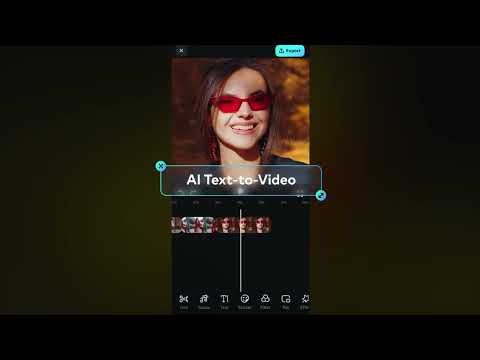
🎥Text to Video
· Generate videos with AI copywriting and subtitles, while maintaining visual quality and adherence to your prompt.
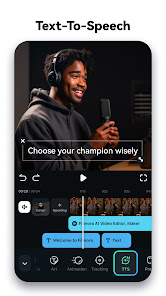
🎙️Text to Speech
· Transform text into professional voiceovers for your videos.
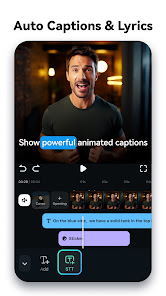
📜Auto Captions
· Auto Speech to Text - Support up to 13 languages and continuously updating.
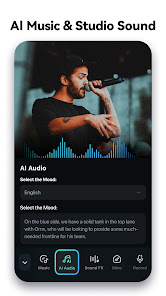
🎵AI Music & Sound Effects
· Generate royalty-free and professional-quality music and soundscapes for your videos!
✨AI Video Effects
· AI Show - Transform your photos into stunning, stylized photos or videos with just one click!
· Infinite Zoom - Dive into the world of endless visual possibilities.
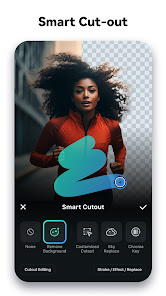
✂️AI Smart Cutout
· You can remove background or chroma key and replace a sky in your videos.
· Customized Cutout - Swipe your finger, then intelligently identify the target area and cut anything out as you want!
· Cutout Plus - You can set strokes, overlay effects, and replace backgrounds for your keyed objects.
📝AI Copywriting
· Generates captivating video scripts, marketing copy, and titles by analyzing topics and keywords, unleashes your creativity, and accelerates video production.
🥁Rhythm Master
· Automatic beat-matching can sync rhythm videos to the perfect beat for a seamless creation experience.
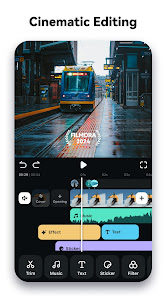
- Trim, split, duplicate, or merge video clips without losing quality.
- Add text, emoji, and exclusive stickers
- Add music, sound effects & voice-overs. Royal-free built-in music library and sound effects.
- Extract music from the video and split audio to remove unwanted parts.
- Add AI effects & premade effects.
- Rotate or crop: Adjust the orientation or size.
- Adjust video ratios for Instagram/TikTok/Youtube posts.
- Adjust speed for fast or slow motion.
- Stunning templates help create videos in one click.
- All-in-one Keyframe: More adjustment items support keyframes, combined with color and special effects, you can create more cool animations.
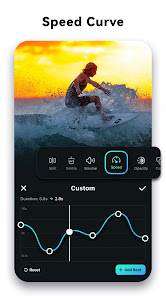
- Speed Curve: Speed control with customizable & pre-set curves for various themes.
- Chromakey: Easily edit green screen video.
- PIP (Picture in Picture): add multiple layers of video, images, stickers, special effects, text, etc.
- Masking: Cover and mix video clips, get different video effects.
- Smart tracking: Support stickers, text, and picture-in-picture intelligent tracking targets, whether you need to track faces, objects, or anything else.
🌟Filmora Pro Subscription
- With Filmora Pro video editor unlimited subscription, you can access all features and paid editing materials including stickers, filter packages, etc. Watermark and Logo Roll will be removed automatically.
- With“Android Pro”, you can access all Pro features and paid editing materials on Android.
- With“All Platform Pro”, you can access all Filmora Pro on Android, iOS, Mac, and Windows.
- Subscription: Monthly, Annual or Perpetual billing.
- You can turn off auto-renewal at any time through your Account Settings.
- Any unused portion of a free trial period, if offered, will be forfeited when the user purchases a subscription.
📧Contact Us
If you would like to know more about the Filmora app:
Service Email: mailer@service.wondershare.com
YouTube: https://www.youtube.com/c/FilmoraWondershare
Facebook: https://www.facebook.com/filmoravideoeditor
Instagram: https://www.instagram.com/filmora_editor
🤖Powerful Brand New AI Features
🎥Text to Video
· Generate videos with AI copywriting and subtitles, while maintaining visual quality and adherence to your prompt.
🎙️Text to Speech
· Transform text into professional voiceovers for your videos.
📜Auto Captions
· Auto Speech to Text - Support up to 13 languages and continuously updating.
🎵AI Music & Sound Effects
· Generate royalty-free and professional-quality music and soundscapes for your videos!
✨AI Video Effects
· AI Show - Transform your photos into stunning, stylized photos or videos with just one click!
· Infinite Zoom - Dive into the world of endless visual possibilities.
✂️AI Smart Cutout
· You can remove background or chroma key and replace a sky in your videos.
· Customized Cutout - Swipe your finger, then intelligently identify the target area and cut anything out as you want!
· Cutout Plus - You can set strokes, overlay effects, and replace backgrounds for your keyed objects.
📝AI Copywriting
· Generates captivating video scripts, marketing copy, and titles by analyzing topics and keywords, unleashes your creativity, and accelerates video production.
🥁Rhythm Master
· Automatic beat-matching can sync rhythm videos to the perfect beat for a seamless creation experience.
🎬User-friendly video editing for beginners
- Trim, split, duplicate, or merge video clips without losing quality.
- Add text, emoji, and exclusive stickers
- Add music, sound effects & voice-overs. Royal-free built-in music library and sound effects.
- Extract music from the video and split audio to remove unwanted parts.
- Add AI effects & premade effects.
- Rotate or crop: Adjust the orientation or size.
- Adjust video ratios for Instagram/TikTok/Youtube posts.
- Adjust speed for fast or slow motion.
- Stunning templates help create videos in one click.
🏆Full-featured video editing for professional
- All-in-one Keyframe: More adjustment items support keyframes, combined with color and special effects, you can create more cool animations.
- Speed Curve: Speed control with customizable & pre-set curves for various themes.
- Chromakey: Easily edit green screen video.
- PIP (Picture in Picture): add multiple layers of video, images, stickers, special effects, text, etc.
- Masking: Cover and mix video clips, get different video effects.
- Smart tracking: Support stickers, text, and picture-in-picture intelligent tracking targets, whether you need to track faces, objects, or anything else.
🌟Filmora Pro Subscription
- With Filmora Pro video editor unlimited subscription, you can access all features and paid editing materials including stickers, filter packages, etc. Watermark and Logo Roll will be removed automatically.
- With“Android Pro”, you can access all Pro features and paid editing materials on Android.
- With“All Platform Pro”, you can access all Filmora Pro on Android, iOS, Mac, and Windows.
- Subscription: Monthly, Annual or Perpetual billing.
- You can turn off auto-renewal at any time through your Account Settings.
- Any unused portion of a free trial period, if offered, will be forfeited when the user purchases a subscription.
📧Contact Us
If you would like to know more about the Filmora app:
Service Email: mailer@service.wondershare.com
YouTube: https://www.youtube.com/c/FilmoraWondershare
Facebook: https://www.facebook.com/filmoravideoeditor
Instagram: https://www.instagram.com/filmora_editor
Updated on
Safety starts with understanding how developers collect and share your data. Data privacy and security practices may vary based on your use, region, and age. The developer provided this information and may update it over time.

This app may share these data types with third parties
App info and performance and Device or other IDs

No data collected
Learn more about how developers declare collection

Data is encrypted in transit

You can request that data be deleted
Ratings and reviews
4.6
906K reviews

Justin Goldman
- Flag inappropriate
April 24, 2024
When I painstakingly drag the marker (or stretch/reduce a clip) to the absolute perfect place it takes every ounce of focus and luck I can pull in from the entire universe for it to not swipe a bit when I remove my finger. And you know what? It NEVER EVER EVER STAYS IN THE SPOT I WANT IT. Everything I've created on filmora is a compromise because the tools do not allow you to accurately execute your decisions. I need about 200 more characters because the auto-subtitle sucks and there's no EQ.
1 person found this review helpful

Mary R
- Flag inappropriate
April 22, 2024
So far, I like the pro version of this app very much. It has many options. The notifications when enabled show features that I may not have used. I have a dog channel on YouTube & like the new pet transitions. I'd love some stickers, gifs, and transitions featuring chihuahuas. I use an S24 Ultra samsung & have no issues with short content. Long form is harder on all phones, but it is workable when you want to upload it in the field. More options than native YouTube creator app.
10 people found this review helpful

Elizabetta di Falco
- Flag inappropriate
- Show review history
April 8, 2024
OG: Amazing! I love the app, and it's great! But I've tried multiple times to use ai tools, such as the "Multiverse Me" or "Snow Queen" to convert my pictures to things such as anime. It never actually does convert them. Edit: With the new update, it works like there was never a problem. I highly recommend downloading it without a doubt! If you are having any trouble, they'll respond to it when they can!! Filmogra is the 1# BEST video editor, EVER. Never delete this app!😊😊😊☀️✨️😍😄😁
141 people found this review helpful
FilmoraGo Studio
March 12, 2024
Thanks for your great support. Regarding the issue you reported, may you upload the source file and the screen recording to the cloud and share the public link via "Setting>>Feedback" with us? We will help you the soonest.
What's new
AI Feature Access Without Logging In: Experience our outstanding AI features without any hassle!
Support for Track Switching: We have now upgraded the ability to easily switch between Picture-in-Picture (PIP) and main tracks, and support dragging clips to switch directly. Take advantage of this new feature to enhance your video editing experience.
Bug Fixes: Enhanced performance and user experience.
Support for Track Switching: We have now upgraded the ability to easily switch between Picture-in-Picture (PIP) and main tracks, and support dragging clips to switch directly. Take advantage of this new feature to enhance your video editing experience.
Bug Fixes: Enhanced performance and user experience.


