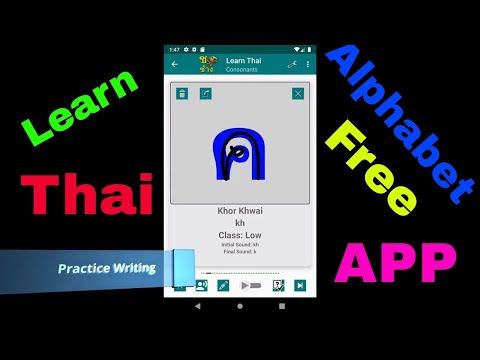

Learn Thai Alphabet Easily
Contains adsIn-app purchases

star
717 reviews

Everyone
info
100K+
Downloads

Everyone
Learn more


About this app
🚀 Why Learn Thai Alphabet?
Get fast, immersive learning with no distractions: ad‑free, audio‑visual & handwriting practice, fun quizzes, and a 7‑day free trial of our premium content.
📘 What You’ll Learn
• 44 consonants (color‑coded by tone class)
• 28 vowels (short and long)
• Thai numerals
• Useful vocabulary: colors, days/months, time phrases, pronouns, animals, family & asking questions
✨ Premium Features (Free Trial)
• Enhanced quiz modes: timed & untimed, detailed feedback
• Personalized learning paths: focus on problem areas
• Unlock traditional vs modern font styles
• Auto‑scroll audio listening with adjustable speed
• In‑app handwriting tracing with feedback
🛠 Key Highlights
High‑quality native audio: accurate Thai tone each time
Smart writing practice: trace and recall
Auto‑play mode: multitask while learning
Clear pronunciation guidance: start, middle, and end sounds
11 learning modules: consonants, vowels, numbers, phrases & more
Clean, minimalist UI for smooth navigation
🎉 Remove Learning Friction
With ads gone, you get a pure, enhanced study experience. Try everything on us for a full week — cancel anytime.
👣 How to Get Started
Install and activate your 7‑day free trial
Explore beginner modules and complete your first quiz
Get tailored practice in weak spots
Keep learning with a low monthly subscription – cancel anytime
📈 Join hundreds of happy learners
Our transition to subscription offers better content and value—no ads, deeper quizzes, and handwriting analytics.
🔒 Privacy & Support
No ads, no trackers
Data kept private
24/7 in‑app support
Get fast, immersive learning with no distractions: ad‑free, audio‑visual & handwriting practice, fun quizzes, and a 7‑day free trial of our premium content.
📘 What You’ll Learn
• 44 consonants (color‑coded by tone class)
• 28 vowels (short and long)
• Thai numerals
• Useful vocabulary: colors, days/months, time phrases, pronouns, animals, family & asking questions
✨ Premium Features (Free Trial)
• Enhanced quiz modes: timed & untimed, detailed feedback
• Personalized learning paths: focus on problem areas
• Unlock traditional vs modern font styles
• Auto‑scroll audio listening with adjustable speed
• In‑app handwriting tracing with feedback
🛠 Key Highlights
High‑quality native audio: accurate Thai tone each time
Smart writing practice: trace and recall
Auto‑play mode: multitask while learning
Clear pronunciation guidance: start, middle, and end sounds
11 learning modules: consonants, vowels, numbers, phrases & more
Clean, minimalist UI for smooth navigation
🎉 Remove Learning Friction
With ads gone, you get a pure, enhanced study experience. Try everything on us for a full week — cancel anytime.
👣 How to Get Started
Install and activate your 7‑day free trial
Explore beginner modules and complete your first quiz
Get tailored practice in weak spots
Keep learning with a low monthly subscription – cancel anytime
📈 Join hundreds of happy learners
Our transition to subscription offers better content and value—no ads, deeper quizzes, and handwriting analytics.
🔒 Privacy & Support
No ads, no trackers
Data kept private
24/7 in‑app support
Master Thai script with audio, quizzes & writing practice. Learn fast & easy!
Updated on
Safety starts with understanding how developers collect and share your data. Data privacy and security practices may vary based on your use, region, and age. The developer provided this information and may update it over time.
- No data shared with third partiesLearn more about how developers declare sharing
- This app may collect these data typesPersonal info, Financial info, and Device or other IDs
- Data is encrypted in transit


Ratings and reviews
663 reviews

A Google user
- Flag inappropriate
January 5, 2020
Simple, easy layout, but with some serious content issues: 1) Several consonant classes are incorrect, and these are essential to know the correct tone when speaking. 2) the list of vowels is not comprehensive; it's missing half the vowels/diphthongs, vowel substitutes and alternative ways to write the same vowel sound. Very problematic when you go to read real Thai. 3) The sound quality is poor and it's almost impossible to make out the phonetic quality of the vowels/words.
6 people found this review helpful
Yuly Pisinberg
January 5, 2020
Thank you for the feedback, you have version 35 and the current version is already 38 so please update to the latest version and all of the issues you stated will be fixed. Thanks for your support 👍
A Google user
- Flag inappropriate
November 26, 2019
It is very easy to use.The app is broken down into easily useable parts. I still go back to review the letters. By the way I bought the app. Great value I can't get any sound or choose between the consonants classes in new version
2 people found this review helpful
Yuly Pisinberg
November 26, 2019
Thank you very much, the new version uses Google Text to speech engine and it requires internet for the first time to download the voices, which are tiny at about 8mb in total. Can you elaborate more about the not being able to select classes?
A Google user
- Flag inappropriate
- Show review history
September 28, 2018
Really nice app but the quizzes are too simple. It's simply in the order the letters were and also you can see the letters in the background to cheat your way through. I would love it if you could change the background for quizzes and also randomize them a bit.
8 people found this review helpful
What’s new
Remove Ads menu item fixed
Everyone
Learn moreApp support
About the developer
IULIAN PISINBERG
yulypis@gmail.com
Ana Ipatescu Nr.8
720043 Suceava
Romania


