
Instant Board - Text Snipets
In-app purchases

star
4.58K reviews

Everyone
info
100K+
Downloads


About this app
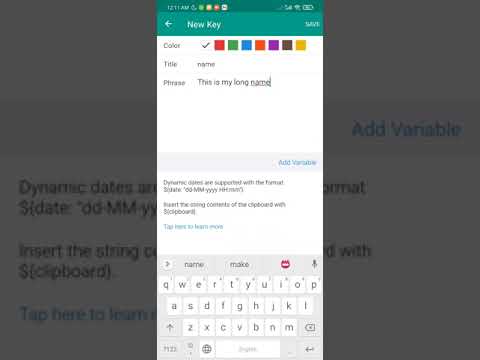
Hate typing the same thing over and over, one key at a time? Personalize and pre-program your keyboard with Instant Board – your personal custom keyboard for phrases and responses.
Features:
1. Create your own custom keys with predefined phrases.
2. Export/Import Keys between devices instantly.
3. Backup/Restore Keys.
4. Send text snippets to your computer.
Advanced Features:
1. Edit Keys directly in your backup file.
2. Clipboard and date as dynamic variable, so you can config them in any format.
Features:
1. Create your own custom keys with predefined phrases.
2. Export/Import Keys between devices instantly.
3. Backup/Restore Keys.
4. Send text snippets to your computer.
Advanced Features:
1. Edit Keys directly in your backup file.
2. Clipboard and date as dynamic variable, so you can config them in any format.
Typing same text instantly
Updated on
Safety starts with understanding how developers collect and share your data. Data privacy and security practices may vary based on your use, region, and age. The developer provided this information and may update it over time.
- No data shared with third partiesLearn more about how developers declare sharing
- No data collectedLearn more about how developers declare collection


Ratings and reviews
4.43K reviews

Dr Mark Helfand
- Flag inappropriate
November 27, 2022
I needed a replacement for Smart Keyboard. It had built in macro text expanders that saved lots of typing. So I tried this app. It was a little difficult to get set up due to my Pixel 6 Pro. I wrote to support and it was excellent. I got a response within minutes. Then I had problems getting my normal keyboard back. Again support responded within minutes. Once set up, the app works very well. However with how often I use macros, changing keyboards isn't for me.
58 people found this review helpful

Alan SP
- Flag inappropriate
August 18, 2021
Great app, not sure how to restore purchase at the moment, but it has great potential for me and what I need from it. Yes, you can use gboard clipboard, it is free, but much more primitive. Full version, if you can restore purchase, gives really powerful options to sort in folders and color code all your messages. This is what I need.
67 people found this review helpful

Ben Furtado (Rygard Darkheart)
- Flag inappropriate
June 4, 2023
If your device doesn't have a text shortcut feature as part of the standard keyboard, give this one a try. It has enough options to fulfill your basic needs, and there's a pro($$version), but I get by with the standard one. Especially useful if you're doing a lot of chatting, for greetings or descriptions, or asking the same questions repeatedly, but want to save time without relying on your keyboard's predictive text function. Faster than copy/paste.
29 people found this review helpful
What’s new
1. Double-click to reset sequential index.
2. Bug fixes and performance improvements
2. Bug fixes and performance improvements
App support
phone
Phone number
+33601044770
About the developer
WANG JIE
jacques09125715@gmail.com
60 Rue de Pontoise Appt. B101
95870 Bezons
France


