
MyMon for Waves LV1

star
131 reviews

Everyone
info
10K+
Downloads

Everyone
Learn more


About this app
Description
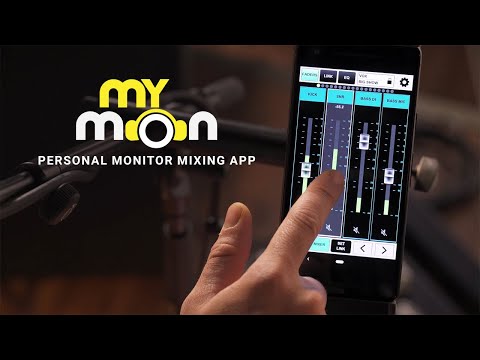
MyMon is a personal monitoring application for the Waves eMotion LV1 live mixer. It gives musicians on stage wireless remote control of their own monitor mix, directly from their mobile device.
Musicians can adjust input levels, mute, pan, apply post-mix EQ and link channels to custom single fader groups, without affecting the band or FOH sound.
• Designed exclusively for the eMotion LV1 live mixer running v11 firmware
• Connect up to 16 mobile devices simultaneously to eMotion LV1
• Musician-friendly app interface: easy swipe navigation, double-tap reset
• Landscape and Portrait screen modes
• Control individual channel pan, mute and volume levels
• Control groups and FX returns (LV1 64/32-channel configurations only)
• Control post-mix (master bus) monitor EQ
• Assign any combination of channels to four LINK masters, each with volume and mute toggles
• Create unique names for Links
• Save and store Link names and assignments per session
• Lock individual devices for security
Simple setup and easy navigation— personal monitor mixing with MyMon makes the live experience more enjoyable for both the sound engineer and musicians.
Please note: MyMon is designed for use with the eMotion LV1 mixer running the latest V11 firmware update.
MyMon does not mix audio on its own; it requires an eMotion LV1 live mixer to fully function.
Requirements
• eMotion LV1 Live Mixer running V11 firmware
• A robust 5GHz Wi-Fi router positioned on stage
• An Ethernet cable connecting the eMotion LV1 host computer with the Wi-Fi router.
• The MyMon Wi-Fi network must be independent of the SoundGrid network.
• MyMon mobile app installed on each Android device
MyMon is a personal monitoring application for the Waves eMotion LV1 live mixer. It gives musicians on stage wireless remote control of their own monitor mix, directly from their mobile device.
Musicians can adjust input levels, mute, pan, apply post-mix EQ and link channels to custom single fader groups, without affecting the band or FOH sound.
• Designed exclusively for the eMotion LV1 live mixer running v11 firmware
• Connect up to 16 mobile devices simultaneously to eMotion LV1
• Musician-friendly app interface: easy swipe navigation, double-tap reset
• Landscape and Portrait screen modes
• Control individual channel pan, mute and volume levels
• Control groups and FX returns (LV1 64/32-channel configurations only)
• Control post-mix (master bus) monitor EQ
• Assign any combination of channels to four LINK masters, each with volume and mute toggles
• Create unique names for Links
• Save and store Link names and assignments per session
• Lock individual devices for security
Simple setup and easy navigation— personal monitor mixing with MyMon makes the live experience more enjoyable for both the sound engineer and musicians.
Please note: MyMon is designed for use with the eMotion LV1 mixer running the latest V11 firmware update.
MyMon does not mix audio on its own; it requires an eMotion LV1 live mixer to fully function.
Requirements
• eMotion LV1 Live Mixer running V11 firmware
• A robust 5GHz Wi-Fi router positioned on stage
• An Ethernet cable connecting the eMotion LV1 host computer with the Wi-Fi router.
• The MyMon Wi-Fi network must be independent of the SoundGrid network.
• MyMon mobile app installed on each Android device
Remote personal monitor mix control app for mobile phone and tablet
Updated on
Safety starts with understanding how developers collect and share your data. Data privacy and security practices may vary based on your use, region, and age. The developer provided this information and may update it over time.
- No data shared with third partiesLearn more about how developers declare sharing
- No data collectedLearn more about how developers declare collection


Ratings and reviews
124 reviews

Paul Hayden
- Flag inappropriate
October 11, 2026
It doesn't work! it works on iPhones and iPads, but apparently I have an android pixel 6 and it doesn't work. my phone doesn't see the board and the board doesn't see my phone. please fix! Also while I'm here. if you can Waves they need to do an update for lv1 classic faders so that when they're switching between pages they don't make a big clunk noise, when they move all the way to the bottom of the board and disturb the whole room.

Andrew Merritt
- Flag inappropriate
April 17, 2022
When it works, it works. Consistency is much more important than features and this app constantly is putting out breaking updates. Nothing worse than walking on stage to find the app updated and won't connect to the server anymore.
9 people found this review helpful

A Google user
- Flag inappropriate
January 18, 2020
It is decent, there are definitely stability improvements to be made but overall works well. Do wish I could access the main mix through the app. And custom layers would be great.
10 people found this review helpful
What’s new
Full LV1 17 Compatibility.
General Bugfixes & Improvements.
General Bugfixes & Improvements.
Everyone
Learn moreApp support
About the developer
Waves, Inc.
it@waves.com
2800 Merchant Dr
Knoxville, TN 37912
United States
+972 50-282-0055


