Video & GIF Memes PRO
4.4star
288 reviews
10K+
Downloads

Everyone
info








About this app
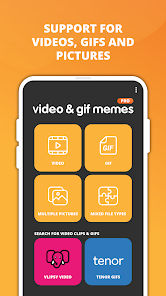
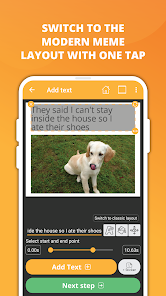
Elevate your meme game with Video & GIF Memes! Craft eye-catching video or GIF memes effortlessly and amuse your friends with your creativity. Simply choose your source file, add text, sprinkle in stickers, and voila – your meme masterpiece is ready to be unleashed.
Key Features:
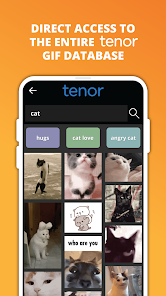
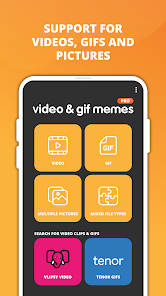
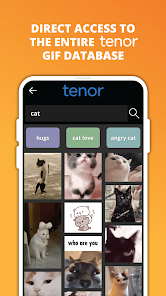
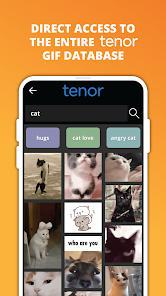
✨ Vast Library: Dive into a treasure trove of meme templates with access to millions via Tenor and Vlipsy.
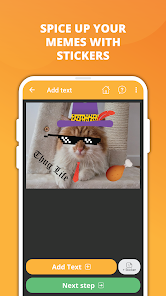
🎨 Sticker Bonanza: Customize your memes with thousands of built-in stickers or create your own using our intuitive sticker editor.
📸 Free Stock Photos: Explore millions of free stock photos from Pixabay to add that extra flair to your creations.
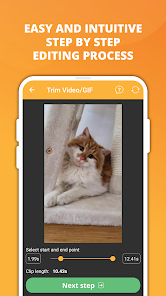
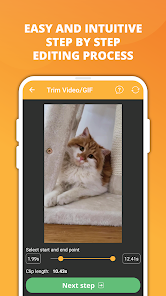
✂️ Seamless Editing: Enjoy a user-friendly step-by-step editing process for effortless meme-making.
🎬 Trimming Magic: Trim videos or GIFs to extract the perfect snippet for your meme.
💬 Multi-Caption Mastery: Craft intricate modern or classic memes with multiple captions.
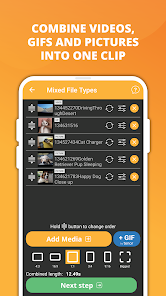
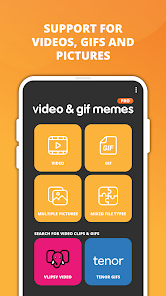
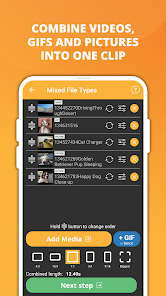
🎭 Mixed Media Support: Combine images, GIFs, and videos to create a unified meme experience.
🎥 Video Customization: Fine-tune your videos with options like frame rate, speed, quality, and more.
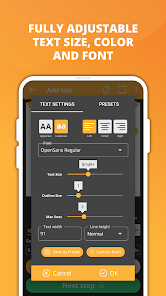
✏️ Text Tweaks: Fully customize text with adjustable parameters like size, color, font, and alignment.
🖋️ Font Fiesta: Choose from over 60 fonts or import your own to add a personal touch.
🚫 Watermark-Free: Your memes stay pristine without any pesky watermarks.
📱 Instagram-Ready: Create square or 4:5 videos perfect for Instagram sharing.
📤 Share & Save: Spread the laughter by sharing your creations as videos or GIFs.
👍 Similar to Meme Generator Free: Enjoy the familiar feel of meme creation with the added bonus of videos and GIFs.
🔒 Privacy Priority: Rest assured, we only collect anonymous analytic data to enhance app stability; your personal data stays safe.
Unleash your meme-making prowess with Video & GIF Memes!
Key Features:
✨ Vast Library: Dive into a treasure trove of meme templates with access to millions via Tenor and Vlipsy.
🎨 Sticker Bonanza: Customize your memes with thousands of built-in stickers or create your own using our intuitive sticker editor.
📸 Free Stock Photos: Explore millions of free stock photos from Pixabay to add that extra flair to your creations.
✂️ Seamless Editing: Enjoy a user-friendly step-by-step editing process for effortless meme-making.
🎬 Trimming Magic: Trim videos or GIFs to extract the perfect snippet for your meme.
💬 Multi-Caption Mastery: Craft intricate modern or classic memes with multiple captions.
🎭 Mixed Media Support: Combine images, GIFs, and videos to create a unified meme experience.
🎥 Video Customization: Fine-tune your videos with options like frame rate, speed, quality, and more.
✏️ Text Tweaks: Fully customize text with adjustable parameters like size, color, font, and alignment.
🖋️ Font Fiesta: Choose from over 60 fonts or import your own to add a personal touch.
🚫 Watermark-Free: Your memes stay pristine without any pesky watermarks.
📱 Instagram-Ready: Create square or 4:5 videos perfect for Instagram sharing.
📤 Share & Save: Spread the laughter by sharing your creations as videos or GIFs.
👍 Similar to Meme Generator Free: Enjoy the familiar feel of meme creation with the added bonus of videos and GIFs.
🔒 Privacy Priority: Rest assured, we only collect anonymous analytic data to enhance app stability; your personal data stays safe.
Unleash your meme-making prowess with Video & GIF Memes!
Updated on
Safety starts with understanding how developers collect and share your data. Data privacy and security practices may vary based on your use, region, and age. The developer provided this information and may update it over time.

No data shared with third parties
Learn more about how developers declare sharing

This app may collect these data types
App activity, App info and performance, and Device or other IDs

Data is encrypted in transit

Data can’t be deleted
Ratings and reviews
4.3
279 reviews

Steven W. (id6klub)
- Flag inappropriate
- Show review history
March 31, 2024
Why did you get rid of the GIF quality slider? I actually used that. The highest quality is no longer available and my newly-created GIFs since this change look worse because of that. If you want to add the auto-optimization, cool, but keep the manual slider, too, please. I almost always used max quality and just adjusted framerate & speed to tweak the file size. Quality is almost always more important than framerate (up to a certain point).
ZomboDroid
April 2, 2024
Hi! The Quality slider actually didn't work properly. It mainly just increased the file size. The effect was mainly psychological. Right now if you disable the "Optimize GIF quality" setting you get the maximum GIF quality. Feel free to contact us at "zombodroid@gmail.com" if you have any questions. Thank you for your patience!

Daniel Gagnon
- Flag inappropriate
- Show review history
December 19, 2020
This app does not show as an option when I try to share a video from my gallery, and searching for a video from within the app displays no thumbnails. It takes quite a long time to find the right video, unless the filename is descriptive. (Edit) What happens when picking images on my device may be beyond your control, but that doesn't address the first part of my review. Also, no other apps seem to have an issue displaying thumbnails when I upload/select an image, video, or gif from within them
15 people found this review helpful
ZomboDroid
December 20, 2020
Thank you for your response. You really can't share directly from your gallery to our app, as our app can handle videos is many ways. Can you send a few screenshots our and let us know which app you're using to pick pictures from. (stock gallery or Google Photos) Our email is "zombodroid@gmail.com". Thank you for remaining patient!

A Google user
- Flag inappropriate
June 6, 2019
Broke down and begrudgingly paid $2.99 for pro version after deleting it and searching for apps to replace it. However, it's the best, I think. I don't mind paying for apps at all but I do mind having the rug pulled out from under me by surprise one day out of nowhere. ALSO THE VIDEOS I HAVE TRIED ARE STRETCHED AND NOT PERFECTLY SHAREABLE. This better be a one time fee.
11 people found this review helpful
ZomboDroid
June 7, 2019
You let us know that the issue you've described has not happened again. If it returns, please let us know. Thank you for your purchase!
What's new
v1.1176
✓ Halloween stickers added
✓ “Extend” button added to cropping screen
✓ Tenor search suggestions Bug Fix
✓ Traffic encryption improvements
✓ Halloween stickers added
✓ “Extend” button added to cropping screen
✓ Tenor search suggestions Bug Fix
✓ Traffic encryption improvements
App support
About the developer
ZOMBODROID d.o.o.
zombodroid@gmail.com
Ulica 25. maja 16
2250 PTUJ
Slovenia
+386 40 171 448


