
BIG Notifications for Seniors
In-app purchases

star
267 reviews

Everyone
info
10K+
Downloads

Everyone
Learn more


About this app
BIG Notifications is an accessibility-focused notification app for seniors and people with low vision. It enlarges Android notifications and shows them in a clearer full-screen view, so notifications are easier to read and easier to act on.
Designed as a companion to BIG Launcher, BIG Notifications can also be used separately. It helps users handle notifications with bigger text, large buttons, and a calmer interface on the phone they already have.
WHY PEOPLE CHOOSE BIG NOTIFICATIONS
• 🔔 Enlarged Android notifications in a clear full-screen view
• 👀 Large text for easier reading without strain
• 👆 Large buttons and simple one-tap control
• ⚙️ Notification actions can be used directly from the enlarged view
• 🧭 Can open automatically or from a shortcut in the notification area
• 🏆 From the creators of award-winning BIG Launcher
MADE FOR CLEARER EVERYDAY NOTIFICATIONS
Standard Android notifications can be small, crowded, or easy to miss. BIG Notifications focuses on readability and control, making alerts easier to see and easier to handle.
It is especially helpful for:
• seniors who find standard notifications too small
• users with low vision who need larger text
• people who prefer a clearer, simpler notification screen
• anyone setting up a calmer Android experience for themselves or a family member
BUILT ON BIG LAUNCHER ACCESSIBILITY PRINCIPLES
BIG Notifications follows the same accessibility approach as BIG Launcher and the BIG APPS SUITE.
It supports:
• enlarged full-screen notifications
• full TalkBack screen reader support
• large controls with no hidden gestures
• direct notification actions from the enlarged view
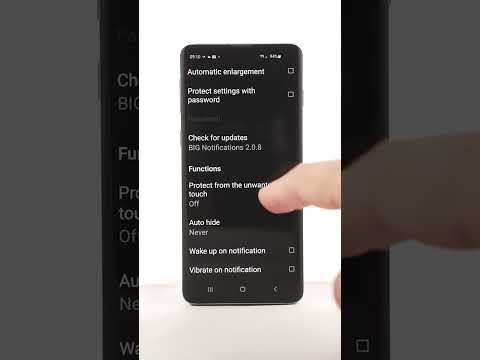
The paid version adds more configuration options, including variable text size, password-protected settings, vibration on notifications, and temporary disable mode when notifications should not disturb.
BIG APPS SUITE
BIG Notifications works well alongside companion apps built with the same focus on simplicity and readability:
• BIG Launcher — a simple home screen for seniors
• BIG Phone — easy calling and contacts
• BIG SMS — large-text SMS messaging
• BIG Alarm — a simple alarm clock
COMPATIBILITY
BIG Notifications is compatible with Android 4.3 and higher.
FREE AND PAID OPTIONS
BIG Notifications can be used as a focused companion app for enlarged notifications. The paid version unlocks additional configuration options for users who need more control.
If BIG Notifications helps, the paid version makes it easier to adapt notification behavior to personal needs.
Designed as a companion to BIG Launcher, BIG Notifications can also be used separately. It helps users handle notifications with bigger text, large buttons, and a calmer interface on the phone they already have.
WHY PEOPLE CHOOSE BIG NOTIFICATIONS
• 🔔 Enlarged Android notifications in a clear full-screen view
• 👀 Large text for easier reading without strain
• 👆 Large buttons and simple one-tap control
• ⚙️ Notification actions can be used directly from the enlarged view
• 🧭 Can open automatically or from a shortcut in the notification area
• 🏆 From the creators of award-winning BIG Launcher
MADE FOR CLEARER EVERYDAY NOTIFICATIONS
Standard Android notifications can be small, crowded, or easy to miss. BIG Notifications focuses on readability and control, making alerts easier to see and easier to handle.
It is especially helpful for:
• seniors who find standard notifications too small
• users with low vision who need larger text
• people who prefer a clearer, simpler notification screen
• anyone setting up a calmer Android experience for themselves or a family member
BUILT ON BIG LAUNCHER ACCESSIBILITY PRINCIPLES
BIG Notifications follows the same accessibility approach as BIG Launcher and the BIG APPS SUITE.
It supports:
• enlarged full-screen notifications
• full TalkBack screen reader support
• large controls with no hidden gestures
• direct notification actions from the enlarged view
The paid version adds more configuration options, including variable text size, password-protected settings, vibration on notifications, and temporary disable mode when notifications should not disturb.
BIG APPS SUITE
BIG Notifications works well alongside companion apps built with the same focus on simplicity and readability:
• BIG Launcher — a simple home screen for seniors
• BIG Phone — easy calling and contacts
• BIG SMS — large-text SMS messaging
• BIG Alarm — a simple alarm clock
COMPATIBILITY
BIG Notifications is compatible with Android 4.3 and higher.
FREE AND PAID OPTIONS
BIG Notifications can be used as a focused companion app for enlarged notifications. The paid version unlocks additional configuration options for users who need more control.
If BIG Notifications helps, the paid version makes it easier to adapt notification behavior to personal needs.
Large full-screen notifications for seniors and people with low vision.
Updated on
Safety starts with understanding how developers collect and share your data. Data privacy and security practices may vary based on your use, region, and age. The developer provided this information and may update it over time.
- No data shared with third partiesLearn more about how developers declare sharing
- No data collectedLearn more about how developers declare collection


Ratings and reviews
242 reviews

John Stiles
- Flag inappropriate
- Show review history
July 26, 2021
THIS APP IS WHAT I'VE BEEN TRYING TO FIND FOR YEARS. It's a HUGE screen overlay notification in case you've missed a call or text (ALL your notifications actually). Word for word the same as your stock notifications (which are still there unchanged). Tap (X) to dismiss it or initiate other options. NOW - I couldn't access settings, so I paid for the upgrade. Don't- still no settings. Might be the Oreo phone or Nova launcher. I would highly recommend it though. Similar apps just can't compare.
20 people found this review helpful
BIG Launcher
April 23, 2026
Thank you for the detailed feedback and for recommending the app. The free version lets users try the core functionality, while the full version adds customization options. If settings still do not appear in the latest version, email us at contact@biglauncher.com with your phone model and Android version and we’ll help.

M L
- Flag inappropriate
February 8, 2022
App only uses dark mode in settings. Actual notifications come in as black text on white background. For a paid app that is part of a collection of apps that use dark mode to specifically improve visibility for visually impaired folks this is not only unacceptable it is unexcusable. DO NOT WASTE YOUR MONEY! Not all apps can be hidden. I have a persistent notification that doesn't display correctly so I thought I would simply hide it. Well, it won't hide either. So annoying!
8 people found this review helpful
BIG Launcher
April 23, 2026
Thank you for the detailed feedback. Dark theme is now available in newer versions of BIG Notifications. To hide notifications from a particular app, first enable ‘Allow disabling notifications of a particular app’, then open the notification details and choose ‘Never show this’.

izuakor francis
- Flag inappropriate
- Show review history
August 24, 2022
The app is very good, am a paid user, but please, the app doesn't display all my notifications. What is the maximum number of notifications it can show at once and can the number of notifications it can view in a page be increased to up to 70 or even 100 notifications at once. Reply me.
19 people found this review helpful
BIG Launcher
April 22, 2026
Thank you for the detailed feedback and for supporting the paid version. We’ve released a newer version since your review with broader improvements. If the app still doesn’t show all notifications, please update first and test again, then email us at contact@biglauncher.com with your phone model and what is missing so we can investigate properly.
What’s new
**v2.0.10**
+ Android 16 / API 36 support, including system bar, display cutout and keyboard insets
+ Google Play Billing 8.3 support
* fixed notification callbacks crashing after the listener service was destroyed
* reconnect and reload notifications after notification listener disconnection
* release phone-state listeners, billing connections and pending work when the service stops
* fixed concurrent notification cache access and stale notifications after screen recreation
+ Android 16 / API 36 support, including system bar, display cutout and keyboard insets
+ Google Play Billing 8.3 support
* fixed notification callbacks crashing after the listener service was destroyed
* reconnect and reload notifications after notification listener disconnection
* release phone-state listeners, billing connections and pending work when the service stops
* fixed concurrent notification cache access and stale notifications after screen recreation
Everyone
Learn moreApp support
About the developer
2BIG s.r.o.
contact@biglauncher.com
686 Chelčického
533 51 Pardubice
Czechia
+420 734 803 710


