GlucoDataHandler
5.0star
60 reviews
1K+
Downloads

Everyone
info




About this app
GlucoDataHandler receives glucose values from different sources and provide a visualization for these values on phone, watch (Wear OS) and Android Auto (using GlucoDataAuto).
Features:
- receives glucose values as Freestyle Libre follower
- receives glucose values as Dexcom Share follower
- receives glucose and IOB/COB values from Nightscout
- receives glucose and IOB/COB values from AndroidAPS
- receives glucose values from Juggluco
- receives glucose values from xDrip+
- receives glucose values from Eversense (using ESEL)
- receives glucose values from Dexom BYODA (not tested, yet!)
- provides several widgets and a floating widget for the phone
- provides notifications with different icons for the phone
- provides lockscreen background
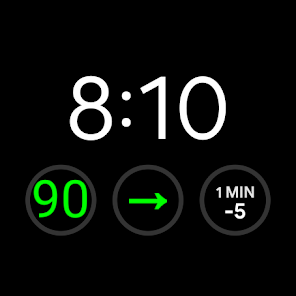
- provides several complications for Wear OS
- provides alarms for phone and watch:
- alarm for very low, low, high, very high and obsolete glucose values
- individual sound and vibration settings for each alarm type
- fullscreen alarm on lockscreen
- WatchDrip+ support (without graph)
- Tasker integration
- forward glucose values as broadcasts to other apps
Foreground service:
The app must run as a foreground service in the background so that it can fetch data from cloud services at a configurable interval, update widgets, notifications, and Wear OS complications, and ensure alerting.
Supported languages:
- English
- German
- Polish (thanks to froster82)
- Portuguese (thanks to dinizmauricio)
- Spanish (by ChatGPT - reviewed by Julio and Daniel)
-> if you want to translate this app into your language, please contact me.
Information:
I´m not a professionell app developer and I only develop this app in my limited spare time for free. I do not earn any money with this app. So please keep this in mind ;-)
If you have any questions, you can contact me, I will try to help you.
Please check your junk folder afterwards ;-)
A special thank to all testers especially lostboy86, froster82 and nevergiveup!
Features:
- receives glucose values as Freestyle Libre follower
- receives glucose values as Dexcom Share follower
- receives glucose and IOB/COB values from Nightscout
- receives glucose and IOB/COB values from AndroidAPS
- receives glucose values from Juggluco
- receives glucose values from xDrip+
- receives glucose values from Eversense (using ESEL)
- receives glucose values from Dexom BYODA (not tested, yet!)
- provides several widgets and a floating widget for the phone
- provides notifications with different icons for the phone
- provides lockscreen background
- provides several complications for Wear OS
- provides alarms for phone and watch:
- alarm for very low, low, high, very high and obsolete glucose values
- individual sound and vibration settings for each alarm type
- fullscreen alarm on lockscreen
- WatchDrip+ support (without graph)
- Tasker integration
- forward glucose values as broadcasts to other apps
Foreground service:
The app must run as a foreground service in the background so that it can fetch data from cloud services at a configurable interval, update widgets, notifications, and Wear OS complications, and ensure alerting.
Supported languages:
- English
- German
- Polish (thanks to froster82)
- Portuguese (thanks to dinizmauricio)
- Spanish (by ChatGPT - reviewed by Julio and Daniel)
-> if you want to translate this app into your language, please contact me.
Information:
I´m not a professionell app developer and I only develop this app in my limited spare time for free. I do not earn any money with this app. So please keep this in mind ;-)
If you have any questions, you can contact me, I will try to help you.
Please check your junk folder afterwards ;-)
A special thank to all testers especially lostboy86, froster82 and nevergiveup!
Updated on
Safety starts with understanding how developers collect and share your data. Data privacy and security practices may vary based on your use, region, and age. The developer provided this information and may update it over time.

No data shared with third parties
Learn more about how developers declare sharing

No data collected
Learn more about how developers declare collection
Ratings and reviews
5.0
55 reviews

Lindsey Jain
- Flag inappropriate
July 20, 2024
Absolutely freaking fantastic!! Thank you SO MUCH for creating this! I just got a new Samsung Galaxy watch 7 and panicked when I could not find a way to see my blood sugars on it... then we found this. I am so thankful to you for creating it and there is so much I can do to customize my watch 😆🥰
1 person found this review helpful
pachi81
July 20, 2024
Thank you so much for your feedback!!! 😀🤗 If you have any questions, just contact me.

Tom S.
- Flag inappropriate
June 22, 2024
Been looking for an app like this with bright clear, simple widgets on the phone as well as the same in complications for the Pixel watch watch faces. It is clear and easy to set up and use. Especially like that you can set the widgets to go directly to the Libre3 app when clicked.
2 people found this review helpful
pachi81
June 23, 2024
Thank you very much! Great to hear, that you like it!!! I do my best to keep it such simple and clear. Regards, Michael

Daniel Arastey
- Flag inappropriate
June 9, 2024
I don't remember how I found this app, but I am so glad I found it. I wanted a way to get my Libre 3 readings on my watch so I wouldn't be using my phone constantly at the gym, and so I could quickly check my BG without bothering others with the phone screen while at the movies. Plus I wanted a way to have my reading in the car. This app gives me all that by acting as a central hub for its companion Wear and Auto apps. I couldn't be happier with it.
1 person found this review helpful
pachi81
June 10, 2024
Thank you very much for your appreciation!!! Such feedback motivates me to continue with my work ;-)
What's new
- New sources:
- Dexcom Share (thanks to Fernand and Daniel for testing!)
- Dexcom BYODA (not tested!!!)
- Eversense (ESEL) (thanks to Thomas for testing!)
- Setting for obsolete value time (new default = 6 minutes)
- UI improvements
- fix crash (thanks to Bernhard for reporting!)
- fix reset sound after alarm (thanks to InsulinJunky and froster82)
- Bugfixes
If you can test Dexcom BYODA, please contact me! Thank you!
- Dexcom Share (thanks to Fernand and Daniel for testing!)
- Dexcom BYODA (not tested!!!)
- Eversense (ESEL) (thanks to Thomas for testing!)
- Setting for obsolete value time (new default = 6 minutes)
- UI improvements
- fix crash (thanks to Bernhard for reporting!)
- fix reset sound after alarm (thanks to InsulinJunky and froster82)
- Bugfixes
If you can test Dexcom BYODA, please contact me! Thank you!
App support
About the developer
Michael Pach
glucodatahandler@michel-inside.de
Germany
undefined