
SnipCam: AI Background Remover
Contains adsIn-app purchases

Everyone
info
10+
Downloads

Everyone
Learn more



About this app
SnipCam is an AI background remover and photo cutout editor that runs directly on your Android phone. Remove backgrounds, create transparent PNG images, and edit photos without uploading them to a cloud server for AI processing.
Unlike cloud-based background removal workflows, SnipCam processes your photos on your device. Your images stay on your phone during AI background removal, giving you more control over your privacy.
AI BACKGROUND REMOVAL ON YOUR PHONE
Take a photo with SnipCam and let on-device AI automatically separate the subject from the background.
Create clean photo cutouts of people, pets, toys, figures, Gunpla, products, and everyday objects. No cloud AI processing is required.
PRIVATE, ON-DEVICE AI
Your photos do not need to be uploaded to a SnipCam server or a third-party AI processing service for background removal.
• AI background removal runs locally on Android
• No cloud upload required for AI processing
• Edit and refine your photos on your phone
• Keep control of your original photos and creations
CREATE AND REFINE PHOTO CUTOUTS
Turn everyday photos into creative images with easy-to-use editing tools.
• Remove photo backgrounds automatically with AI
• Refine background removal manually
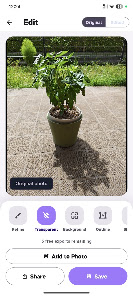
• Create transparent-background images
• Replace backgrounds with white, black, preset, or custom colors
• Add colored outlines, shadows, and glow effects
• Apply fisheye, pixel, Retro Game, and Stars effects
• Compare original and edited images
• Place your cutout onto another photo
TRANSPARENT PNG AND JPEG EXPORT
Save your creations directly to your Android device or share them through the Android share sheet.
Create transparent PNG cutouts, sticker-style images, profile pictures, product photos, and creative photo edits.
Choose PNG for transparency or JPEG for standard images.
MORE THAN JUST PEOPLE
SnipCam is designed for different subjects, not only portraits.
Cut out pets, plushies, toys, figures, Gunpla, products, and other everyday objects. Refine the results and customize the background to match your style.
FREE EXPORTS AND SNIPCAM PRO
Start with 3 free export credits. Each successful save or share uses 1 credit.
When your credits run out, watch a rewarded ad to receive 2 additional export credits.
You can continue taking photos, removing backgrounds, refining cutouts, and editing images without export credits.
Upgrade to SnipCam Pro for unlimited PNG and JPEG exports, unlimited saves and shares, and full Pro export options.
SIMPLE PHOTO CUTOUT WORKFLOW
Take a photo → Remove the background with AI → Refine and edit → Save or share.
Create your next transparent image, photo cutout, or creative edit with SnipCam. On-device AI background removal, without cloud processing.
Unlike cloud-based background removal workflows, SnipCam processes your photos on your device. Your images stay on your phone during AI background removal, giving you more control over your privacy.
AI BACKGROUND REMOVAL ON YOUR PHONE
Take a photo with SnipCam and let on-device AI automatically separate the subject from the background.
Create clean photo cutouts of people, pets, toys, figures, Gunpla, products, and everyday objects. No cloud AI processing is required.
PRIVATE, ON-DEVICE AI
Your photos do not need to be uploaded to a SnipCam server or a third-party AI processing service for background removal.
• AI background removal runs locally on Android
• No cloud upload required for AI processing
• Edit and refine your photos on your phone
• Keep control of your original photos and creations
CREATE AND REFINE PHOTO CUTOUTS
Turn everyday photos into creative images with easy-to-use editing tools.
• Remove photo backgrounds automatically with AI
• Refine background removal manually
• Create transparent-background images
• Replace backgrounds with white, black, preset, or custom colors
• Add colored outlines, shadows, and glow effects
• Apply fisheye, pixel, Retro Game, and Stars effects
• Compare original and edited images
• Place your cutout onto another photo
TRANSPARENT PNG AND JPEG EXPORT
Save your creations directly to your Android device or share them through the Android share sheet.
Create transparent PNG cutouts, sticker-style images, profile pictures, product photos, and creative photo edits.
Choose PNG for transparency or JPEG for standard images.
MORE THAN JUST PEOPLE
SnipCam is designed for different subjects, not only portraits.
Cut out pets, plushies, toys, figures, Gunpla, products, and other everyday objects. Refine the results and customize the background to match your style.
FREE EXPORTS AND SNIPCAM PRO
Start with 3 free export credits. Each successful save or share uses 1 credit.
When your credits run out, watch a rewarded ad to receive 2 additional export credits.
You can continue taking photos, removing backgrounds, refining cutouts, and editing images without export credits.
Upgrade to SnipCam Pro for unlimited PNG and JPEG exports, unlimited saves and shares, and full Pro export options.
SIMPLE PHOTO CUTOUT WORKFLOW
Take a photo → Remove the background with AI → Refine and edit → Save or share.
Create your next transparent image, photo cutout, or creative edit with SnipCam. On-device AI background removal, without cloud processing.
Remove photo backgrounds with private, on-device AI. No cloud upload needed.
Updated on
Safety starts with understanding how developers collect and share your data. Data privacy and security practices may vary based on your use, region, and age. The developer provided this information and may update it over time.


What’s new
• NEW: Home screen to take photos or import from your gallery.
• Enhanced app protection for a more secure experience.
• On-device AI removes backgrounds and creates transparent PNGs.
• Refine edges, add outlines, fisheye effects or custom backgrounds.
• Save and share PNG or JPEG images.
• Free exports with optional rewarded ads for 2 extra exports.
• Enjoy ad-free, unlimited exports with SnipCam Pro, available yearly or lifetime.
• Enhanced app protection for a more secure experience.
• On-device AI removes backgrounds and creates transparent PNGs.
• Refine edges, add outlines, fisheye effects or custom backgrounds.
• Save and share PNG or JPEG images.
• Free exports with optional rewarded ads for 2 extra exports.
• Enjoy ad-free, unlimited exports with SnipCam Pro, available yearly or lifetime.
Everyone
Learn moreApp support
About the developer
MINTIER, K.K.
studio@mintier.dev
2-11-17-102, SHINYAMASHITA, NAKA-KU
YOKOHAMA, 神奈川県 231-0801
Japan
+81 50-6860-7140


