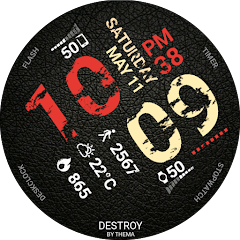
Destroy Watch Face
Contains adsIn-app purchases
4.5star
8.4K reviews
500K+
Downloads

Everyone
info





About this app
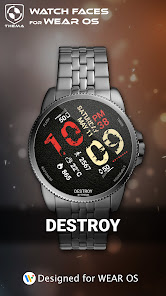
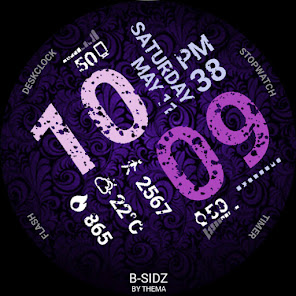
Destroy Watch Face for Wear OS!
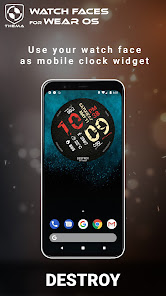
Don't have a Wear OS watch? You can still use this watch face as a clock widget on your mobile!
⛔️NOT FOR SAMSUNG GEAR S2 / GEAR S3 !! (running Tizen OS)⛔️
If you have one, do not install this application.
To find support and compatible applications with your watch, please go to http://www.themaapps.com/watch_on_tizen_os
★ Features of Destroy Watch Face ★
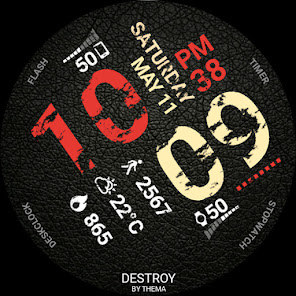
- Clock Widget (No second hand due to battery consumption)
- Choose design colors
- Day & Month
- Watch battery
- Mobile battery (requires phone app)
- Weather (requires phone app)
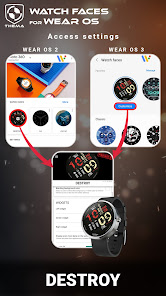
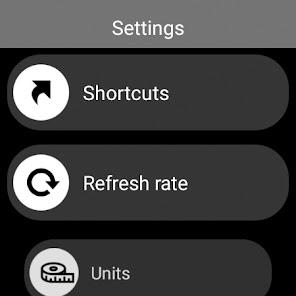
The settings of the watch face are located in the "Wear OS" app of your mobile.
Just hit the gear icon over the watch face preview and the settings screen will show up!
★ FREE Settings ★
- Choose design colors on watch & mobile
- Define heartbeat frequency refresh rate
- Define weather refresh rate
- Weather unit
- 12 / 24 hours mode
- Define interactive mode duration
- Choose the ambient mode b&w and eco luminosity
- Choose to display a leading zero on hours
- Display brand name or not
- Choose to display or not the seconds dots
★ PREMIUM Settings ★
- Choose your own title in place of "DESTROY"
- Switch between éco / simple b&w / full ambient mode
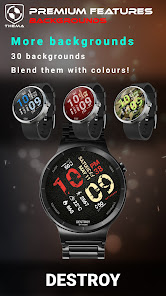
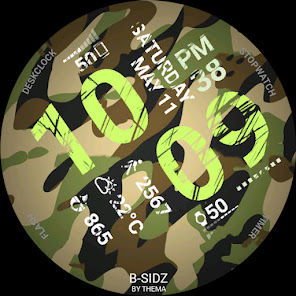
- Choose background among different styles
- Blend background with colors
- Define a secondary timezone for digital display
- Data:
+ Change the indicator to display on the 3 positions
+ Choose between up to 8 indicators (Daily step count, Heartbeat frequency, Unread Email from Gmail, etc...)
+ Complication (wear 2.0 & 3.0)
- Interactivity
+ Access to detailed data by touching a widget
+ Switch the displayed data by touching a widget
+ Change the shortcut to execute on the 4 positions
+ Choose your shortcut among all applications installed on your watch!
+ Choose to display the interactive areas
★ Additional settings on phone ★
The optional phone app is an easiest way to customize the watch face. It provides additional settings and data.
- Choose to switch between small/big/translucent/opaque cards (Wear 1.5x only)
- Choose between 2 weather providers (Yr & OpenWeatherMap)
- Define manual or automatic location
- Notifications for new designs
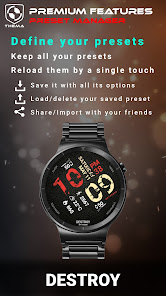
- Presets manager:
+ Save your preset with all its options (colors, backgrounds, data, features. EVERYTHING is saved!)
+ Load / delete one of your previously saved preset
+ Share / Import presets
★ Installation ★
Watch Face
Wear OS 1.X
This watch face will be installed automatically from your phone paired.
If it doesn't show up please go to the Wear OS App > Settings and Resync all apps.
Wear OS 2.X
A notification will be displayed on your watch, right after your mobile installation. You just have to hit it to start the installation process of the watch face.
If the notification did not display for some reason, you can still install the watch face by using the Google Play Store available on your watch: just search the watch face by its name.
Mobile clock widget
Just long press on your launcher, then select the application widget to drop it on your home screen of your mobile.
Customize the widget settings with the application.
★ More watch faces
Visit my watch faces collection for Wear OS on the Play Store at https://goo.gl/CRzXbS
** If you have any issues or questions, fill free to contact me by email (English or French language) before giving a bad rating. Thanks!
Website: https://www.themaapps.com/
Youtube: https://youtube.com/ThomasHemetri
Twitter: https://x.com/ThomasHemetri
Instagram: https://www.instagram.com/thema_watchfaces
Don't have a Wear OS watch? You can still use this watch face as a clock widget on your mobile!
⛔️NOT FOR SAMSUNG GEAR S2 / GEAR S3 !! (running Tizen OS)⛔️
If you have one, do not install this application.
To find support and compatible applications with your watch, please go to http://www.themaapps.com/watch_on_tizen_os
★ Features of Destroy Watch Face ★
- Clock Widget (No second hand due to battery consumption)
- Choose design colors
- Day & Month
- Watch battery
- Mobile battery (requires phone app)
- Weather (requires phone app)
The settings of the watch face are located in the "Wear OS" app of your mobile.
Just hit the gear icon over the watch face preview and the settings screen will show up!
★ FREE Settings ★
- Choose design colors on watch & mobile
- Define heartbeat frequency refresh rate
- Define weather refresh rate
- Weather unit
- 12 / 24 hours mode
- Define interactive mode duration
- Choose the ambient mode b&w and eco luminosity
- Choose to display a leading zero on hours
- Display brand name or not
- Choose to display or not the seconds dots
★ PREMIUM Settings ★
- Choose your own title in place of "DESTROY"
- Switch between éco / simple b&w / full ambient mode
- Choose background among different styles
- Blend background with colors
- Define a secondary timezone for digital display
- Data:
+ Change the indicator to display on the 3 positions
+ Choose between up to 8 indicators (Daily step count, Heartbeat frequency, Unread Email from Gmail, etc...)
+ Complication (wear 2.0 & 3.0)
- Interactivity
+ Access to detailed data by touching a widget
+ Switch the displayed data by touching a widget
+ Change the shortcut to execute on the 4 positions
+ Choose your shortcut among all applications installed on your watch!
+ Choose to display the interactive areas
★ Additional settings on phone ★
The optional phone app is an easiest way to customize the watch face. It provides additional settings and data.
- Choose to switch between small/big/translucent/opaque cards (Wear 1.5x only)
- Choose between 2 weather providers (Yr & OpenWeatherMap)
- Define manual or automatic location
- Notifications for new designs
- Presets manager:
+ Save your preset with all its options (colors, backgrounds, data, features. EVERYTHING is saved!)
+ Load / delete one of your previously saved preset
+ Share / Import presets
★ Installation ★
Watch Face
Wear OS 1.X
This watch face will be installed automatically from your phone paired.
If it doesn't show up please go to the Wear OS App > Settings and Resync all apps.
Wear OS 2.X
A notification will be displayed on your watch, right after your mobile installation. You just have to hit it to start the installation process of the watch face.
If the notification did not display for some reason, you can still install the watch face by using the Google Play Store available on your watch: just search the watch face by its name.
Mobile clock widget
Just long press on your launcher, then select the application widget to drop it on your home screen of your mobile.
Customize the widget settings with the application.
★ More watch faces
Visit my watch faces collection for Wear OS on the Play Store at https://goo.gl/CRzXbS
** If you have any issues or questions, fill free to contact me by email (English or French language) before giving a bad rating. Thanks!
Website: https://www.themaapps.com/
Youtube: https://youtube.com/ThomasHemetri
Twitter: https://x.com/ThomasHemetri
Instagram: https://www.instagram.com/thema_watchfaces
Updated on
Safety starts with understanding how developers collect and share your data. Data privacy and security practices may vary based on your use, region, and age. The developer provided this information and may update it over time.

No data shared with third parties
Learn more about how developers declare sharing

This app may collect these data types
App activity and App info and performance

Data is encrypted in transit

Data can’t be deleted
Ratings and reviews
4.5
6.83K reviews

Brandon Olsen
- Flag inappropriate
July 30, 2022
Watch Face is mostly great. I still have huge issues getting the step counter to work. I set it the way you're supposed to and it seems like everyday it shows 0. I go back in and reset everything including the external data complication and it works fine for a few hours before it resets back to 0. I'm just about to give up on it and find something more reliable
16 people found this review helpful

Matt Dull
- Flag inappropriate
- Show review history
June 14, 2023
Love the look. I have set my custom apps around the edges. They work, but after a month I went into the app to change the custom application and cannot choose one anymore. Update: not sure why this seems like a hidden feature now. It shows clearly in the phone app but the buttons just don't work anymore? Maybe if those buttons are hit to customize, a dialog can point you in the right direction? Or open on the watch? Great watch face though
7 people found this review helpful
thema
June 14, 2023
Hi. To modify them, go to the settings of the watch face on your watch. Hold your finger on the screen until the settings screen shows up. And then go in the widget category to modify the widget you want: select complication and it will open the complication chooser helper :)

savedR (savedR)
- Flag inappropriate
- Show review history
January 3, 2023
**Restart your watch in Settings if you can't pick a custom Complication type, if it keeps reading "TAP ME"! Really love this. I keep coming back to this face because it's got a ton of information, good options, and the premium price isn't bad & unlocks custom widgets, which means it shows my Fitbit step count on my Pixel Watch; other faces will only show it from Google Fit. I've never had a problem with it not updating, which I HAVE had with the Facer ones I've tried, so that's cool.
3 people found this review helpful
What's new
2.24.07.2117
- Targetsdk 34 and compatibility fixes
- Fixed translations
- Added specific settings visualization
- Bump libraries versions
Requires app update on both Watch & Mobile.
If you have any issue, please let me know by email at thema.apps@gmail.com
- Targetsdk 34 and compatibility fixes
- Fixed translations
- Added specific settings visualization
- Bump libraries versions
Requires app update on both Watch & Mobile.
If you have any issue, please let me know by email at thema.apps@gmail.com


