Master Watch Face
Contains adsIn-app purchases
4.5star
4.79K reviews
500K+
Downloads

Everyone
info




About this app
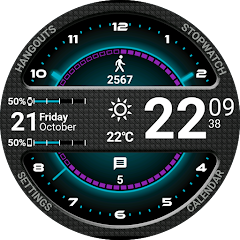
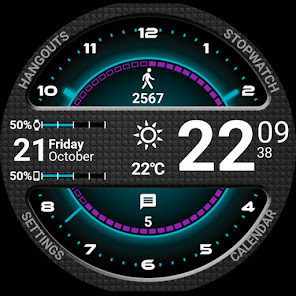
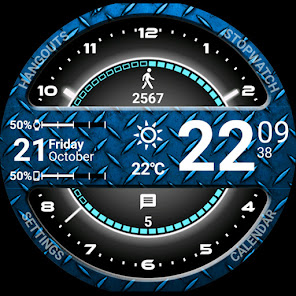
Master Watch Face for Wear OS!
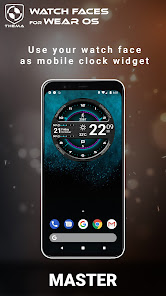
Don't have a Wear OS watch? You can still use this watch face as a clock widget on your mobile!
⛔️NOT FOR SAMSUNG GEAR S2 / GEAR S3 !! (running Tizen OS)⛔️
If you have one, do not install this application.
To find support and compatible applications with your watch, please go to http://www.themaapps.com/watch_on_tizen_os
★ Features of Master Watch Face ★
- Clock Widget (No second hand due to battery consumption)
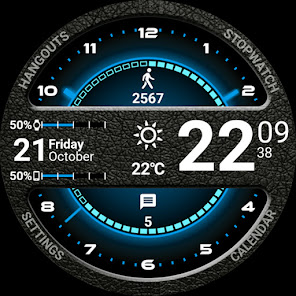
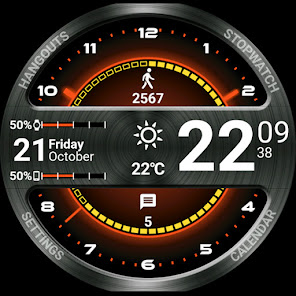
- Choose design colors
- Day & Month
- Watch battery
- Mobile battery (requires phone app)
- Weather (requires phone app)
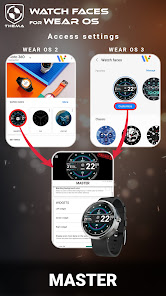
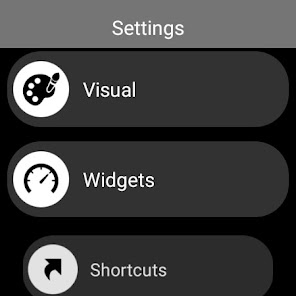
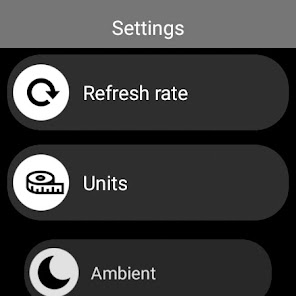
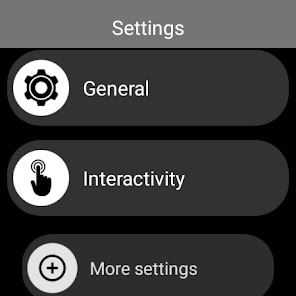
The settings of the watch face are located in the "Wear OS" app of your mobile.
Just hit the gear icon over the watch face preview and the settings screen will show up!
★ FREE Settings ★
- Choose design colors on watch & mobile
- Define heartbeat frequency refresh rate
- Define weather refresh rate
- Weather unit
- 12 / 24 hours mode
- Define interactive mode duration
- Choose the ambient mode b&w and eco luminosity
- Choose to display a leading zero on hours
- Choose to display or not the seconds dots
★ PREMIUM Settings ★
- Switch between éco / simple b&w / full ambient mode
- Choose background among different styles
- Blend background with colors
- Define a secondary timezone for digital display
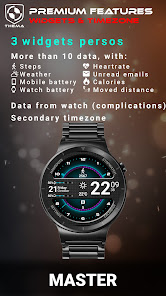
- Data:
+ Change the indicator to display on the 3 positions
+ Choose between up to 8 indicators (Daily step count, Heartbeat frequency, Unread Email from Gmail, etc...)
+ Complication (wear 2.0 & 3.0)
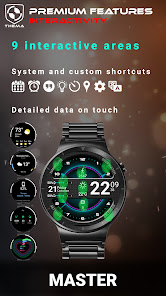
- Interactivity
+ Access to detailed data by touching a widget
+ Switch the displayed data by touching a widget
+ Change the shortcut to execute on the 4 positions
+ Choose your shortcut among all applications installed on your watch!
+ Choose to display the interactive areas
★ Additional settings on phone ★
The optional phone app is an easiest way to customize the watch face. It provides additional settings and data.
- Choose to switch between small/big/translucent/opaque cards (Wear 1.5x only)
- Choose between 2 weather providers (Yr & OpenWeatherMap)
- Define manual or automatic location
- Notifications for new designs
- Presets manager:
+ Save your preset with all its options (colors, backgrounds, data, features. EVERYTHING is saved!)
+ Load / delete one of your previously saved preset
+ Share / Import presets
★ Installation ★
Watch Face
Wear OS 1.X
This watch face will be installed automatically from your phone paired.
If it doesn't show up please go to the Wear OS App > Settings and Resync all apps.
Wear OS 2.X
A notification will be displayed on your watch, right after your mobile installation. You just have to hit it to start the installation process of the watch face.
If the notification did not display for some reason, you can still install the watch face by using the Google Play Store available on your watch: just search the watch face by its name.
Mobile clock widget
Just long press on your launcher, then select the application widget to drop it on your home screen of your mobile.
Customize the widget settings with the application.
★ More watch faces
Visit my watch faces collection for Wear OS on the Play Store at https://goo.gl/CRzXbS
** If you have any issues or questions, fill free to contact me by email (English or French language) before giving a bad rating. Thanks!
Website: https://www.themaapps.com/
Youtube: https://youtube.com/ThomasHemetri
Twitter: https://twitter.com/ThomasHemetri
Instagram: https://www.instagram.com/thema_watchfaces
Don't have a Wear OS watch? You can still use this watch face as a clock widget on your mobile!
⛔️NOT FOR SAMSUNG GEAR S2 / GEAR S3 !! (running Tizen OS)⛔️
If you have one, do not install this application.
To find support and compatible applications with your watch, please go to http://www.themaapps.com/watch_on_tizen_os
★ Features of Master Watch Face ★
- Clock Widget (No second hand due to battery consumption)
- Choose design colors
- Day & Month
- Watch battery
- Mobile battery (requires phone app)
- Weather (requires phone app)
The settings of the watch face are located in the "Wear OS" app of your mobile.
Just hit the gear icon over the watch face preview and the settings screen will show up!
★ FREE Settings ★
- Choose design colors on watch & mobile
- Define heartbeat frequency refresh rate
- Define weather refresh rate
- Weather unit
- 12 / 24 hours mode
- Define interactive mode duration
- Choose the ambient mode b&w and eco luminosity
- Choose to display a leading zero on hours
- Choose to display or not the seconds dots
★ PREMIUM Settings ★
- Switch between éco / simple b&w / full ambient mode
- Choose background among different styles
- Blend background with colors
- Define a secondary timezone for digital display
- Data:
+ Change the indicator to display on the 3 positions
+ Choose between up to 8 indicators (Daily step count, Heartbeat frequency, Unread Email from Gmail, etc...)
+ Complication (wear 2.0 & 3.0)
- Interactivity
+ Access to detailed data by touching a widget
+ Switch the displayed data by touching a widget
+ Change the shortcut to execute on the 4 positions
+ Choose your shortcut among all applications installed on your watch!
+ Choose to display the interactive areas
★ Additional settings on phone ★
The optional phone app is an easiest way to customize the watch face. It provides additional settings and data.
- Choose to switch between small/big/translucent/opaque cards (Wear 1.5x only)
- Choose between 2 weather providers (Yr & OpenWeatherMap)
- Define manual or automatic location
- Notifications for new designs
- Presets manager:
+ Save your preset with all its options (colors, backgrounds, data, features. EVERYTHING is saved!)
+ Load / delete one of your previously saved preset
+ Share / Import presets
★ Installation ★
Watch Face
Wear OS 1.X
This watch face will be installed automatically from your phone paired.
If it doesn't show up please go to the Wear OS App > Settings and Resync all apps.
Wear OS 2.X
A notification will be displayed on your watch, right after your mobile installation. You just have to hit it to start the installation process of the watch face.
If the notification did not display for some reason, you can still install the watch face by using the Google Play Store available on your watch: just search the watch face by its name.
Mobile clock widget
Just long press on your launcher, then select the application widget to drop it on your home screen of your mobile.
Customize the widget settings with the application.
★ More watch faces
Visit my watch faces collection for Wear OS on the Play Store at https://goo.gl/CRzXbS
** If you have any issues or questions, fill free to contact me by email (English or French language) before giving a bad rating. Thanks!
Website: https://www.themaapps.com/
Youtube: https://youtube.com/ThomasHemetri
Twitter: https://twitter.com/ThomasHemetri
Instagram: https://www.instagram.com/thema_watchfaces
Updated on
Safety starts with understanding how developers collect and share your data. Data privacy and security practices may vary based on your use, region, and age. The developer provided this information and may update it over time.

No data shared with third parties
Learn more about how developers declare sharing

This app may collect these data types
App activity and App info and performance

Data is encrypted in transit

Data can’t be deleted
Ratings and reviews
4.4
3.95K reviews

Derrek Duncan
- Flag inappropriate
April 23, 2023
I can't rave enough about this watch face for my Galaxy Watch 5! It's absolutely amazing! They offer an impressive amount of customizable information in a visually stunning format that welcomes my glances with my own color preferences. It's not just convenient, it's a game-changer! It saves me so much time and battery life not scrolling screens, and their 4 custom short-cuts instantly became a necessity in my everyday life. They have done such an amazing job on this app! Thank you so very much!
19 people found this review helpful

Karen Tatro
- Flag inappropriate
- Show review history
April 22, 2024
Everything is impressive! Super easy to install & configure. Beautiful display. Everything I want in a watch face. I must admit -- of all the watch faces available in the app store, this developer is by far my favorite. Excellent products!
1 person found this review helpful

Nir Arad
- Flag inappropriate
March 26, 2024
Absolutely five stars. Working and looking great on my Watch 6 Classic. It is elegant, functional and yet uncluttered. Just how I like it. I'm quite picky, and I don't have a single bad word for this watchface. Love it!
3 people found this review helpful
What's new
2.24.01.1608
- Fixed widgets alignment
- Added hints for interactivity
- Added date formats
- Fixed translations
- Fixed minor issues and crashs
Requires app update on both Watch & Mobile.
If you have any issue, please let me know by email at thema.apps@gmail.com
- Fixed widgets alignment
- Added hints for interactivity
- Added date formats
- Fixed translations
- Fixed minor issues and crashs
Requires app update on both Watch & Mobile.
If you have any issue, please let me know by email at thema.apps@gmail.com


