
Musicolet Music Player
In-app purchases
4.7star
199K reviews
10M+
Downloads

Everyone
info
About this app
------------------------------------
PLEASE READ THIS BEFORE INSTALLING
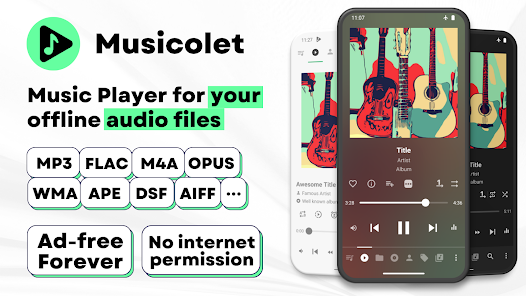
1. This app can organise and play only the local audio files which are stored on the internal storage or SD card.
2. This app can not stream/download/search new music online.
------------------------------------
File formats supported:
mp3, m4a, wma, flac, opus, aac, alac, ape, dsf and many more...
Features:
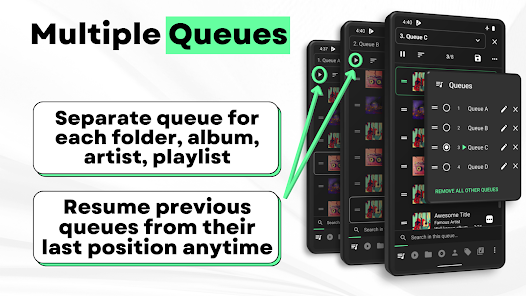
✅ Multiple Queues
Separate queue for each folder, album, artist, playlist. Resume previous queues from their last position anytime.
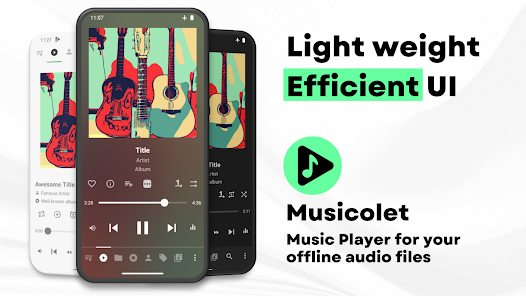
✅ Efficient UI, Easy navigation
For fast and easy navigation we placed all important components of the app (like Main player, Queues, Folders, Albums, Artists, Playlists) in just one row. So you can access them with just 1-Tap!
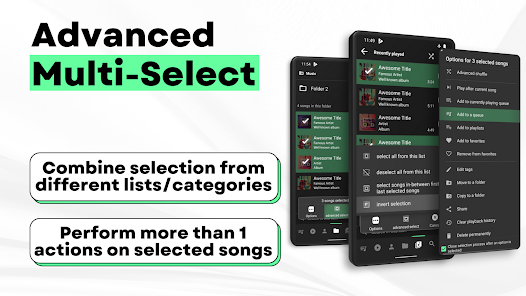
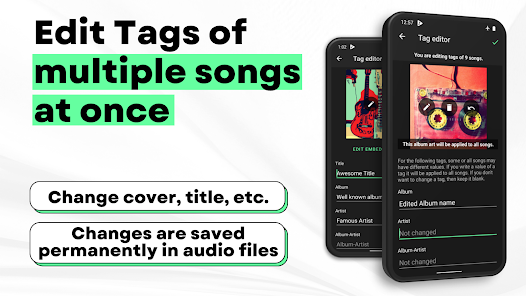
✅ Tag editor+: Can edit tags and album-arts of multiple songs at once.
✅ Move/Copy songs, Rename folders directly in app.
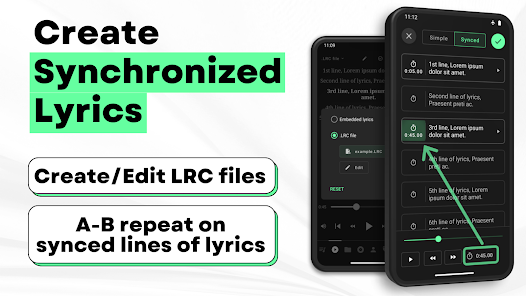
✅ Create Synchronized Lyrics.
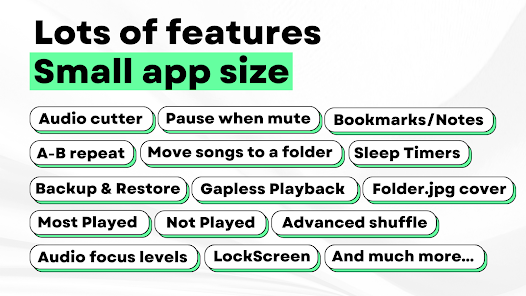
✅ Save Bookmarks and Notes.
✅ Add/remove a song to >1 playlist, from notifications, widgets and even from lockscreen
✅ Folder browsing 📁
2-types of folder structures: 1) Linear (all folders at once) and 2) Hierarchical(folders within folders)
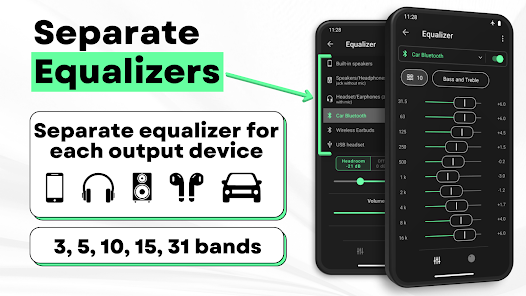
✅ Powerful Equalizer🎚🎚🎚: Separate presets and settings for Speakers🔊, Headphones🎧, Bluetooth etc.
✅ Gapless playback
✅ 🎧Earphone controls🎧
Single click for pause/play. Double click for next and Triple click for previous song. On each press >=4 you can Fast-Forward the song.
✅ Embedded Lyrics + LRC support
Supports offline lyrics embedded in audio file as ID3 tag. You can edit embedded lyrics from tag editor. Musicolet also support .lrc files for synced lyrics.
(Note: Musicolet doesn't fetch lyrics automatically from internet. You have to manually write or paste lyrics in tag editor, if there is no embedded lyrics. It doesn't fetch lrc file automatically. For lrc files, You have to find lrc file from internet, put it in the same folder and rename to exactly match it with audio file name manually.)
✅ Sleep timers
2 types: 1) close app after hh:mm time or 2) close app after N songs.
✅ Add shortcuts of any album/artist/folder/playlist to your HomeScreen (Launcher) app.
✅ Stunning Widgets
✅ Lock Screen (with controls, Queue and Lyrics)
✅ 🚘 Android Auto support 🚘
From your 'Android Auto' enabled car, you can control music and access your playlists, queues, folders and whole music library.
✅🎉Change notifications appearance🎉
✅ You can also enable Fast-Forward and rewind buttons in notifications from settings.
✅ Light and dark themes
✅ Backup and Restore
Automatic and Manual backups. Restore settings, playlists, play-counts from any backup anytime on any device.
And much more...
🚫No Ads🚫
Ad-free forever, for all users. 🤩
No internet permission, Completely offline
Musicolet doesn't even use Internet permission (a.k.a. network access permission). (You can check this in 'App permissions' at the bottom of this description in Play Store.)
Dedicated to Music lovers 🎶 all around the world. 🌎
Created with love ❤, lots of code and sleepless nights. Hope you will like our work.
------------------
Our official website: https://krosbits.in/musicolet
https://krosbits.in/musicolet/download
------------------
To send feedback/suggestions, report bugs or for other queries...
Contact us: musicolet@krosbits.in
PLEASE READ THIS BEFORE INSTALLING
1. This app can organise and play only the local audio files which are stored on the internal storage or SD card.
2. This app can not stream/download/search new music online.
------------------------------------
File formats supported:
mp3, m4a, wma, flac, opus, aac, alac, ape, dsf and many more...
Features:
✅ Multiple Queues
Separate queue for each folder, album, artist, playlist. Resume previous queues from their last position anytime.
✅ Efficient UI, Easy navigation
For fast and easy navigation we placed all important components of the app (like Main player, Queues, Folders, Albums, Artists, Playlists) in just one row. So you can access them with just 1-Tap!
✅ Tag editor+: Can edit tags and album-arts of multiple songs at once.
✅ Move/Copy songs, Rename folders directly in app.
✅ Create Synchronized Lyrics.
✅ Save Bookmarks and Notes.
✅ Add/remove a song to >1 playlist, from notifications, widgets and even from lockscreen
✅ Folder browsing 📁
2-types of folder structures: 1) Linear (all folders at once) and 2) Hierarchical(folders within folders)
✅ Powerful Equalizer🎚🎚🎚: Separate presets and settings for Speakers🔊, Headphones🎧, Bluetooth etc.
✅ Gapless playback
✅ 🎧Earphone controls🎧
Single click for pause/play. Double click for next and Triple click for previous song. On each press >=4 you can Fast-Forward the song.
✅ Embedded Lyrics + LRC support
Supports offline lyrics embedded in audio file as ID3 tag. You can edit embedded lyrics from tag editor. Musicolet also support .lrc files for synced lyrics.
(Note: Musicolet doesn't fetch lyrics automatically from internet. You have to manually write or paste lyrics in tag editor, if there is no embedded lyrics. It doesn't fetch lrc file automatically. For lrc files, You have to find lrc file from internet, put it in the same folder and rename to exactly match it with audio file name manually.)
✅ Sleep timers
2 types: 1) close app after hh:mm time or 2) close app after N songs.
✅ Add shortcuts of any album/artist/folder/playlist to your HomeScreen (Launcher) app.
✅ Stunning Widgets
✅ Lock Screen (with controls, Queue and Lyrics)
✅ 🚘 Android Auto support 🚘
From your 'Android Auto' enabled car, you can control music and access your playlists, queues, folders and whole music library.
✅🎉Change notifications appearance🎉
✅ You can also enable Fast-Forward and rewind buttons in notifications from settings.
✅ Light and dark themes
✅ Backup and Restore
Automatic and Manual backups. Restore settings, playlists, play-counts from any backup anytime on any device.
And much more...
🚫No Ads🚫
Ad-free forever, for all users. 🤩
No internet permission, Completely offline
Musicolet doesn't even use Internet permission (a.k.a. network access permission). (You can check this in 'App permissions' at the bottom of this description in Play Store.)
Dedicated to Music lovers 🎶 all around the world. 🌎
Created with love ❤, lots of code and sleepless nights. Hope you will like our work.
------------------
Our official website: https://krosbits.in/musicolet
https://krosbits.in/musicolet/download
------------------
To send feedback/suggestions, report bugs or for other queries...
Contact us: musicolet@krosbits.in
Updated on
Safety starts with understanding how developers collect and share your data. Data privacy and security practices may vary based on your use, region, and age. The developer provided this information and may update it over time.

No data shared with third parties
Learn more about how developers declare sharing

No data collected
Learn more about how developers declare collection
Ratings and reviews
4.7
193K reviews

Devils Knock
- Flag inappropriate
April 24, 2024
The best music player app for phones and to top it off, it's free with no ads. Not really worth mentioning all it does as the store page is accurate. I will say it does seem to run smoother and be less resource intensive than most other apps and it also updates quite fast when I add new music. The queues feature I've also not seen on other music players and it's very easy if you want to jump between different playlists and have it save the spot
51 people found this review helpful

–Phase–
- Flag inappropriate
- Show review history
April 23, 2024
Pretty much the best music player I've ever used on mobile. Only one small issue though: I tried using the audio cutter to edit out a portion of a song, and I think it corrupted it. The song still plays, but it just shows 0:00 for the length, and I can no longer rewind or seek. Attempting to use the audio cutter on that same song again causes the app to crash. Might be because I replaced the original song with the edited version, but still, this isn't normal. Other than that, though, great app.
19 people found this review helpful
Krosbits
April 24, 2024
Please try this: (1) Musicolet › menu › Settings › Song library and tags › Advanced › Preferred scanner › set 'Musicolet scanner'. --- (2) Then, Musicolet › menu › Scan › Advanced › "Reload metadata tags of all songs" › "Scan now". 🙏🙂

Sandor Lecko
- Flag inappropriate
May 3, 2024
Everything about Musicolet = ACES. It's exactly what I've been looking for; lots of useful features without clutter, poor design decisions, or pesky commercials.. I've tried many offline music players and none come close on so many levels.. I've upgraded to the premium version, which incorporates a few more useful features.. this is a keeper.. thanks Musicolet for all your hard work and diligence in designing and maintaining an app that fills a much needed niche.. Bravo!
7 people found this review helpful
What's new
v 6.11.1:
+ Bug fixes.
—
v 6.11:
⭐ Customize blur background in 'Now Playing' screen.
⭐ Sleep timer: Quickly use the last timers with just 1 tap.
⭐ Option in queues tab: "Stop after this song".
🌟 [PRO] Screencast - new option for casting: + Screencast without screen mirroring.
🌟 Chromecast is now possible from Chromebooks too.
—
👉 Read more in the App › Help and info › What's new.
+ Bug fixes.
—
v 6.11:
⭐ Customize blur background in 'Now Playing' screen.
⭐ Sleep timer: Quickly use the last timers with just 1 tap.
⭐ Option in queues tab: "Stop after this song".
🌟 [PRO] Screencast - new option for casting: + Screencast without screen mirroring.
🌟 Chromecast is now possible from Chromebooks too.
—
👉 Read more in the App › Help and info › What's new.


