

100+
Downloads

Everyone
info


About this app
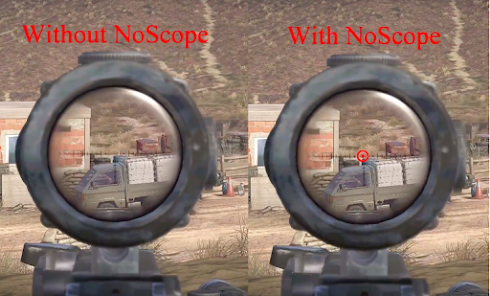
NoScope is designed to increase performance on virtually any first-person shooter by ALWAYS having a reticle on your screen regardless of gun or if you are looking down the sights/scope. Similar to many hardware based solutions on the market, only there are NO wires, calibration is automatic, a variety of reticle styles and colors, all for a fraction of the price.
Since it uses your Smart TV, it is game console independent. Never leave a smudge on your TV and never worry about the sticker or suction cup falling off in the middle of a game.
Features:
Automatically calibrates to the center of your screen
Move the reticle if your game isn’t centered on your screen
Resize the reticle to meet your needs
Change the reticle color between a pre-set collection of colors
Change the reticle style to meet your mood
Now supports for both horizontal and vertical split-screen, with two independent reticles.
All customizations are automatically saved, so when you relaunch NoScope it will look exactly like before.
Since it uses your Smart TV, it is game console independent. Never leave a smudge on your TV and never worry about the sticker or suction cup falling off in the middle of a game.
Features:
Automatically calibrates to the center of your screen
Move the reticle if your game isn’t centered on your screen
Resize the reticle to meet your needs
Change the reticle color between a pre-set collection of colors
Change the reticle style to meet your mood
Now supports for both horizontal and vertical split-screen, with two independent reticles.
All customizations are automatically saved, so when you relaunch NoScope it will look exactly like before.
Updated on
Safety starts with understanding how developers collect and share your data. Data privacy and security practices may vary based on your use, region, and age. The developer provided this information and may update it over time.

No data shared with third parties
Learn more about how developers declare sharing

No data collected
Learn more about how developers declare collection
Ratings and reviews
2.8
9 reviews

j p
- Flag inappropriate
- Show review history
June 1, 2025
works, but I'm forced to use a phone app as my TCL tv remote doesn't have the colored buttons, so there's no way to back out of this app's menu, so when the remote apps fail to function, by extension this app fails as well for me. EDIT: I ended up buying a universal tv remote with the colored buttons, problem solved. great app for pvp shooter games, you can position your view before you aim down sights, helpful tool that gives you an advantage in games that don't have crosshairs, or have hard to see ones. I'd like to see more color and crosshairs options. highly recommend, you'll have to buy a universal remote if you don't have those color buttons, still worth it!
Real World Cyber Solutions LLC
March 3, 2023
Sorry for the inconvenience, but we can't always account for all the limitations TV manufactures create by minimizing their remotes. There is another work around, you can connect a USB keyboard. The 'g', 'b', 'y', 'r' keys will work as the green, blue, yellow, and red keys respectively.

Preston Wireman
- Flag inappropriate
March 17, 2024
I dont know how to keep the reticle on my tv screen when i change my HDMI. When i change my HDMI the reticle goes away. If you can please help me that would be great. I just dont know how to keep the reticle on my tv screen when i change the HDMI.
8 people found this review helpful
Real World Cyber Solutions LLC
March 17, 2024
As the instructions state, you cannot change the HDMI settings. This isn't a bug in our application, it's how Android TVs are designed. Please reach out to support@noscpopeapp.com and we can likely get you up and gaming in no time.
Next time, consider reaching out to app creators before giving bad reviews.

Jayden Austin
- Flag inappropriate
November 10, 2024
great app once you get it working although I do wish there were more crosshair options
1 person found this review helpful
Real World Cyber Solutions LLC
November 10, 2024
Thanks for the review and glad you like the app. Feel free to send reticle suggestions to support@noscopeapp.com and we will see what we can do.
What’s new
Updated to adhere to Google Play policies.
App support
About the developer
REAL WORLD CYBER SOLUTIONS, LLC
support@noscopeapp.com
17724 Terryglass Ln
Charlotte, NC 28278
United States
+1 980-272-8510