
カラオケメモ
5K+
Downloads

Everyone
info
About this app
When you go to karaoke, have you ever wondered, "What should I sing next?" or "What was the song I wanted to sing the other day?"
But if you write it on a regular memo pad, it's hard to see, and it gets mixed up with other memos, making it difficult to manage!
This is a karaoke memo app for such people.
Official site
https://karaokememo.com/?ref=gp_pro
Official Twitter account
https://twitter.com/karaokememo?lang=ja
*Basically, information will be distributed for the product version.
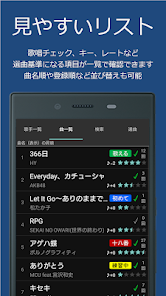
You can record not only the singer name and song title, but also information unique to karaoke, such as key settings.
You can also divide it into your favorite genres, such as "favorites" and "songs that get you excited!"
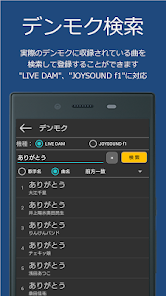
Even if you don't know the official name of the song, you can search for and register the song included in the actual karaoke machine!
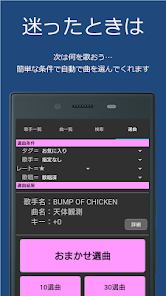
If you can't decide which song to sing, you can easily select it with "Automatic song selection"♪
If you are interested, try the trial version first!
https://play.google.com/store/apps/details?id=itotsuka.karaoke_memo_trial
There is also a light version with no registration restrictions.
https://play.google.com/store/apps/details?id=itotsuka.karaoke_memo_lite
*If you want to transfer data from the trial version, please use "Data transfer (procedure for changing models)" on the management screen.
If you have any questions, problems, or requests, please let us know by writing a review.
We also accept inquiries from the "Inquiries" within the app.
★★★Main features★★★
・Key settings
·Tagging
・Registered song search
・Automatic lyrics acquisition
・Automatic song selection
・Denmoku search
・Ranking search
·import
·backup
・Data transfer (model change procedure)
You can also set themes and switch operation modes.
★★★Function details★★★
[Song registration]
The following contents can be registered.
·Singer name
・Singer name (pronunciation)
・Song title
・Song name (pronunciation)
・Tags (favorites, etc.) *Up to 100 characters
·Key
・Rate (how often you want to sing, etc.)
・Status (practicing, etc.)
・Number of songs ※Up to 999 times
・Score
・Memo
[List sort]
You can sort the contents of the list by singer name, song title, registration date, etc.
[Edit all together]
You can set tags for multiple songs (singers), change the number of songs sung, and delete them.
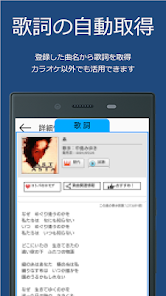
[Automatic acquisition of lyrics]
You can check the lyrics by connecting to the network.
*You can check from the song details screen.
[Registered song search]
You can search for songs registered in Karaoke Memo.
You can also specify detailed conditions.
*Uses an original search system (see “★★★Original Search System★★★” below)
[Random song selection]
A song will be randomly selected from the songs registered in your karaoke memo.
You can specify tags and singers as conditions, and it is also possible to select 10 or 30 songs at once.
Convenient when you have trouble selecting songs!
[Denmoku search]
Connect to the network and search for songs.
Searched songs can be registered in karaoke memo.
Even if the song is already registered, if the request number is not registered, it will be added to the memo field.
[Ranking search]
You can search rankings in 7 patterns: weekly, monthly, yearly, overall, trending, anime, and Vocaloid.
Searched songs can be registered in karaoke memo.
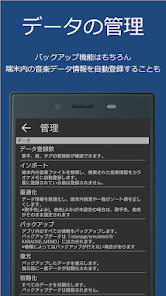
【import】
Automatically registers information about music files on your device.
【optimization】
Optimize data information and correct data defects such as in-device searches and list sort order.
*If the same singer is registered twice or an error occurs when updating song information, it may be resolved by updating to the latest version.
【backup】
Back up all the information registered in Karaoke Memo.
Backup data is used in the restore function.
[Restoration]
Restore your backed up data.
The data will be initialized once before restoration.
【Initialization】
Initialize all data.
Backed up data will not be deleted.
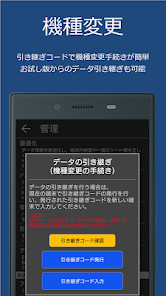
[Data transfer (procedures for changing models)]
You can transfer data to another device, such as when changing models.
You can even share data with others.
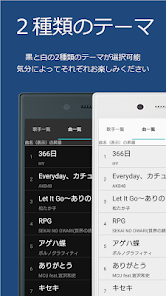
[Theme color]
There are two themes to choose from: black and white.
Please enjoy each one depending on your mood.
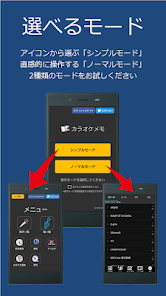
【Display mode】
"Simple mode" selected from icons
"Normal mode" for intuitive operation
Enjoy two different modes.
*The previous version can be used as "Normal Mode"
[List display items]
You can set the items to be displayed in the song list.
*Display order cannot be set
[List display size]
You can change the display size of the singer list, song list, etc.
[Cache enabled]
Once you display the lyrics screen once, it will be displayed faster from the second time onwards.
*Uses the device's internal memory area
[JavaScript enabled]
You will be able to listen to the lyrics on the lyrics screen.
*Ads may be displayed.
*Display may be delayed
[Remembering search contents]
You can remember the last searched content for song search and Denmoku search.
This is useful if you always do the same search.
[Sending usage information]
Send usage information such as the number of registered songs and sort order settings.
Please cooperate with us to improve quality.
[Check the latest version]
Checks whether the latest version is available when starting the app.
【FAQ】
You can check the most frequently asked questions.
【inquiry】
Click here if you cannot find a solution in the Frequently Asked Questions or to report a problem.
[Tell a friend (share)]
You can share Karaoke Memo with your friends via the following SNS or email.
・LINE
・Twitter
・Facebook
・mixi
·Email
★★★Unique search system★★★
Karaoke Memo uses its own search system.
for example,
"Thank you" "Thank you" → "Thank you"
“Shomei” “Shomee” → “Shomei”
"Violin" "Hiolin" → "Violin"
Even a slightly distorted expression like this will be a hit!
★★★Please note★★★
The device's internal memory area is used to store data and cache.
If the memory area is low, the number of memos that can be saved may be reduced or it may not be possible to save them.
Please be forewarned.
★★★Required environment★★★
Android OS 8.0 or higher
★★★Recommended environment★★★
Android OS 14 or higher
But if you write it on a regular memo pad, it's hard to see, and it gets mixed up with other memos, making it difficult to manage!
This is a karaoke memo app for such people.
Official site
https://karaokememo.com/?ref=gp_pro
Official Twitter account
https://twitter.com/karaokememo?lang=ja
*Basically, information will be distributed for the product version.
You can record not only the singer name and song title, but also information unique to karaoke, such as key settings.
You can also divide it into your favorite genres, such as "favorites" and "songs that get you excited!"
Even if you don't know the official name of the song, you can search for and register the song included in the actual karaoke machine!
If you can't decide which song to sing, you can easily select it with "Automatic song selection"♪
If you are interested, try the trial version first!
https://play.google.com/store/apps/details?id=itotsuka.karaoke_memo_trial
There is also a light version with no registration restrictions.
https://play.google.com/store/apps/details?id=itotsuka.karaoke_memo_lite
*If you want to transfer data from the trial version, please use "Data transfer (procedure for changing models)" on the management screen.
If you have any questions, problems, or requests, please let us know by writing a review.
We also accept inquiries from the "Inquiries" within the app.
★★★Main features★★★
・Key settings
·Tagging
・Registered song search
・Automatic lyrics acquisition
・Automatic song selection
・Denmoku search
・Ranking search
·import
·backup
・Data transfer (model change procedure)
You can also set themes and switch operation modes.
★★★Function details★★★
[Song registration]
The following contents can be registered.
·Singer name
・Singer name (pronunciation)
・Song title
・Song name (pronunciation)
・Tags (favorites, etc.) *Up to 100 characters
·Key
・Rate (how often you want to sing, etc.)
・Status (practicing, etc.)
・Number of songs ※Up to 999 times
・Score
・Memo
[List sort]
You can sort the contents of the list by singer name, song title, registration date, etc.
[Edit all together]
You can set tags for multiple songs (singers), change the number of songs sung, and delete them.
[Automatic acquisition of lyrics]
You can check the lyrics by connecting to the network.
*You can check from the song details screen.
[Registered song search]
You can search for songs registered in Karaoke Memo.
You can also specify detailed conditions.
*Uses an original search system (see “★★★Original Search System★★★” below)
[Random song selection]
A song will be randomly selected from the songs registered in your karaoke memo.
You can specify tags and singers as conditions, and it is also possible to select 10 or 30 songs at once.
Convenient when you have trouble selecting songs!
[Denmoku search]
Connect to the network and search for songs.
Searched songs can be registered in karaoke memo.
Even if the song is already registered, if the request number is not registered, it will be added to the memo field.
[Ranking search]
You can search rankings in 7 patterns: weekly, monthly, yearly, overall, trending, anime, and Vocaloid.
Searched songs can be registered in karaoke memo.
【import】
Automatically registers information about music files on your device.
【optimization】
Optimize data information and correct data defects such as in-device searches and list sort order.
*If the same singer is registered twice or an error occurs when updating song information, it may be resolved by updating to the latest version.
【backup】
Back up all the information registered in Karaoke Memo.
Backup data is used in the restore function.
[Restoration]
Restore your backed up data.
The data will be initialized once before restoration.
【Initialization】
Initialize all data.
Backed up data will not be deleted.
[Data transfer (procedures for changing models)]
You can transfer data to another device, such as when changing models.
You can even share data with others.
[Theme color]
There are two themes to choose from: black and white.
Please enjoy each one depending on your mood.
【Display mode】
"Simple mode" selected from icons
"Normal mode" for intuitive operation
Enjoy two different modes.
*The previous version can be used as "Normal Mode"
[List display items]
You can set the items to be displayed in the song list.
*Display order cannot be set
[List display size]
You can change the display size of the singer list, song list, etc.
[Cache enabled]
Once you display the lyrics screen once, it will be displayed faster from the second time onwards.
*Uses the device's internal memory area
[JavaScript enabled]
You will be able to listen to the lyrics on the lyrics screen.
*Ads may be displayed.
*Display may be delayed
[Remembering search contents]
You can remember the last searched content for song search and Denmoku search.
This is useful if you always do the same search.
[Sending usage information]
Send usage information such as the number of registered songs and sort order settings.
Please cooperate with us to improve quality.
[Check the latest version]
Checks whether the latest version is available when starting the app.
【FAQ】
You can check the most frequently asked questions.
【inquiry】
Click here if you cannot find a solution in the Frequently Asked Questions or to report a problem.
[Tell a friend (share)]
You can share Karaoke Memo with your friends via the following SNS or email.
・LINE
・mixi
★★★Unique search system★★★
Karaoke Memo uses its own search system.
for example,
"Thank you" "Thank you" → "Thank you"
“Shomei” “Shomee” → “Shomei”
"Violin" "Hiolin" → "Violin"
Even a slightly distorted expression like this will be a hit!
★★★Please note★★★
The device's internal memory area is used to store data and cache.
If the memory area is low, the number of memos that can be saved may be reduced or it may not be possible to save them.
Please be forewarned.
★★★Required environment★★★
Android OS 8.0 or higher
★★★Recommended environment★★★
Android OS 14 or higher
Updated on
Safety starts with understanding how developers collect and share your data. Data privacy and security practices may vary based on your use, region, and age. The developer provided this information and may update it over time.

No data shared with third parties
Learn more about how developers declare sharing

No data collected
Learn more about how developers declare collection

Data isn’t encrypted
Data can’t be deleted
What's new
●Ver7.13.1(2024/5/2)
・Androidバージョンのサポート対象が変更となりました
<必須> Android 8.0
<推奨> Android 14
●Ver7.12.1(2024/4/22)
・よみがなの自動設定機能について、ON/OFF設定できるようになりました
・その他軽微な修正を行いました
●Ver7.11.1(2023/8/31)
・曲検索で歌手名と曲名のAND条件(スペース区切りで指定)ができるようになりました
・以前復活した「デンモク登録時にリクエストNo.をメモ欄に記録する機能」について、ON/OFF設定できるようになりました
・その他軽微な修正を行いました
●Ver7.10.1(2023/8/28)
・データの復元時(データ引き継ぎも含む)に一部文字化けする不具合を修正しました
・その他軽微な修正を行いました
●Ver7.9.1(2023/7/27)
・曲詳細画面で表示されている歌手名でデンモク検索できるようになりました
●Ver7.8.1(2023/4/3)
・デンモク(DAM検索)の前方一致検索が廃止になりました
・Androidバージョンのサポート対象が変更となりました
<必須> Android 8.0
<推奨> Android 14
●Ver7.12.1(2024/4/22)
・よみがなの自動設定機能について、ON/OFF設定できるようになりました
・その他軽微な修正を行いました
●Ver7.11.1(2023/8/31)
・曲検索で歌手名と曲名のAND条件(スペース区切りで指定)ができるようになりました
・以前復活した「デンモク登録時にリクエストNo.をメモ欄に記録する機能」について、ON/OFF設定できるようになりました
・その他軽微な修正を行いました
●Ver7.10.1(2023/8/28)
・データの復元時(データ引き継ぎも含む)に一部文字化けする不具合を修正しました
・その他軽微な修正を行いました
●Ver7.9.1(2023/7/27)
・曲詳細画面で表示されている歌手名でデンモク検索できるようになりました
●Ver7.8.1(2023/4/3)
・デンモク(DAM検索)の前方一致検索が廃止になりました
App support
About the developer
伊藤宜哲
itotsuka@hotmail.com
中野3丁目45−10
204
中野区, 東京都 164-0001
Japan
undefined


