
PIXUSはがきクリエイター
100K+
Downloads

Everyone
info
About this app
◆ Main features ◆
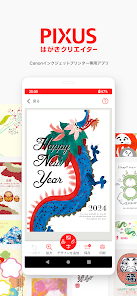
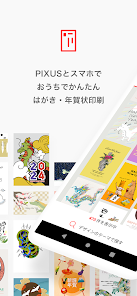
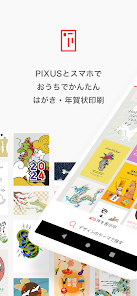
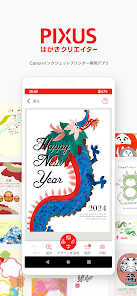
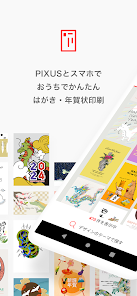
・You can print New Year's cards from your smartphone with simple and intuitive operations.
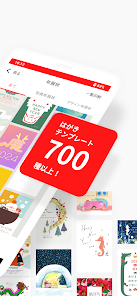
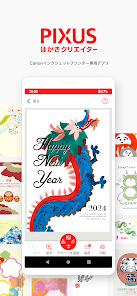
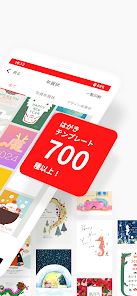
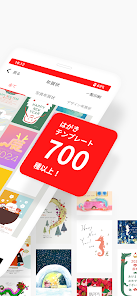
・You can use a wide variety of New Year's card designs for free. (Over 350 New Year's designs + over 60 mourning and winter greeting designs included)
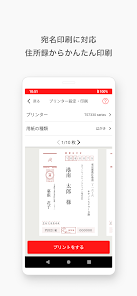
・You can create an address book (up to 1000 entries) for free, and you can print up to 100 addresses at once!
・Easy and easy migration of address book data when changing models!
◆ Useful functions ◆
[Recorded design]
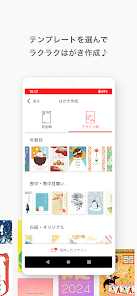
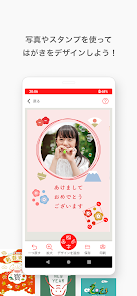
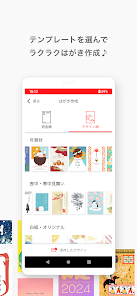
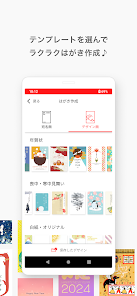
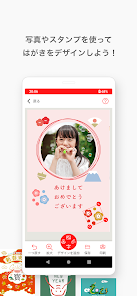
・In addition to simple designs such as formal and casual, over 350 free New Year's designs such as photo frame designs
・Includes designs for mourning and winter greetings
・Deco stamps that can be customized are also available (lucky charms, greetings, year names, zodiac signs, backgrounds, etc.)
・You can also create your own original New Year's card from blank paper!
[Design aspect]
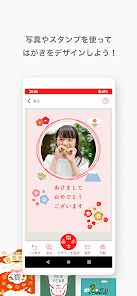
・Design surface creation: Designs can be easily created with few steps.
・Save designs: You can save, edit, and print multiple designs.
・Insert photo: Tap inside the frame to insert a photo.
・Text input: You can add text or edit existing text.
・Handwriting pen: You can select your favorite color and edit it with a handwriting pen.
*Note: When printing without borders, please note that the top 2mm, bottom 5mm, and 2.8mm left and right of the postcard (when in portrait orientation) will not be printed.
[Address book/Address side]
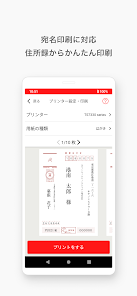
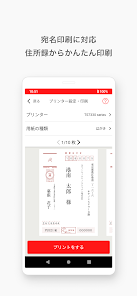
・Creating an address book: You can create an address book by entering the address and name of the recipient. (Maximum 1000 items)
*Note: Regarding input numbers, half-width numbers will be uniformly converted to Chinese numerals, and full-width numbers will be converted to Arabic numerals.
*The size of the postal code number depends on the resolution of the device, so it may be printed small on some models.
・Load address book: You can also select from the address book on your smartphone and add it to the address book in the app.
・Sender registration: Multiple senders (up to 6) can be registered. You can print by changing the settings for each design.
・Editing the address side: You can select "vertical writing, horizontal writing, light ink" and "selectable fonts (cursive/block font/design, etc.)".
*Note: We recommend using the design typeface for design purposes.
・Support for joint names: Up to 6 people can write joint names for both sender and recipient.
・There is also a "work place" for business purposes, so you can create one with your job title or department name! Furthermore, it is now possible to check printed status, print a list of recipients, and add sender information!
[Print]
・Please set the number of copies, paper type, etc. before printing.
*For some models, "Postcard" and "Inkjet Postcard" are not displayed as paper types. In that case, please select "plain paper" for "postcards" and "photo paper" for "inkjet postcards" depending on the paper you are using. Please note that the color appearance may differ.
*Internet environment is required to use the app.
*When printing borderless, the image will be printed slightly larger than the postcard size. Therefore, the parts that protrude from the postcard will not be printed.
Also, when printing with borders, the sizes of the left, right, top and bottom borders will be slightly different.
*Some functions may not be available depending on the device you are using. Also, some operation screens may not be displayed on tablet devices.
◆ Compatible models ◆
[PIXUS]
XK120,TS8730,TS6730,TS6630,XK500,XK110,TS8630,TS3530,TR8630a,TR703a,XK100,TS8530,TS7530,TS5430,XK90, , TS7330, TS6330, TS5330, XK80, TS8230, TS6230, TS5030S, TS5130S, TS3130S, XK70, 530F, MG7530, MG7130, MG6930, MG6730, MG6530, MG6330, MG6230, MG5730, MG5630, MG5530, MG5430, MG5330, MG4230, MG4130, MG3630, MG3530, iP8730, iP7230, iX6830, iP110, imagePROGRAF PRO-G1, PRO-S1, PRO-100S, PRO-10S, PRO-100 , PRO-10 , PRO-1, TR9530, TR8630, TR8530, TR7530, TR4530, TR703, TR153, MX923, MX893, MX523, MX513
[MAXIFY]
MB5430, MB5130, MB2730, MB2130, iB4130, MB5330, MB5030, MB2330, MB2030, iB4030
[G series]
G3370, G7030, G6030, G5030, G3360, G3310
[GX series]
GX6530,GX5530,GX2030,GX1030,GX4030, GX5030, GX7030, GX6030
*Inkjet glossy postcards cannot be used with some models.
*In order to maintain the quality of some content, depending on the printer model, it may not be possible to print as desired.
◆ Compatible OS ◆
・Android 7.0 or later
*This app is a smartphone app. Problems may occur when using a tablet device. Additionally, some smartphones are not supported. note that.
◆ About the license agreement ◆
Canon Marketing Japan Inc. (hereinafter referred to as "our company") provides the New Year's card creation application "PIXUS Postcard Creator" (including help for the app and its updated versions. These are collectively referred to as "Licensed Software"). We have established a license agreement (hereinafter referred to as this agreement) as follows regarding the use of our products by our customers.
[License agreement]
https://cweb.canon.jp/pixus/apps/p-hagaki/agreement-android.html
Customers may use the "Licensed Software" only if they agree to each provision of this agreement. If you install the Licensed Software, you agree to be bound by the terms of this agreement.
・You can print New Year's cards from your smartphone with simple and intuitive operations.
・You can use a wide variety of New Year's card designs for free. (Over 350 New Year's designs + over 60 mourning and winter greeting designs included)
・You can create an address book (up to 1000 entries) for free, and you can print up to 100 addresses at once!
・Easy and easy migration of address book data when changing models!
◆ Useful functions ◆
[Recorded design]
・In addition to simple designs such as formal and casual, over 350 free New Year's designs such as photo frame designs
・Includes designs for mourning and winter greetings
・Deco stamps that can be customized are also available (lucky charms, greetings, year names, zodiac signs, backgrounds, etc.)
・You can also create your own original New Year's card from blank paper!
[Design aspect]
・Design surface creation: Designs can be easily created with few steps.
・Save designs: You can save, edit, and print multiple designs.
・Insert photo: Tap inside the frame to insert a photo.
・Text input: You can add text or edit existing text.
・Handwriting pen: You can select your favorite color and edit it with a handwriting pen.
*Note: When printing without borders, please note that the top 2mm, bottom 5mm, and 2.8mm left and right of the postcard (when in portrait orientation) will not be printed.
[Address book/Address side]
・Creating an address book: You can create an address book by entering the address and name of the recipient. (Maximum 1000 items)
*Note: Regarding input numbers, half-width numbers will be uniformly converted to Chinese numerals, and full-width numbers will be converted to Arabic numerals.
*The size of the postal code number depends on the resolution of the device, so it may be printed small on some models.
・Load address book: You can also select from the address book on your smartphone and add it to the address book in the app.
・Sender registration: Multiple senders (up to 6) can be registered. You can print by changing the settings for each design.
・Editing the address side: You can select "vertical writing, horizontal writing, light ink" and "selectable fonts (cursive/block font/design, etc.)".
*Note: We recommend using the design typeface for design purposes.
・Support for joint names: Up to 6 people can write joint names for both sender and recipient.
・There is also a "work place" for business purposes, so you can create one with your job title or department name! Furthermore, it is now possible to check printed status, print a list of recipients, and add sender information!
[Print]
・Please set the number of copies, paper type, etc. before printing.
*For some models, "Postcard" and "Inkjet Postcard" are not displayed as paper types. In that case, please select "plain paper" for "postcards" and "photo paper" for "inkjet postcards" depending on the paper you are using. Please note that the color appearance may differ.
*Internet environment is required to use the app.
*When printing borderless, the image will be printed slightly larger than the postcard size. Therefore, the parts that protrude from the postcard will not be printed.
Also, when printing with borders, the sizes of the left, right, top and bottom borders will be slightly different.
*Some functions may not be available depending on the device you are using. Also, some operation screens may not be displayed on tablet devices.
◆ Compatible models ◆
[PIXUS]
XK120,TS8730,TS6730,TS6630,XK500,XK110,TS8630,TS3530,TR8630a,TR703a,XK100,TS8530,TS7530,TS5430,XK90, , TS7330, TS6330, TS5330, XK80, TS8230, TS6230, TS5030S, TS5130S, TS3130S, XK70, 530F, MG7530, MG7130, MG6930, MG6730, MG6530, MG6330, MG6230, MG5730, MG5630, MG5530, MG5430, MG5330, MG4230, MG4130, MG3630, MG3530, iP8730, iP7230, iX6830, iP110, imagePROGRAF PRO-G1, PRO-S1, PRO-100S, PRO-10S, PRO-100 , PRO-10 , PRO-1, TR9530, TR8630, TR8530, TR7530, TR4530, TR703, TR153, MX923, MX893, MX523, MX513
[MAXIFY]
MB5430, MB5130, MB2730, MB2130, iB4130, MB5330, MB5030, MB2330, MB2030, iB4030
[G series]
G3370, G7030, G6030, G5030, G3360, G3310
[GX series]
GX6530,GX5530,GX2030,GX1030,GX4030, GX5030, GX7030, GX6030
*Inkjet glossy postcards cannot be used with some models.
*In order to maintain the quality of some content, depending on the printer model, it may not be possible to print as desired.
◆ Compatible OS ◆
・Android 7.0 or later
*This app is a smartphone app. Problems may occur when using a tablet device. Additionally, some smartphones are not supported. note that.
◆ About the license agreement ◆
Canon Marketing Japan Inc. (hereinafter referred to as "our company") provides the New Year's card creation application "PIXUS Postcard Creator" (including help for the app and its updated versions. These are collectively referred to as "Licensed Software"). We have established a license agreement (hereinafter referred to as this agreement) as follows regarding the use of our products by our customers.
[License agreement]
https://cweb.canon.jp/pixus/apps/p-hagaki/agreement-android.html
Customers may use the "Licensed Software" only if they agree to each provision of this agreement. If you install the Licensed Software, you agree to be bound by the terms of this agreement.
Updated on
Safety starts with understanding how developers collect and share your data. Data privacy and security practices may vary based on your use, region, and age. The developer provided this information and may update it over time.

This app may share these data types with third parties
Personal info

No data collected
Learn more about how developers declare collection

Data is encrypted in transit

Data can’t be deleted

Committed to follow the Play Families Policy
What's new
利用規約・プライバシーポリシー表示時の不具合を修正しました。