
じぶん銀行アプリ(auじぶん銀行)
3.5star
8.84K reviews
1M+
Downloads

Everyone
info


About this app
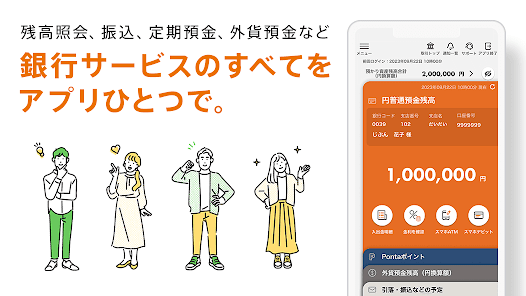
● Consolidate all banking services such as account opening, transfer, smartphone ATM, debit card.
● Increase the number of times you can use the service free of charge according to your balance and usage status! “Jibun Plus” where you can earn Ponta points.
au Jibun Bank is an online bank jointly established by KDDI and Mitsubishi UFJ Bank. Whether you use au or not, you can use a variety of banking services with just one app, including balance inquiries, transfers, time deposits, and foreign currency deposits.
-------
Main function
-------
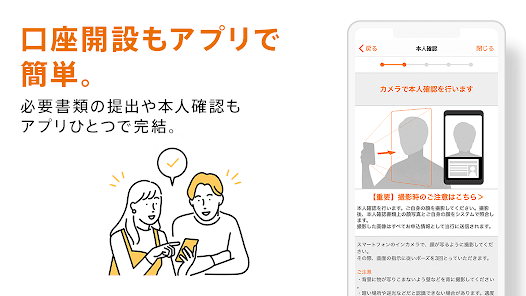
■ Account opening
・You can easily enter the information necessary to apply for opening an account by taking a photo of your identity verification document (driver's license, etc.) and your face with your smartphone camera.
・If you take a face image from the Jibun Bank app and apply, you can use the account before the cash card arrives with face authentication.
■Balance Inquiry/Deposit/Withdrawal Details Inquiry
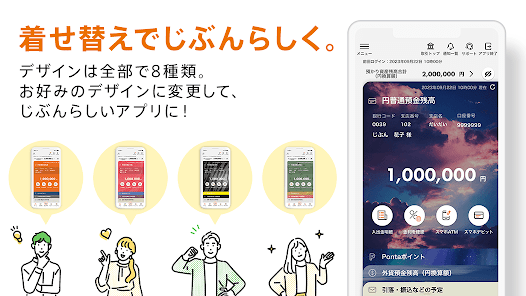
- Easily check your savings account balance from the top screen. In addition, you can now check the balance of various deposits at a glance from the account information button.
・Added a function that allows you to check the notes entered in Internet banking in the deposit and withdrawal details.
■ Transfer
・Transfers can be made using only mobile phone numbers between au Jibun Bank accounts. You can select from the address book and transfer money easily with no fees.
・For debiting rent and utility bills, it is convenient to use the Fixed Amount Automatic Deposit Service, which allows you to withdraw a specified amount each month from a financial institution in your name to your au Jibun Bank account free of charge.
■ Time deposits/Structured deposits
・Yen time deposits with guaranteed principal and structured deposits with attractive high interest rates.
・You can check interest rates and apply for deposits.
■ Foreign currency deposit
・Deposits from yen are advantageous. Exchange fees for deposits are free for all 8 currencies.
・You can check interest rates and apply for deposits.
・Profit and loss of foreign currency deposits are displayed in real time. You can check the transaction status of foreign currency deposits at a glance by displaying the balance, trading volume, and profit and loss of foreign currency deposits in graphs.
■ Exchange rate notification
・If you register the exchange rate in advance, you will be notified by push notification when the set value is reached.
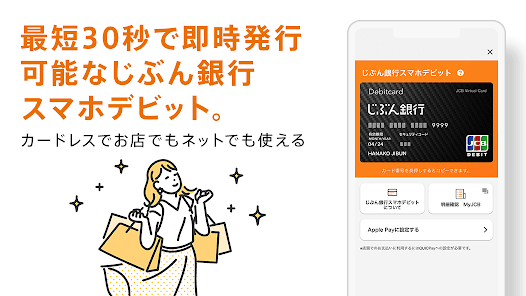
■ Jibun Bank Smartphone Debit
・It is a JCB debit that can be issued immediately from the Jibun Bank app in as little as 30 seconds. Since it is cardless, there is no need to wait for mail.
・You can use your JCB credit card for shopping on internet sites around the world and at your usual shops.
*When using in-store, it is necessary to set Jibun Bank Smartphone Debit as the main card for Google Pay ™.
*Can be used at stores throughout Japan with the QUICPay+™ (Quick Pay Plus) mark.
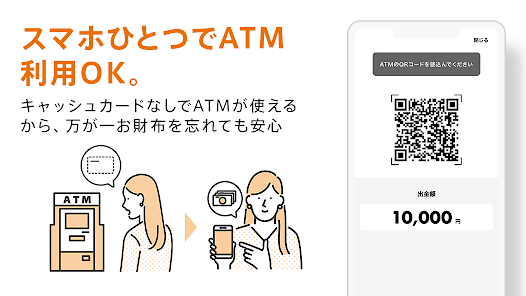
■Smartphone ATM
・You can use the Jibun Bank app instead of a cash card to deposit and withdraw cash at Lawson Bank ATMs (*excluding some) and Seven Bank ATMs.
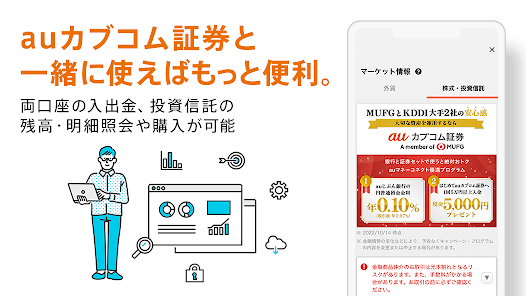
More convenient if used with au Kabucom Securities
・If you register and authenticate the API use of au Kabucom Securities from the Jibun Bank app, you can check the balance and details of investment trusts of au Kabucom Securities, and purchase investment trusts from rankings.
*Account information authentication of au Kabucom Securities is required for use.
■ My Plus
・Jibun Plus is a service that collects stamps according to various balances and usage conditions, and you can receive free benefits such as Ponta point multiplier, ATM usage fee, and transfer fee for each of the four stages.
・ You can easily check the status of stamp acquisition, the number of remaining free charges, and the Ponta point multiplier with the Jibun Bank app.
* To collect Ponta points, you need to register an au ID at au Jibun Bank.
■ AI foreign currency prediction
・AI (artificial intelligence) analyzes and predicts future exchange fluctuations based on past exchange fluctuations.
・Predict fluctuations within 1 hour, 1 business day (*), or 5 business days (*) for US dollar, euro, Australian dollar, rand, and NZ dollar, and display the results with icons.
*Monday to Friday
■ Japan AI market forecast
・After the final figures of au Jibun Bank Japan PMI are announced every month, we will analyze the future trend of Japanese stock prices based on the past month's movements of PMI and TOPIX.
・AI predicts whether TOPIX will rise or fall after 5 business days (*).
*Monday to Friday, excluding holidays
■ Market information
・Information useful for foreign currency transactions such as exchange rates, economic indicators, and news, as well as information on stocks and investment trusts (financial instruments brokerage).
■Others
Various services such as card loans, mortgages, campaigns, columns, electronic money readers, etc. can be used from the Jibun Bank app.
-------
Security
-------
■ Smartphone authentication service
・This is a service that completes a transaction by confirming the details of the transaction displayed on the screen from the Jibun Bank app each time a transaction such as a transfer is made.
・Smartphone authentication has introduced a "transaction authentication" function. Transaction authentication is a strong security function to prevent unauthorized remittances due to falsification of transfer details.
au Jibun Bank's smartphone authentication incorporates this transaction authentication into a smartphone banking application, so there is no need to carry devices such as password cards.
■ Unlocking/Relocking Internet Banking
This is a security function that normally locks the use of Internet banking and unlocks it from the Jibun Bank app only when using it.
・You can log in only once within 60 minutes after unlocking. Automatically locks after 60 minutes or after logging out. Since the lock can only be released using the smartphone owned by the customer, it is possible to prevent fraudulent remittance damage using Internet banking.
■ Unlocking/relocking ATM locks
・This is a security function that normally locks the use of ATMs and unlocks them from the Jibun Bank app only when using them.
・When 60 minutes have passed after unlocking, it will be automatically locked again. Since the lock can only be unlocked with the smartphone owned by the customer, it reduces the damage caused by withdrawals such as when the cash card is stolen or counterfeited.
*Settings are required to use the security function.
-------
【Recommended environment】
https://www.jibunbank.co.jp/environment/#flg-sp
【Notes】
! The Jibun Bank app can only be used on one device.
! As a general rule, we are available 24 hours a day, 365 days a year (excluding our system maintenance hours). If the service becomes unavailable due to temporary maintenance, etc., we will notify you on our website.
● Increase the number of times you can use the service free of charge according to your balance and usage status! “Jibun Plus” where you can earn Ponta points.
au Jibun Bank is an online bank jointly established by KDDI and Mitsubishi UFJ Bank. Whether you use au or not, you can use a variety of banking services with just one app, including balance inquiries, transfers, time deposits, and foreign currency deposits.
-------
Main function
-------
■ Account opening
・You can easily enter the information necessary to apply for opening an account by taking a photo of your identity verification document (driver's license, etc.) and your face with your smartphone camera.
・If you take a face image from the Jibun Bank app and apply, you can use the account before the cash card arrives with face authentication.
■Balance Inquiry/Deposit/Withdrawal Details Inquiry
- Easily check your savings account balance from the top screen. In addition, you can now check the balance of various deposits at a glance from the account information button.
・Added a function that allows you to check the notes entered in Internet banking in the deposit and withdrawal details.
■ Transfer
・Transfers can be made using only mobile phone numbers between au Jibun Bank accounts. You can select from the address book and transfer money easily with no fees.
・For debiting rent and utility bills, it is convenient to use the Fixed Amount Automatic Deposit Service, which allows you to withdraw a specified amount each month from a financial institution in your name to your au Jibun Bank account free of charge.
■ Time deposits/Structured deposits
・Yen time deposits with guaranteed principal and structured deposits with attractive high interest rates.
・You can check interest rates and apply for deposits.
■ Foreign currency deposit
・Deposits from yen are advantageous. Exchange fees for deposits are free for all 8 currencies.
・You can check interest rates and apply for deposits.
・Profit and loss of foreign currency deposits are displayed in real time. You can check the transaction status of foreign currency deposits at a glance by displaying the balance, trading volume, and profit and loss of foreign currency deposits in graphs.
■ Exchange rate notification
・If you register the exchange rate in advance, you will be notified by push notification when the set value is reached.
■ Jibun Bank Smartphone Debit
・It is a JCB debit that can be issued immediately from the Jibun Bank app in as little as 30 seconds. Since it is cardless, there is no need to wait for mail.
・You can use your JCB credit card for shopping on internet sites around the world and at your usual shops.
*When using in-store, it is necessary to set Jibun Bank Smartphone Debit as the main card for Google Pay ™.
*Can be used at stores throughout Japan with the QUICPay+™ (Quick Pay Plus) mark.
■Smartphone ATM
・You can use the Jibun Bank app instead of a cash card to deposit and withdraw cash at Lawson Bank ATMs (*excluding some) and Seven Bank ATMs.
More convenient if used with au Kabucom Securities
・If you register and authenticate the API use of au Kabucom Securities from the Jibun Bank app, you can check the balance and details of investment trusts of au Kabucom Securities, and purchase investment trusts from rankings.
*Account information authentication of au Kabucom Securities is required for use.
■ My Plus
・Jibun Plus is a service that collects stamps according to various balances and usage conditions, and you can receive free benefits such as Ponta point multiplier, ATM usage fee, and transfer fee for each of the four stages.
・ You can easily check the status of stamp acquisition, the number of remaining free charges, and the Ponta point multiplier with the Jibun Bank app.
* To collect Ponta points, you need to register an au ID at au Jibun Bank.
■ AI foreign currency prediction
・AI (artificial intelligence) analyzes and predicts future exchange fluctuations based on past exchange fluctuations.
・Predict fluctuations within 1 hour, 1 business day (*), or 5 business days (*) for US dollar, euro, Australian dollar, rand, and NZ dollar, and display the results with icons.
*Monday to Friday
■ Japan AI market forecast
・After the final figures of au Jibun Bank Japan PMI are announced every month, we will analyze the future trend of Japanese stock prices based on the past month's movements of PMI and TOPIX.
・AI predicts whether TOPIX will rise or fall after 5 business days (*).
*Monday to Friday, excluding holidays
■ Market information
・Information useful for foreign currency transactions such as exchange rates, economic indicators, and news, as well as information on stocks and investment trusts (financial instruments brokerage).
■Others
Various services such as card loans, mortgages, campaigns, columns, electronic money readers, etc. can be used from the Jibun Bank app.
-------
Security
-------
■ Smartphone authentication service
・This is a service that completes a transaction by confirming the details of the transaction displayed on the screen from the Jibun Bank app each time a transaction such as a transfer is made.
・Smartphone authentication has introduced a "transaction authentication" function. Transaction authentication is a strong security function to prevent unauthorized remittances due to falsification of transfer details.
au Jibun Bank's smartphone authentication incorporates this transaction authentication into a smartphone banking application, so there is no need to carry devices such as password cards.
■ Unlocking/Relocking Internet Banking
This is a security function that normally locks the use of Internet banking and unlocks it from the Jibun Bank app only when using it.
・You can log in only once within 60 minutes after unlocking. Automatically locks after 60 minutes or after logging out. Since the lock can only be released using the smartphone owned by the customer, it is possible to prevent fraudulent remittance damage using Internet banking.
■ Unlocking/relocking ATM locks
・This is a security function that normally locks the use of ATMs and unlocks them from the Jibun Bank app only when using them.
・When 60 minutes have passed after unlocking, it will be automatically locked again. Since the lock can only be unlocked with the smartphone owned by the customer, it reduces the damage caused by withdrawals such as when the cash card is stolen or counterfeited.
*Settings are required to use the security function.
-------
【Recommended environment】
https://www.jibunbank.co.jp/environment/#flg-sp
【Notes】
! The Jibun Bank app can only be used on one device.
! As a general rule, we are available 24 hours a day, 365 days a year (excluding our system maintenance hours). If the service becomes unavailable due to temporary maintenance, etc., we will notify you on our website.
Updated on
Safety starts with understanding how developers collect and share your data. Data privacy and security practices may vary based on your use, region, and age. The developer provided this information and may update it over time.

No data shared with third parties
Learn more about how developers declare sharing

No data collected
Learn more about how developers declare collection

Data is encrypted in transit

You can request that data be deleted
Ratings and reviews
3.0
8.74K reviews

Martin Esser
- Flag inappropriate
- Show review history
February 11, 2023
The app installation requests an 8 digit authentification code. They state it was printed on the letter I received with the AU cash card. Not true. The letter did not come with such code.
2 people found this review helpful

Minh Nguyen
- Flag inappropriate
March 30, 2022
Cannot do identity process. The app is freezing and buggy.
6 people found this review helpful

Laurence Wilson
- Flag inappropriate
June 6, 2024
I don't share my file