
PianoRemote
2.0star
435 reviews
10K+
Downloads

Everyone
info


About this app
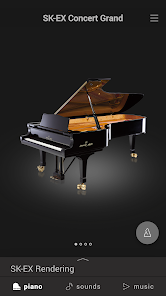
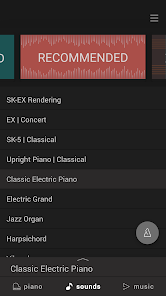
PianoRemote is a control app developed for Kawai digital/hybrid pianos, allowing players to change sounds, adjust settings, and enjoy the wide variety of built-in music.[*1]
■ For more information, please refer to the PianoRemote page on the Kawai Global website:
https://www.kawai-global.com/product/pianoremote/
Supported Kawai digital/hybrid piano models:
https://www.kawai-global.com/product/pianoremote/#supportedmodels
■ Please note that PianoRemote requires Location (GPS) to be enabled, and both Location and Storage permissions to be approved in order to scan for Bluetooth MIDI devices and to save settings. Please approve both permission requests to ensure that PianoRemote functions correctly. This app does not collect, send, or store your location.
・ Easy operation of your Kawai digital/hybrid piano using a smartphone or tablet
PianoRemote allows various functions of the digital/hybrid piano to be easily selected.
・ Consistent UI design with Kawai digital/hybrid piano touch panel
PianoRemote is designed to allow easy, intuitive operation via a smartphone or tablet.
The user interface is standardised, meaning there is no need to learn new operations.
・ Music player feature that can be used like a music app
PianoRemote includes a wide variety of songs and classical pieces that are built-in to Kawai digital/hybrid pianos.[*2]
This music can be controlled in the same way as a regular music app. However, it’s also possible to change the sound used for playback, allowing songs and classical pieces to be enjoyed with a different tonal character and atmosphere.
・ Interact with music using “Lesson” and “Concert Magic” modes
In addition to listening to the built-in songs and classical pieces, the additional “Lesson” and “Concert Magic” modes allow musicians to practice the music, and non-musicians to enjoy playing pieces and learning rhythm with a single finger.[*3]
・ Control various built-in functions
PianoRemote can be used to control various functions of the Kawai digital/hybrid piano. For example, the Metronome is an essential aid for practise, the Virtual Technician allows the sound and other aspects of the piano to be adjusted to suit one’s person preference, while the Dual and Split functions allow different sounds to be combined for more engaging performances.[*4]
・ Straightforward connection using Bluetooth MIDI
PianoRemote supports Bluetooth MIDI wireless communication, allowing immediate connection to the Kawai digital/hybrid piano without the need for additional cables.[*5]
・ Compatible with iOS/Android smartphones and tablets
PianoRemote supports both iOS and Android smartphones and tablets, allowing the app to be used on a range of different devices, for many years.[*6]
*1 A compatible Kawai Digital/Hybrid Piano must be connected to a smartphone or tablet.
*2 Copyrighted songs are not included among the piano’s built-in songs.
*3 Some songs do not support “Lesson” and “Concert Magic” modes due to the composition of the data.
*4 “Recorder” and “USB Memory Player” function control is not supported.
*5 Connection via USB cable or a Bluetooth MIDI adapter such as the QuiccoSound mi.1 also supported.
*6 Android7.0 or higher device with support for standard MIDI functions required. Please contact the device manufacturer to confirm MIDI support status.
■ For more information, please refer to the PianoRemote page on the Kawai Global website:
https://www.kawai-global.com/product/pianoremote/
Supported Kawai digital/hybrid piano models:
https://www.kawai-global.com/product/pianoremote/#supportedmodels
■ Please note that PianoRemote requires Location (GPS) to be enabled, and both Location and Storage permissions to be approved in order to scan for Bluetooth MIDI devices and to save settings. Please approve both permission requests to ensure that PianoRemote functions correctly. This app does not collect, send, or store your location.
・ Easy operation of your Kawai digital/hybrid piano using a smartphone or tablet
PianoRemote allows various functions of the digital/hybrid piano to be easily selected.
・ Consistent UI design with Kawai digital/hybrid piano touch panel
PianoRemote is designed to allow easy, intuitive operation via a smartphone or tablet.
The user interface is standardised, meaning there is no need to learn new operations.
・ Music player feature that can be used like a music app
PianoRemote includes a wide variety of songs and classical pieces that are built-in to Kawai digital/hybrid pianos.[*2]
This music can be controlled in the same way as a regular music app. However, it’s also possible to change the sound used for playback, allowing songs and classical pieces to be enjoyed with a different tonal character and atmosphere.
・ Interact with music using “Lesson” and “Concert Magic” modes
In addition to listening to the built-in songs and classical pieces, the additional “Lesson” and “Concert Magic” modes allow musicians to practice the music, and non-musicians to enjoy playing pieces and learning rhythm with a single finger.[*3]
・ Control various built-in functions
PianoRemote can be used to control various functions of the Kawai digital/hybrid piano. For example, the Metronome is an essential aid for practise, the Virtual Technician allows the sound and other aspects of the piano to be adjusted to suit one’s person preference, while the Dual and Split functions allow different sounds to be combined for more engaging performances.[*4]
・ Straightforward connection using Bluetooth MIDI
PianoRemote supports Bluetooth MIDI wireless communication, allowing immediate connection to the Kawai digital/hybrid piano without the need for additional cables.[*5]
・ Compatible with iOS/Android smartphones and tablets
PianoRemote supports both iOS and Android smartphones and tablets, allowing the app to be used on a range of different devices, for many years.[*6]
*1 A compatible Kawai Digital/Hybrid Piano must be connected to a smartphone or tablet.
*2 Copyrighted songs are not included among the piano’s built-in songs.
*3 Some songs do not support “Lesson” and “Concert Magic” modes due to the composition of the data.
*4 “Recorder” and “USB Memory Player” function control is not supported.
*5 Connection via USB cable or a Bluetooth MIDI adapter such as the QuiccoSound mi.1 also supported.
*6 Android7.0 or higher device with support for standard MIDI functions required. Please contact the device manufacturer to confirm MIDI support status.
Updated on
Safety starts with understanding how developers collect and share your data. Data privacy and security practices may vary based on your use, region, and age. The developer provided this information and may update it over time.


Ratings and reviews
2.0
390 reviews

Jon Paul McLeary
- Flag inappropriate
- Show review history
May 12, 2020
It connects via Bluetooth to my Kdp110 - but then immediately says it's disconnected - only to let you connect to it again - only to tell you there is no piano connected. It's more than a little annoying. Basically a worthless app without a fix. I can't use any of it's intended functionality. UPDATE - heard from Kawai (exceptional service!) my piano isn't supported (missed that in the notes). Disappointed, but, updating my rating based on the demo and really hoping they develop this app more.
27 people found this review helpful

Ge Hu
- Flag inappropriate
- Show review history
December 12, 2022
Worked good w/ ca-49. Not a great user interface, after I figured out in the app that was in Japanese (here in the United States), how to change the language to English. The menu to do in Japanese.. recording: Didn't like export of a wave or flac cause It is not from the intrinsic music you play (that it should be capable of exporting.) It uses the phone to record what you played lol. I guess it's the bandwidth of how big that file could be. Anyway, recording Midi exports worked fine.
4 people found this review helpful

Peter T. Phan
- Flag inappropriate
- Show review history
October 17, 2022
Does not connect with any Android phone I've tried. Pixel 6 Pro and Pixel 7 Pro both show connected, but then it just asks you connect the piano again. I have zero problems with the iOS version on the iPads in the household. Only fails to properly connect with Android. Seeing as this app was last updated 1 year ago, it makes sense it's terrible. Piano is a KDP120.
7 people found this review helpful
What's new
- Chinese can now be selected as a display language in the System menu.
- Fixed an issue whereby event times could be stored incorrectly when using the SMF recorder.
- Various other bug fixes and improvements.
- Fixed an issue whereby event times could be stored incorrectly when using the SMF recorder.
- Various other bug fixes and improvements.