
南山堂 医学英和大辞典第12版
5+
Downloads

Everyone
info
About this app
<================================
A medical dictionary that continues to receive high praise.
The number of recorded words is approximately 250,000 words, one of the largest among similar books.
<================================
■ Dictionary content information ■
・Contains about 250,000 words, one of the largest books of its kind.
In addition to trying to include terms selected by various academic societies in the translations, we have also included new chemical structural formulas (approximately 600 points).
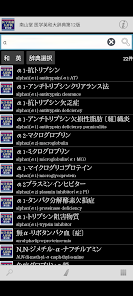
・The ``Japanese-English glossary (approximately 200,000 words)'' that was included with the book on CD-ROM is also included in the app.
■ Power up the features of dictionary content with app functions! ■
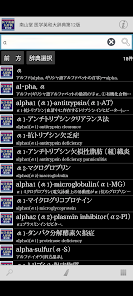
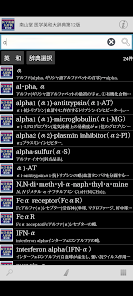
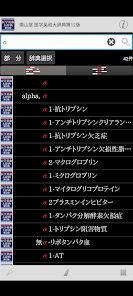
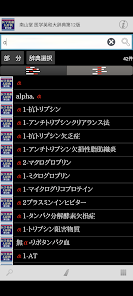
- Equipped with a special keyword partial match "KWIT search" function.
It is possible to display the list of search results "aligned" at the locations that match the search keyword.
■ Complete search function! ■
・Automatic search every time you enter a keyword. Instantly update search results with "Incremental Search".
- Search keyword input is of course also supported by voice input.
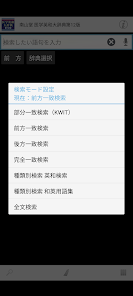
- Match conditions for search keywords can be specified in detail, such as "starting match" and "suffix matching". Instantly re-search even when conditions change.
- You can use "Full text search" to search the text of all items in almost all dictionaries.
・It is possible to search within the text of the dictionary entry you are currently reading.
- Automatically records the history of entered keywords and displayed items. Re-entering and re-displaying is easy.
■ Since it is an app, you can share operations with other apps! ■
・Supports basic Android operation "Share"! It is possible to have the dictionary browser search for text selected in another app.
- You can freely specify the dictionary you want to search using "Shared" from among the dictionary apps you already have.
・Contrary to "Share", you can search the web using the text of the dictionary entry. Of course, you can also search in dictionary apps.
■ Customize the text to make it easier to read! ■
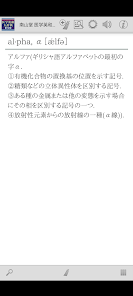
- Font size can be set in detail for text in dictionary entries.
- Equipped with a dark theme type display mode (black background + white text) that is less tiring on the eyes.
-Of course, you can also change the item size using touch operations.
■ Register important information as a bookmark! ■
-You can register bookmarks to dictionary items at any time.
- Bookmarks can be divided into 10 color patterns and memo text can be set.
- The bookmark list screen is equipped with a filter function that displays only bookmarks of a specific color.
- The display order on the bookmark list screen can be sorted by registration date, item order, etc.
■ Strong cooperation between dictionary series! ■
- You can freely group dictionary series and search them all at once.
・In the group dictionary search result list, you can jump to the beginning of each member's dictionary.
・Duplicate is also OK! One dictionary can be registered as a member of various groups at the same time.
・Of course, the bookmarks of the group dictionary can be displayed all at once.
-You can immediately search in another dictionary using the text of the displayed dictionary item.
■ Equipped with convenient additional/expanded functions! ■
- You can have the text of dictionary entries read out loud with synthesized voice.
■ No need to connect to the internet after preparations are complete! ■
- All data required by the dictionary is saved within the app.
・After installation and preparation for use, it can be used completely offline.
■ Update history [latest version 1.01] ■
・We have started releasing the app.
■ Notes ■
- To use this app, you will need a free auxiliary app to search and display the LogoVista electronic dictionary series.
When launching the app, if the existence of the auxiliary app cannot be confirmed, an option to move to Google Play will be displayed.
Please obtain "LogoVista Electronic Dictionary Viewing Browser Ver.2 for Android" from Google Play.
・To use the text reading function using synthesized voice, you need to install the separate free "Google Text-to-Speech" app.
-If you have any questions about our products, please contact us at the address below.
android.dev@logovista.co.jp
■ About saving data to external storage (external SD card) ■
・You can save some of the dictionary app data to external storage (external SD card).
*There are precautions such as conditions for use. For more information, please check Q8 from our Q&A page below.
https://www.logovista.co.jp/LVERP/information/support/user_qa/android/top.html#Q8
■ Operating environment ■
・Android OS 6.0 to 13.0
*The operating environment is the latest version released. If you are using an earlier version, the terms may be different.
■ About Chromebook compatible models
To use the LogoVista electronic dictionary series for Android app on your Chromebook, you need a Chromebook that supports Google Play (Android app).
■ Operation not guaranteed ■
・Android OS 1.0 to 5.1.1
・Android device equipped with a non-ARM CPU
・“Go Edition” version of each Android OS
■Developer/Distributor ■
Logovista Co., Ltd. https://www.logovista.co.jp/
■ Content publisher ■
Nanzando Co., Ltd.
A medical dictionary that continues to receive high praise.
The number of recorded words is approximately 250,000 words, one of the largest among similar books.
<================================
■ Dictionary content information ■
・Contains about 250,000 words, one of the largest books of its kind.
In addition to trying to include terms selected by various academic societies in the translations, we have also included new chemical structural formulas (approximately 600 points).
・The ``Japanese-English glossary (approximately 200,000 words)'' that was included with the book on CD-ROM is also included in the app.
■ Power up the features of dictionary content with app functions! ■
- Equipped with a special keyword partial match "KWIT search" function.
It is possible to display the list of search results "aligned" at the locations that match the search keyword.
■ Complete search function! ■
・Automatic search every time you enter a keyword. Instantly update search results with "Incremental Search".
- Search keyword input is of course also supported by voice input.
- Match conditions for search keywords can be specified in detail, such as "starting match" and "suffix matching". Instantly re-search even when conditions change.
- You can use "Full text search" to search the text of all items in almost all dictionaries.
・It is possible to search within the text of the dictionary entry you are currently reading.
- Automatically records the history of entered keywords and displayed items. Re-entering and re-displaying is easy.
■ Since it is an app, you can share operations with other apps! ■
・Supports basic Android operation "Share"! It is possible to have the dictionary browser search for text selected in another app.
- You can freely specify the dictionary you want to search using "Shared" from among the dictionary apps you already have.
・Contrary to "Share", you can search the web using the text of the dictionary entry. Of course, you can also search in dictionary apps.
■ Customize the text to make it easier to read! ■
- Font size can be set in detail for text in dictionary entries.
- Equipped with a dark theme type display mode (black background + white text) that is less tiring on the eyes.
-Of course, you can also change the item size using touch operations.
■ Register important information as a bookmark! ■
-You can register bookmarks to dictionary items at any time.
- Bookmarks can be divided into 10 color patterns and memo text can be set.
- The bookmark list screen is equipped with a filter function that displays only bookmarks of a specific color.
- The display order on the bookmark list screen can be sorted by registration date, item order, etc.
■ Strong cooperation between dictionary series! ■
- You can freely group dictionary series and search them all at once.
・In the group dictionary search result list, you can jump to the beginning of each member's dictionary.
・Duplicate is also OK! One dictionary can be registered as a member of various groups at the same time.
・Of course, the bookmarks of the group dictionary can be displayed all at once.
-You can immediately search in another dictionary using the text of the displayed dictionary item.
■ Equipped with convenient additional/expanded functions! ■
- You can have the text of dictionary entries read out loud with synthesized voice.
■ No need to connect to the internet after preparations are complete! ■
- All data required by the dictionary is saved within the app.
・After installation and preparation for use, it can be used completely offline.
■ Update history [latest version 1.01] ■
・We have started releasing the app.
■ Notes ■
- To use this app, you will need a free auxiliary app to search and display the LogoVista electronic dictionary series.
When launching the app, if the existence of the auxiliary app cannot be confirmed, an option to move to Google Play will be displayed.
Please obtain "LogoVista Electronic Dictionary Viewing Browser Ver.2 for Android" from Google Play.
・To use the text reading function using synthesized voice, you need to install the separate free "Google Text-to-Speech" app.
-If you have any questions about our products, please contact us at the address below.
android.dev@logovista.co.jp
■ About saving data to external storage (external SD card) ■
・You can save some of the dictionary app data to external storage (external SD card).
*There are precautions such as conditions for use. For more information, please check Q8 from our Q&A page below.
https://www.logovista.co.jp/LVERP/information/support/user_qa/android/top.html#Q8
■ Operating environment ■
・Android OS 6.0 to 13.0
*The operating environment is the latest version released. If you are using an earlier version, the terms may be different.
■ About Chromebook compatible models
To use the LogoVista electronic dictionary series for Android app on your Chromebook, you need a Chromebook that supports Google Play (Android app).
■ Operation not guaranteed ■
・Android OS 1.0 to 5.1.1
・Android device equipped with a non-ARM CPU
・“Go Edition” version of each Android OS
■Developer/Distributor ■
Logovista Co., Ltd. https://www.logovista.co.jp/
■ Content publisher ■
Nanzando Co., Ltd.
Updated on
Safety starts with understanding how developers collect and share your data. Data privacy and security practices may vary based on your use, region, and age. The developer provided this information and may update it over time.

No data shared with third parties
Learn more about how developers declare sharing

No data collected
Learn more about how developers declare collection

Data is encrypted in transit

Data can’t be deleted
App support
About the developer
LOGOVISTA CO.,LTD.
android.dev@logovista.co.jp
1-15-2, OCHIAI
TAMA CENTER TOSEI BLDG. 2F.
TAMA, 東京都 206-0033
Japan
+81 80-3359-7376


