
Mind Render


Everyone
info
5K+
Downloads

Everyone
Learn more


About this app
Mind Render is a programming app that lets you easily create 3D games by dragging and dropping command blocks.
There's no need to write complicated code.
Moving characters, making them jump, fighting enemies—simply combine blocks.
You can easily create your own games.
"I want to make a game, but programming seems difficult."
This app is recommended for people like that.
You don't have to create a game from scratch.
Start by running a sample game and changing the characters, movements, sounds, etc.
"What will happen if I change this?"
You can start creating games by making small modifications like this.
◆ Start by modifying a sample game
It's perfectly normal to not know where to start when creating a game for the first time.
With Mind Render, you can start by running the provided sample game and changing parts of the program.
Change the character.
Speed up enemy movements.
Change BGM and sound effects.
Change effects.
Start by changing one thing and see how it runs.
If it doesn't work as expected, try changing it again.
As you experiment and play, it gradually becomes your own unique game.
◆ Just combine blocks
Programs are created by dragging and dropping command blocks written in easy-to-understand language.
You can create various movements such as character movement, jumping, attacking, collision detection, and scoring without having to learn difficult programming languages.
You can try various genres depending on your ideas, such as action, racing, and battles.
◆ Learn by watching videos
Don't worry if you think, "What should I do next?"
Tutorial videos and sample programs are provided.
You can gradually learn how to use Mind Render and the concepts of programming by actually working with it.
◆ Freely arrange with abundant 3D materials
We provide a large number of usable materials such as characters, backgrounds, BGM, sound effects, and effects.
You can express your own unique world by paying attention to the appearance and sound.
◆ Realistic movements because it's 3D
Mind Render has a built-in physics engine.
Objects fall. Collisions. Falling over.
Such realistic movements are naturally reproduced without writing any special programs.
Games using movements and mechanisms unique to 3D space can be enjoyed even by beginners.
You can also create two-player competitive games by splitting the screen.
◆ Let everyone play your finished game
You can publish the games you create within Mind Render.
Other users can play your games, and you can also find new ideas from the more than 600 games already published.
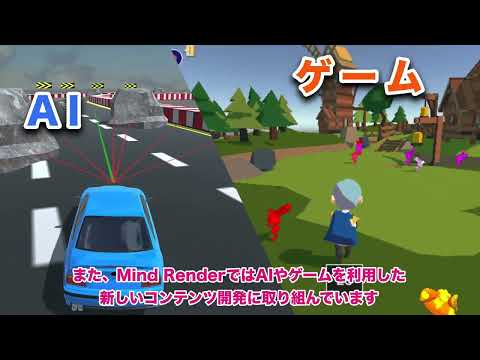
◆ Try your hand at AI programming
You can load learning models created with Teachable Machine, etc., and create AI programs using images and audio.
You like games.
You like creating things.
You're a little interested in programming.
First, try running one of the sample games.
Then, try changing just one thing.
That's where your game creation begins.
Even beginners can create 3D games!
Updated on
Safety starts with understanding how developers collect and share your data. Data privacy and security practices may vary based on your use, region, and age. The developer provided this information and may update it over time.


What’s new
■ブロック機能
・弾の発射や、武器のエフェクト・サウンドを設定するブロックを追加しました。
・変数などの使用箇所を確認できるようにしました。
■オブジェクト・背景の編集
・シーンエディタに、木や岩などを置ける「背景追加モード」を追加しました。
・オブジェクトの複数追加・並び替え・親子設定に対応しました。
・攻撃モーションに合わせて、装備した武器の当たり判定が自動でオン・オフされるようになりました。
・当たり判定を表示するオプションを追加しました。
■作品の保存
・ログインなしで15作品を保存できる「端末ロッカー」を追加しました。
・ラボには保存できなくなりました。作品はロッカーに保存してください。
■音楽づくり・AIヘルプ
・MMLエディタにAI作曲チャットを追加しました。
・ブロックを添付してAIヘルプに質問できるようになりました。
■フォント・コメント
・「まる文字」「手書き」「ポップ」の3書体を追加しました。
・コメント候補を増やし、カテゴリで探せるようにしました。
■操作の改善・不具合修正
・配置や「元に戻す」などの操作を改善し、各種不具合を修正しました。
Everyone
Learn moreApp support
About the developer
MOBILE INTERNET TECHNOLOGY CO., LTD.
google_play@gomobileit.com
3-6, KIOICHO
KIOICHO PARK BLDG. 1F.
CHIYODA-KU, 東京都 102-0094
Japan
+81 3-6268-9611