
春日部市プレミアム付商品券
1K+
Downloads

Everyone
info

About this app
■What is Kasukabe City premium electronic gift certificate?
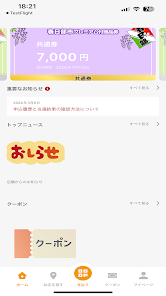
You can apply for, purchase, and make QR code payments for the "Kasukabe City Premium Electronic Gift Certificate," which can be used at participating member stores in Kasukabe City.
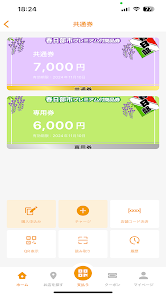
It is an electronic gift certificate that can be used for 13,000 yen when purchased for 10,000 yen.It is a common coupon of 7,000 yen that can be used at all member stores in Kasukabe City, and store area excluding chain stores such as grocery supermarkets, home centers, convenience stores, and drug stores. You can use a special ticket worth 6,000 yen that can be used at stores with an area of less than 1,000 square meters.
*QR code is a registered trademark of Denso Wave Co., Ltd.
[Payment function]
① Read the QR code at the store
②User enters purchase amount
③The store staff will confirm the amount.
④Payment completed
[Coupon function]
When a coupon is distributed, you can use it by showing it at the store.
①Show it to the store staff
② Coupon usage completed
[Notification function]
-You can check notifications from the office and stores on the app.
[Member store search function]
・You can narrow down your search by area.
・You can narrow down your search by industry.
・You can search by store name (prefix match).
- After searching, you can check the location of the store on the map.
【Notes】
*Please be sure to read before downloading the app.
・The "Kasukabe City Premium Electronic Gift Certificate" can only be used at participating participating stores, so please check before using.
・This app connects to the Internet. If you cannot connect to the Internet, you will not be able to use the service.
- Communication charges apply for using the app.
・Coupons have different expiration dates and number of uses. There are also periods when it is not distributed.
・If you change your smartphone model, please install the app on the new device and log in using the email address and password you used before changing the model. Once authenticated, you can transfer it to a new device. (The balance will also be carried over.)
・If you have two-step verification set and your phone number changes due to a change in model, etc., you may not be able to log in to the app on the new device.
If you change your phone number, be sure to cancel 2-step verification on your old device by following the steps: ``My Page → 2-Step Verification Settings → Press the button to cancel 2-Step Verification''.
- If you start other apps at the same time, the memory capacity will increase and it may not work properly.
- Although the security of this app is sufficiently maintained, authentication is automatically performed every time you open the app to make it easier to use. If you are concerned, please manage your security by setting a lock screen on your phone.
You can apply for, purchase, and make QR code payments for the "Kasukabe City Premium Electronic Gift Certificate," which can be used at participating member stores in Kasukabe City.
It is an electronic gift certificate that can be used for 13,000 yen when purchased for 10,000 yen.It is a common coupon of 7,000 yen that can be used at all member stores in Kasukabe City, and store area excluding chain stores such as grocery supermarkets, home centers, convenience stores, and drug stores. You can use a special ticket worth 6,000 yen that can be used at stores with an area of less than 1,000 square meters.
*QR code is a registered trademark of Denso Wave Co., Ltd.
[Payment function]
① Read the QR code at the store
②User enters purchase amount
③The store staff will confirm the amount.
④Payment completed
[Coupon function]
When a coupon is distributed, you can use it by showing it at the store.
①Show it to the store staff
② Coupon usage completed
[Notification function]
-You can check notifications from the office and stores on the app.
[Member store search function]
・You can narrow down your search by area.
・You can narrow down your search by industry.
・You can search by store name (prefix match).
- After searching, you can check the location of the store on the map.
【Notes】
*Please be sure to read before downloading the app.
・The "Kasukabe City Premium Electronic Gift Certificate" can only be used at participating participating stores, so please check before using.
・This app connects to the Internet. If you cannot connect to the Internet, you will not be able to use the service.
- Communication charges apply for using the app.
・Coupons have different expiration dates and number of uses. There are also periods when it is not distributed.
・If you change your smartphone model, please install the app on the new device and log in using the email address and password you used before changing the model. Once authenticated, you can transfer it to a new device. (The balance will also be carried over.)
・If you have two-step verification set and your phone number changes due to a change in model, etc., you may not be able to log in to the app on the new device.
If you change your phone number, be sure to cancel 2-step verification on your old device by following the steps: ``My Page → 2-Step Verification Settings → Press the button to cancel 2-Step Verification''.
- If you start other apps at the same time, the memory capacity will increase and it may not work properly.
- Although the security of this app is sufficiently maintained, authentication is automatically performed every time you open the app to make it easier to use. If you are concerned, please manage your security by setting a lock screen on your phone.
Updated on
Safety starts with understanding how developers collect and share your data. Data privacy and security practices may vary based on your use, region, and age. The developer provided this information and may update it over time.

No data shared with third parties
Learn more about how developers declare sharing

No data collected
Learn more about how developers declare collection

Data is encrypted in transit

You can request that data be deleted
What's new
新規にアプリをリリースしました。