
Remote Phone Call

star
550 reviews

Everyone
info
10K+
Downloads

Everyone
Learn more


About this app
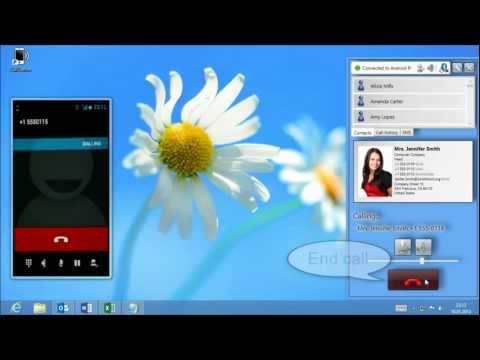
Just Remote Phone lets you manage your Android phone from your Windows PC without constantly picking up your phone. SMS messages, call history and contacts are synchronized over your local Wi-Fi or Bluetooth connection, so you can stay focused on your work while keeping full access to your phone.
Unlike cloud-based solutions, communication takes place directly between your Android phone and your Windows PC. No cloud service is required, and the Windows client does not permanently store your SMS messages, call history or contacts.
Designed for productive desktop work
Whether you are working in the office or from home, Just Remote Phone helps you handle everyday phone communication directly from your desktop.
SMS synchronization
• Read SMS conversations on your PC
• Reply comfortably using your keyboard
• Search your SMS history
• Receive new SMS instantly
Call management
• Synchronize your complete call history
• View incoming, outgoing and missed calls
• Dial phone numbers directly from your desktop
• Receive notifications about incoming calls
Contacts
• Browse contacts stored on your Android phone
• Search contacts instantly
• Quickly find numbers before calling or sending SMS
Microsoft Office integration
• Dial phone numbers directly from Microsoft Outlook contacts
• Search and use Outlook contacts without copying them to your phone
• Start phone calls directly from Microsoft Excel
• Ideal for customer lists, spreadsheets and office workflows
Connection
• Direct Wi-Fi connection
• Bluetooth connection (recommended)
• No Internet connection required
• No cloud service required
Privacy
Your Android phone communicates directly with your Windows PC over your local network or Bluetooth.
SMS messages and call history are synchronized only while the devices are connected. The Windows client does not permanently store SMS messages or call history. Your communication data are never uploaded to a cloud service and remain under your control.
Why SMS and Call Log permissions are required
The primary purpose of Just Remote Phone is to synchronize SMS messages and call history from your Android phone to your connected Windows PC.
READ_SMS is required to synchronize, display and reply to SMS messages from the desktop.
READ_CALL_LOG is required to synchronize incoming, outgoing and missed calls so users can access and manage their call history from their PC.
Without these permissions, the application's primary functionality cannot operate.
Unlike cloud-based solutions, communication takes place directly between your Android phone and your Windows PC. No cloud service is required, and the Windows client does not permanently store your SMS messages, call history or contacts.
Designed for productive desktop work
Whether you are working in the office or from home, Just Remote Phone helps you handle everyday phone communication directly from your desktop.
SMS synchronization
• Read SMS conversations on your PC
• Reply comfortably using your keyboard
• Search your SMS history
• Receive new SMS instantly
Call management
• Synchronize your complete call history
• View incoming, outgoing and missed calls
• Dial phone numbers directly from your desktop
• Receive notifications about incoming calls
Contacts
• Browse contacts stored on your Android phone
• Search contacts instantly
• Quickly find numbers before calling or sending SMS
Microsoft Office integration
• Dial phone numbers directly from Microsoft Outlook contacts
• Search and use Outlook contacts without copying them to your phone
• Start phone calls directly from Microsoft Excel
• Ideal for customer lists, spreadsheets and office workflows
Connection
• Direct Wi-Fi connection
• Bluetooth connection (recommended)
• No Internet connection required
• No cloud service required
Privacy
Your Android phone communicates directly with your Windows PC over your local network or Bluetooth.
SMS messages and call history are synchronized only while the devices are connected. The Windows client does not permanently store SMS messages or call history. Your communication data are never uploaded to a cloud service and remain under your control.
Why SMS and Call Log permissions are required
The primary purpose of Just Remote Phone is to synchronize SMS messages and call history from your Android phone to your connected Windows PC.
READ_SMS is required to synchronize, display and reply to SMS messages from the desktop.
READ_CALL_LOG is required to synchronize incoming, outgoing and missed calls so users can access and manage their call history from their PC.
Without these permissions, the application's primary functionality cannot operate.
Work with your Android phone directly from your Windows PC
Updated on
Safety starts with understanding how developers collect and share your data. Data privacy and security practices may vary based on your use, region, and age. The developer provided this information and may update it over time.
- No data shared with third partiesLearn more about how developers declare sharing
- No data collectedLearn more about how developers declare collection


Ratings and reviews
548 reviews

A Google user
- Flag inappropriate
April 10, 2020
I tried this a couple of years ago. Very useful. Click on a phone number in a browser window or in Outlook on your PC, or copy and paste a number into the desktop app and it will make your phone dial that number. The only reason I uninstalled it the first time is because the phone app was a battery hog. I was hoping that it is better now, so I tried it again. Unfortunately, it is still a battery hog. No way to close the app except to force a shutdown in the app properties.
53 people found this review helpful

Mark H
- Flag inappropriate
May 19, 2024
Works great, especially now that the Handsfree (bluetooth) mode connects much better with pc. Only issue i have is that when sending SMS, line breaks are lost in the sent message, so i have to remember to add a space after each line to help make it more readable. i've sent the dev multiple emails on this issue, but no reply. :(
10 people found this review helpful

Brian Scott
- Flag inappropriate
June 3, 2021
Latest version of RPC now a winner! I tried using this last year but found bluetooth connection to my phone hit and miss, even when the phone was right next to my PC ! This made it frustrating so I stopped using it. However since the last update it reconnects fine as soon as I am in range - I have thick walls and it still works up to 50 feet. Integration with Outlook, Excel, and Office 365 perfect, either use the icon or right click on something that is a phone number and you can phone or text. I don't use the SMS function as I am now using Google messenger + Google Messenger for Web which allows SMS-MMS & RCS from & to the PC - if I used RPC to SMS it would muck up the sync between the Google apps - no biggy - best to use just one messaging app anyway.
29 people found this review helpful
What’s new
NEW: Minor changes for Android 16
Everyone
Learn moreApp support
About the developer
Dipl.-Ing. Thomas Lehner
support@justremotephone.com
Reischekstraße 13
4020 Linz
Austria