
케이웨더 날씨(날씨, 미세먼지, 위젯, 기상청)
Contains ads

3.7star
21.7K reviews
1M+
Downloads

Everyone
info


About this app
Kweather, Korea's largest weather and air quality information provider, has released a new update to its weather application, "Kweather Weather."
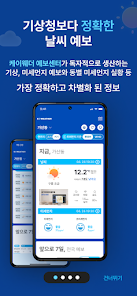
1. More Accurate Weather Forecasts than the Korea Meteorological Administration
- Kweather Forecast Center independently produces weather and fine dust forecasts, providing the most accurate and differentiated information, including district-specific fine dust.
2. Dedicated Forecaster Service
- Kweather's expert weather forecasters provide personalized weather forecasts for sports, events, and travel (paid).
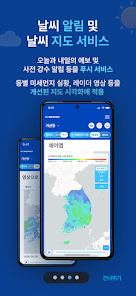
3. Weather Alerts and Map Services
- Push notifications for today's and tomorrow's forecasts, as well as advance precipitation alerts, are provided, along with district-specific fine dust status updates and radar images, all presented in an improved map visualization.
4. Freely Arrange Weather Cards
- User convenience has been enhanced by allowing users to freely rearrange the order of weather information by category.
[Required Access Permissions]
■ Location
- Used for searching your current location within the Kweather Weather app.
This information is not stored on the server and is only accessed when searching for your current location.
[Frequently Asked Questions]
■ It's raining outside, but the current weather is listed as clear.
- The current weather is based on data from the Korea Meteorological Administration (KMA) observatory and is updated every hour. Therefore, it may be delayed depending on the update cycle.
■ The forecast is incorrect.
- Forecasts are based on estimated probabilities, not 100% accurate. As extreme weather events due to climate change intensify, it's becoming increasingly difficult to provide accurate forecasts. If the weather is unpredictable, please alternate between checking Kweather and the KMA forecast to prepare for changes.
■ The information isn't updating.
- Updates may be intermittently delayed during peak commuting hours and on the hour. In this case, try pressing the refresh button or relaunching the app after 1-2 minutes.
■ The screen ratio is incorrect.
- Some users may experience difficulties using the application due to incorrect resolution ratios. Please note that you can display the screen in the normal aspect ratio by going to System Settings > Display > Screen Ratio Correction > Checking the corresponding app.
◆ Please submit any inquiries or improvement requests below and we will respond promptly.
◆ Blog: http://mkweather.wordpress.com
◆ Email: ct@kweather.co.kr
1. More Accurate Weather Forecasts than the Korea Meteorological Administration
- Kweather Forecast Center independently produces weather and fine dust forecasts, providing the most accurate and differentiated information, including district-specific fine dust.
2. Dedicated Forecaster Service
- Kweather's expert weather forecasters provide personalized weather forecasts for sports, events, and travel (paid).
3. Weather Alerts and Map Services
- Push notifications for today's and tomorrow's forecasts, as well as advance precipitation alerts, are provided, along with district-specific fine dust status updates and radar images, all presented in an improved map visualization.
4. Freely Arrange Weather Cards
- User convenience has been enhanced by allowing users to freely rearrange the order of weather information by category.
[Required Access Permissions]
■ Location
- Used for searching your current location within the Kweather Weather app.
This information is not stored on the server and is only accessed when searching for your current location.
[Frequently Asked Questions]
■ It's raining outside, but the current weather is listed as clear.
- The current weather is based on data from the Korea Meteorological Administration (KMA) observatory and is updated every hour. Therefore, it may be delayed depending on the update cycle.
■ The forecast is incorrect.
- Forecasts are based on estimated probabilities, not 100% accurate. As extreme weather events due to climate change intensify, it's becoming increasingly difficult to provide accurate forecasts. If the weather is unpredictable, please alternate between checking Kweather and the KMA forecast to prepare for changes.
■ The information isn't updating.
- Updates may be intermittently delayed during peak commuting hours and on the hour. In this case, try pressing the refresh button or relaunching the app after 1-2 minutes.
■ The screen ratio is incorrect.
- Some users may experience difficulties using the application due to incorrect resolution ratios. Please note that you can display the screen in the normal aspect ratio by going to System Settings > Display > Screen Ratio Correction > Checking the corresponding app.
◆ Please submit any inquiries or improvement requests below and we will respond promptly.
◆ Blog: http://mkweather.wordpress.com
◆ Email: ct@kweather.co.kr
Updated on
Safety starts with understanding how developers collect and share your data. Data privacy and security practices may vary based on your use, region, and age. The developer provided this information and may update it over time.

No data shared with third parties
Learn more about how developers declare sharing

No data collected
Learn more about how developers declare collection

Data isn’t encrypted
Data can’t be deleted
Ratings and reviews
4.0
21.5K reviews

Gabe Lee
- Flag inappropriate
June 26, 2020
위젯이 왜이렇게 거지같을까요. 정오에 새벽 4시 날씨를 보여주는게 말이 되나요? 시간단위로 자동 업데이트 되는기능은 없어서 항상 수동으로 업데이트 눌러줘야되는데 무한로딩만 되고 업데이트는 안되고.. 고칠 생각이 전혀 없는건가요?
4 people found this review helpful

Bo Gimm
- Flag inappropriate
- Show review history
June 25, 2020
낮과 밤의 날씨도 시간마다 볼수 있어 참 좋아요. 밤시간의 이미지에 해가아니라 달로 바꾸시면 안될까요?
2 people found this review helpful

Myung Hwan Lee
- Flag inappropriate
January 15, 2021
Good morning 🙏🌄☺💓✨💛🙏🌄☺💓
App support
About the developer
케이웨더(주)
kweather.app2@gmail.com
대한민국 서울특별시 구로구
구로구 디지털로26길 5 (구로동)
08389
+82 10-4235-0360