삼성카드
3.5star
74.1K reviews

Everyone
info
10M+
Downloads




About this app
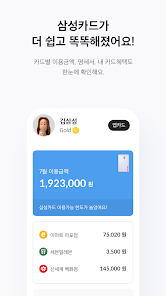
□ 'MY': Only the essentials for card use at a glance
- Check card usage history and benefits at a glance
- Check services linked to your card
□ 'Today PICK': Recommends benefits perfectly suited to you
- AI solution recommends personalized benefits based on your spending habits
- Focused benefits from frequently used brands
- LINK: Automatically recommends benefits at nearby merchants
□ 'Finance': Seamless management and easy access
- Apply for financial services more easily and quickly
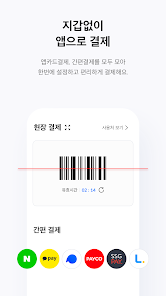
□ 'App Card Payment': Pay with an app without a physical card
- Easier and faster mobile payment service
- Manage various simple payments all at once
[Note]
- Only cards in your name (personal credit/corporate individual/check cards, etc.) can be registered as app cards.
- App cards can only be used on one phone with a USIM card installed in your name. However, they cannot be used on phones that have been modified by the user.
- To maintain device security, we recommend updating your operating system and antivirus software to the latest versions. Also, please avoid using wireless LAN (Wi-Fi) from unknown sources or with insecure settings, and use mobile networks (3G, LTE, 5G).
- Data charges may apply when downloading apps or using services while connected to a mobile network (3G, LTE, 5G).
- For more information, please visit our website (www.samsungcard.com) or call 1588-8700.
[App Access Permissions Guide]
Please allow the following permissions for a more convenient app experience. - (Required) Phone: Identity verification, connection to customer service line
- (Optional) Location: Weather information
- (Optional) Notifications: Send notification messages
- (Optional) NFC: Mobile transportation card use
- (Optional) Camera: Scan QR codes for payments, use SmartFax, take ID photos
- (Optional) Photos and videos: Use SmartFax
- (Optional) Microphone: Use chatbot voice search
- (Optional) Biometrics: Identity verification, login
※ Even if you do not agree to optional access permissions, you can still use the app for other functions.
※ Starting with Android 6.0 and higher, you can now consent to required and optional permissions separately. Therefore, we recommend updating to 6.0 or higher. After updating, you must delete and reinstall the app to reset permissions.
※ Access permissions can be changed under Settings > Applications > Samsung Card > Permissions on your phone. However, the path may vary depending on your phone model.
※ To prevent voice phishing and electronic financial transaction incidents, we may collect and use information about malicious apps installed on your mobile device.
※ For a faster and more convenient digital ARS experience, please allow the "Display on top of other apps" and "Display full-screen notifications on the lock screen."
[Call-related screen service information]
This app displays informative mobile content provided by the call recipient. To achieve this, it provides phone numbers and app notification information to the service provider, Bridgetech (Colgate Inc.).
- Functions provided: Call-related screen services (digital ARS, etc.)
- Retention and usage period: Until the provider withdraws consent
- Opt-out of provision and withdrawal of consent
· Main phone number: 1588-8700
· Email consultation
※ Data charges may apply depending on your subscription plan when using the screen service.
- Check card usage history and benefits at a glance
- Check services linked to your card
□ 'Today PICK': Recommends benefits perfectly suited to you
- AI solution recommends personalized benefits based on your spending habits
- Focused benefits from frequently used brands
- LINK: Automatically recommends benefits at nearby merchants
□ 'Finance': Seamless management and easy access
- Apply for financial services more easily and quickly
□ 'App Card Payment': Pay with an app without a physical card
- Easier and faster mobile payment service
- Manage various simple payments all at once
[Note]
- Only cards in your name (personal credit/corporate individual/check cards, etc.) can be registered as app cards.
- App cards can only be used on one phone with a USIM card installed in your name. However, they cannot be used on phones that have been modified by the user.
- To maintain device security, we recommend updating your operating system and antivirus software to the latest versions. Also, please avoid using wireless LAN (Wi-Fi) from unknown sources or with insecure settings, and use mobile networks (3G, LTE, 5G).
- Data charges may apply when downloading apps or using services while connected to a mobile network (3G, LTE, 5G).
- For more information, please visit our website (www.samsungcard.com) or call 1588-8700.
[App Access Permissions Guide]
Please allow the following permissions for a more convenient app experience. - (Required) Phone: Identity verification, connection to customer service line
- (Optional) Location: Weather information
- (Optional) Notifications: Send notification messages
- (Optional) NFC: Mobile transportation card use
- (Optional) Camera: Scan QR codes for payments, use SmartFax, take ID photos
- (Optional) Photos and videos: Use SmartFax
- (Optional) Microphone: Use chatbot voice search
- (Optional) Biometrics: Identity verification, login
※ Even if you do not agree to optional access permissions, you can still use the app for other functions.
※ Starting with Android 6.0 and higher, you can now consent to required and optional permissions separately. Therefore, we recommend updating to 6.0 or higher. After updating, you must delete and reinstall the app to reset permissions.
※ Access permissions can be changed under Settings > Applications > Samsung Card > Permissions on your phone. However, the path may vary depending on your phone model.
※ To prevent voice phishing and electronic financial transaction incidents, we may collect and use information about malicious apps installed on your mobile device.
※ For a faster and more convenient digital ARS experience, please allow the "Display on top of other apps" and "Display full-screen notifications on the lock screen."
[Call-related screen service information]
This app displays informative mobile content provided by the call recipient. To achieve this, it provides phone numbers and app notification information to the service provider, Bridgetech (Colgate Inc.).
- Functions provided: Call-related screen services (digital ARS, etc.)
- Retention and usage period: Until the provider withdraws consent
- Opt-out of provision and withdrawal of consent
· Main phone number: 1588-8700
· Email consultation
※ Data charges may apply depending on your subscription plan when using the screen service.
Updated on
Safety starts with understanding how developers collect and share your data. Data privacy and security practices may vary based on your use, region, and age. The developer provided this information and may update it over time.


Ratings and reviews
3.4
72.5K reviews

Nirmal Prashanth
- Flag inappropriate
December 10, 2025
It will be a great experience for many people like me, if there is a English language options also. I am not able to fully utilize the app, due to the language barrier. Do consider releasing an English version, and the same with the Monimo App.
1 person found this review helpful
Samsung Card
December 11, 2025
Hello!This is SamsungCard
We apologize for any inconvenience you have experienced while using our app
We have reviewed your feedback regarding the inconvenience with the foreign language translation feature and will strive to improve where we are lacking
SamsungCard will continue to work hard to reflect customer user convenience as our top priority

A Google user
- Flag inappropriate
April 11, 2020
So many errors when processing things. I was trying to get my personal card in addition to corporate card but gave up after over 5 times trials because it never goes after filling in my identity card info. And whenever I try to request an SMS service, it tells me it's out of service and asks me to contact the CS. Unbelievably poor app esp considering its brand.
21 people found this review helpful
Samsung Card
April 13, 2020
Dear
Sorry for the inconvenience of using the service. We will review the inconvenience you sent when we improve the app in the future.
Thanks.

Aavash Bhandari
- Flag inappropriate
August 17, 2022
The samsung app card is working weirdly after the latest update. Seems like the new update has bugs and needs quick review and improvements. The UI seems nice but not user friendly from my experience. And on desktop version I was logging in with the Pin number, now I have to do a QR scan everytime.
18 people found this review helpful
What’s new
업데이트 v5.4.602
- 앱 사용성을 개선하였습니다.
- 앱 사용성을 개선하였습니다.
App support
About the developer
삼성카드(주)
scard.app@samsung.com
대한민국 서울특별시 중구
중구 세종대로 67 (태평로2가)
04514
+82 10-2285-0397


