
산길 안전 AI
Contains ads


Everyone
info
10+
Downloads

Everyone
Learn more


About this app
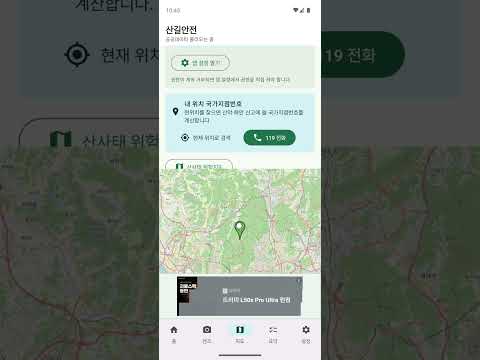
Trail Safety AI is a safety assistant app designed to help you grasp essential trail information at a glance before and after hiking.
By pointing your camera at hiking guide boards or signs, it recognizes key phrases and summarizes potential hazards and safety rules you need to check during your hike. You can also check information necessary for making hiking decisions, such as weather, wind, precipitation risks, and wildfire risks, allowing you to prepare calmly even on unfamiliar trails.
Key Features
· Recognize Trail Guide Text
Scan guide boards and signs with your camera to quickly check trail names, warning messages, and safety rules.
· Hiking Hazard Guide
Shows precautions worth checking before hiking based on weather, wind, precipitation, and wildfire risk information.
· Check Trail Information
Check the distance, difficulty, altitude, key points, and recommended gear for representative trails.
· Map-Based Route View
Explore your hiking route by checking locations and key points around the trail on a map. · Available even if permissions are denied
You can check basic trail information and safety guidelines even if you do not allow camera or location permissions.
Trail Safety utilizes public forest data and in-app analysis to assist with hiking preparations. However, the information provided by the app is for reference only; you must decide for yourself whether to proceed with the hike by comprehensively considering on-site conditions, weather advisories, closure notices, and your own health status. In the event of an emergency, please contact official rescue agencies such as 119 immediately.
Check trail safety one more time before you depart to prepare for a safer hike.
By pointing your camera at hiking guide boards or signs, it recognizes key phrases and summarizes potential hazards and safety rules you need to check during your hike. You can also check information necessary for making hiking decisions, such as weather, wind, precipitation risks, and wildfire risks, allowing you to prepare calmly even on unfamiliar trails.
Key Features
· Recognize Trail Guide Text
Scan guide boards and signs with your camera to quickly check trail names, warning messages, and safety rules.
· Hiking Hazard Guide
Shows precautions worth checking before hiking based on weather, wind, precipitation, and wildfire risk information.
· Check Trail Information
Check the distance, difficulty, altitude, key points, and recommended gear for representative trails.
· Map-Based Route View
Explore your hiking route by checking locations and key points around the trail on a map. · Available even if permissions are denied
You can check basic trail information and safety guidelines even if you do not allow camera or location permissions.
Trail Safety utilizes public forest data and in-app analysis to assist with hiking preparations. However, the information provided by the app is for reference only; you must decide for yourself whether to proceed with the hike by comprehensively considering on-site conditions, weather advisories, closure notices, and your own health status. In the event of an emergency, please contact official rescue agencies such as 119 immediately.
Check trail safety one more time before you depart to prepare for a safer hike.
Read forest hiking trail signs, check the weather, and familiarize yourself with safety warnings.
Updated on
Safety starts with understanding how developers collect and share your data. Data privacy and security practices may vary based on your use, region, and age. The developer provided this information and may update it over time.
- This app may share these data types with third partiesDevice or other IDs
- No data collectedLearn more about how developers declare collection
- Data is encrypted in transit
- Data can’t be deleted


What’s new
Updated for the latest Android (16), with the in-app user manual and rescue beacon guidance included.
- Improved compatibility and stability for the latest Android 16.
- A step-by-step 'User manual' on the Settings tab covers every feature.
- Clear guidance on where to turn on the rescue beacon: the red megaphone at the top-right, or 'Open rescue beacon' on Settings.
- GPS coordinates are never sent to a server.
- Improved compatibility and stability for the latest Android 16.
- A step-by-step 'User manual' on the Settings tab covers every feature.
- Clear guidance on where to turn on the rescue beacon: the red megaphone at the top-right, or 'Open rescue beacon' on Settings.
- GPS coordinates are never sent to a server.
Everyone
Learn moreApp support
About the developer
김경민
formin97@gmail.com
청마로 37
거영블루힐, 102동 503호
서구, 인천광역시 22675
South Korea


