
Launcher95 PRO
In-app purchases
4.4star
80 reviews
1K+
Downloads

Everyone
info
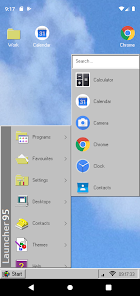
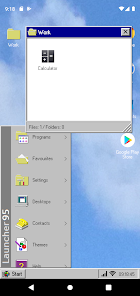
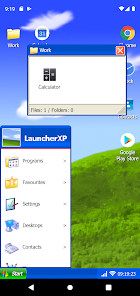
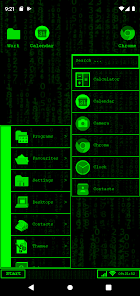
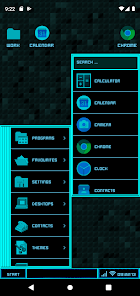
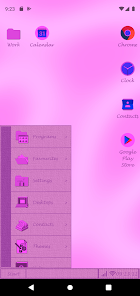
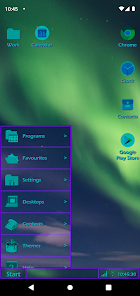
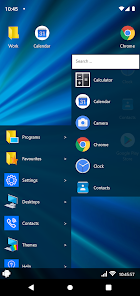
About this app
Get a retro desktop feeling for your Android mobile device!
Free Version:
- "Favourites"-Apps-Menu limited to 10 apps
- No multiple desktops
- 1 Theme (95 Style)
PRO Version:
- Unlimited Apps in your "Favourites"-Apps-Menu
- Extend desktop width
- Access multiple desktops to keep your workspace clean
- Theme your device with many different themes from the theme store
- 4 free themes included
- Add shadow effects
- Add animations
- Change fonts, font colors, window colors and more
Free Version:
- "Favourites"-Apps-Menu limited to 10 apps
- No multiple desktops
- 1 Theme (95 Style)
PRO Version:
- Unlimited Apps in your "Favourites"-Apps-Menu
- Extend desktop width
- Access multiple desktops to keep your workspace clean
- Theme your device with many different themes from the theme store
- 4 free themes included
- Add shadow effects
- Add animations
- Change fonts, font colors, window colors and more
Updated on
Safety starts with understanding how developers collect and share your data. Data privacy and security practices may vary based on your use, region, and age. The developer provided this information and may update it over time.

No data shared with third parties
Learn more about how developers declare sharing

This app may collect these data types
Personal info

Data is encrypted in transit

Data can’t be deleted
Ratings and reviews
4.4
74 reviews

SargeDarge
- Flag inappropriate
October 18, 2024
Its very nice, but, I was buying pronwith the idea if I use "cut off desktop" ill be able to use my physical d pad on my catS22 flip but its not that well still. If anything, add better d pad/highlighting support, as in have a better highlighter when you use the start menu, theres no highlighting there, and better d pad meaning have it when i press right. It gose right, instead of doing nothing. And better themes, the ones provided make me have a headache.

silent cicada
- Flag inappropriate
September 2, 2022
Exactly what I was looking for! There are two things I have an issue with; I can't add shortcuts to websites , and there is no way to change the icons in the programs section of the start menu (I'm replacing every app icon with the original Windows 95 ones). Otherwise, this is perfect! Now I just need a beige retro style phone case to complete the look!
3 people found this review helpful

Caleb Robertson
- Flag inappropriate
March 24, 2021
Excellent interface I have such an easier time navigating my own phone with this app. Worth it to buy pro version, the themes are great. I've been using this for a few months now and have no complaints. I do have a suggestion: when you create folders on your desktop it would be nice to have the window open large enough to show all apps in the folder at once rather than scrolling through
12 people found this review helpful
What's new
Fixing Android 14 crashes ... ( Not my fault :-( )
App support
About the developer
Frank Völker
fvsoftdev@gmail.com
Riederwaldsiedlung 27
86529 Schrobenhausen
Germany
undefined