
打字練習簿 Premium-拼音/粵拼/速成/倉頡輸入法練習


Everyone
info
50+
Downloads

Everyone
Learn more


About this app
Features:
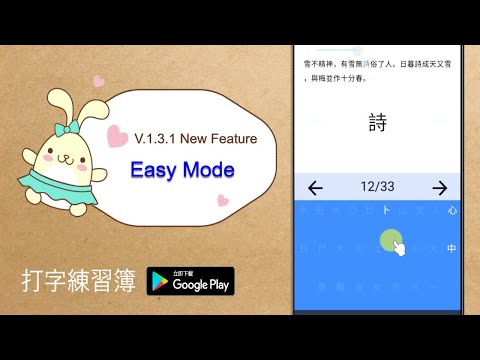
- Pinyin / Jyutping / Quick / Cangjie Input Method Practice Input Tools
- Paste the text you desire to practice
- Key hints after two mistakes
- Six separate tabs to store texts
- Can double as a quick notepad
Acknowledgements:
i. Random Bible Text (隨選聖經經文) feature: Scripture Text of Revised Chinese Union Version © 2006, 2010, 2017 Hong Kong Bible Society. www.hkbs.org.hk/en/ Used by permission.
ii. Jyutping feature was created with reference to: Rime Cantonese input schema (https://github.com/rime/rime-cantonese)。
This App is suitable for people with some basic understanding of the Chinese Pinyin / Jyutping / Cangjie / Quick Input Method. Through the practice with the texts you decide, you will soon become a skillful typist and will be able to intuitively decipher words when you see them. To begin, we recommend you use your favorite reading content or a text that you must read/ memorize.
Here are some useful links that will take you to a plethora of text contents that you may copy and paste for typing practice.
* 讀古詩詞網 - 唐詩三百首 (Three Hundred Poems of the Tang Dynasty)
https://fanti.dugushici.com/ancient_proses/query?q%5Bprose_series_id_eq%5D=1#mobile-result
* 漢川草廬 - 古文觀止 (A collection of classical Chinese essays from Guwenguanzhi)
http://www.xn--5rtnx620bw5s.tw/f/f.htm
* 香港聖經公會 - 網上聖經 (Chinese Bible)
http://rcuv.hkbs.org.hk/
Welcome to try out the free version:Link:https://play.google.com/store/apps/details?id=live.simplidees.quick_cangjie_notepad_free
- Pinyin / Jyutping / Quick / Cangjie Input Method Practice Input Tools
- Paste the text you desire to practice
- Key hints after two mistakes
- Six separate tabs to store texts
- Can double as a quick notepad
Acknowledgements:
i. Random Bible Text (隨選聖經經文) feature: Scripture Text of Revised Chinese Union Version © 2006, 2010, 2017 Hong Kong Bible Society. www.hkbs.org.hk/en/ Used by permission.
ii. Jyutping feature was created with reference to: Rime Cantonese input schema (https://github.com/rime/rime-cantonese)。
This App is suitable for people with some basic understanding of the Chinese Pinyin / Jyutping / Cangjie / Quick Input Method. Through the practice with the texts you decide, you will soon become a skillful typist and will be able to intuitively decipher words when you see them. To begin, we recommend you use your favorite reading content or a text that you must read/ memorize.
Here are some useful links that will take you to a plethora of text contents that you may copy and paste for typing practice.
* 讀古詩詞網 - 唐詩三百首 (Three Hundred Poems of the Tang Dynasty)
https://fanti.dugushici.com/ancient_proses/query?q%5Bprose_series_id_eq%5D=1#mobile-result
* 漢川草廬 - 古文觀止 (A collection of classical Chinese essays from Guwenguanzhi)
http://www.xn--5rtnx620bw5s.tw/f/f.htm
* 香港聖經公會 - 網上聖經 (Chinese Bible)
http://rcuv.hkbs.org.hk/
Welcome to try out the free version:Link:https://play.google.com/store/apps/details?id=live.simplidees.quick_cangjie_notepad_free
Practice Pinyin / Quick / Cangjie / Jyutping Input Method with words you choose
Updated on
Safety starts with understanding how developers collect and share your data. Data privacy and security practices may vary based on your use, region, and age. The developer provided this information and may update it over time.
- No data shared with third partiesLearn more about how developers declare sharing
- No data collectedLearn more about how developers declare collection


What’s new
What’s New in 1.5.2:
• Added physical keyboard support for external keyboards.
• Increased text-area note tabs from 6 to 12.
What’s New in 1.5.1:
• Added auto-skip for mastered characters.
Characters answered correctly enough times in the same session can now be skipped automatically and shown dimmed.
You can turn this on or off in Settings and set the threshold from 1 to 5 correct entries.
• Added physical keyboard support for external keyboards.
• Increased text-area note tabs from 6 to 12.
What’s New in 1.5.1:
• Added auto-skip for mastered characters.
Characters answered correctly enough times in the same session can now be skipped automatically and shown dimmed.
You can turn this on or off in Settings and set the threshold from 1 to 5 correct entries.
Everyone
Learn moreApp support
About the developer
STEPHEN CHANG CHANG
simplidees@gmail.com
P.O.BOX 57
TONGSIAO POST OFFICE
通霄鎮
苗栗縣, Taiwan 35799