
Flight Map Pro

Everyone
info
50+
Downloads

Everyone
Learn more




About this app
Flight Map Pro is your personal on-board flight companion for Android. Whether you're a passenger curious about your position or a pilot looking for a heads-up display, Flight Map Pro works entirely offline — no internet required, fully compatible with Airplane Mode.
Cockpit View
A realistic artificial horizon instrument shows your pitch, roll and bank angle in real time. Switch to terrain mode to see a live perspective view of the ground ahead — the terrain scrolls as you fly, zooms with a pinch gesture, and remembers your zoom level between sessions. A built-in distance scale shows you exactly how far ahead you can see.
Navigation
- Real-time aircraft position on a zoomable offline world map
- Line to destination on both the map and cockpit terrain view
- Search from a database of world airports or enter any longitude/latitude coordinates (decimal or degrees/minutes/seconds)
- Estimated Time to Destination and Time of Arrival based on aircraft type and current speed
- Route recording — automatically starts when speed exceeds 180 km/h, saved with date and destination
Satellite View
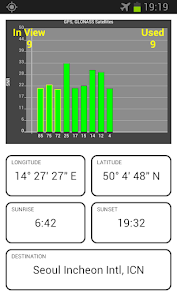
A live chart shows all visible GPS satellites, their signal strength and which ones are being used for the fix. Use it to find the best window seat for GPS reception.
Customisation
- Dark and Light skin
- Metric or Imperial units (km/mi, metres/feet)
- Terrain view on/off
- Multiple aircraft types for accurate ETA calculation
- Multi language
No internet required — the full world map is bundled in the app. Works even in Airplane Mode from the moment you take off.
Note: GPS performance depends on your device. For best results, place the phone near a window and allow it to acquire satellites before takeoff. A-GPS devices benefit from a brief internet connection on the ground before the flight. Does not work in Boeing 787 due to windows being tinted, rather than shutters, effectively blocking GPS signal inside the aircraft.
Cockpit View
A realistic artificial horizon instrument shows your pitch, roll and bank angle in real time. Switch to terrain mode to see a live perspective view of the ground ahead — the terrain scrolls as you fly, zooms with a pinch gesture, and remembers your zoom level between sessions. A built-in distance scale shows you exactly how far ahead you can see.
Navigation
- Real-time aircraft position on a zoomable offline world map
- Line to destination on both the map and cockpit terrain view
- Search from a database of world airports or enter any longitude/latitude coordinates (decimal or degrees/minutes/seconds)
- Estimated Time to Destination and Time of Arrival based on aircraft type and current speed
- Route recording — automatically starts when speed exceeds 180 km/h, saved with date and destination
Satellite View
A live chart shows all visible GPS satellites, their signal strength and which ones are being used for the fix. Use it to find the best window seat for GPS reception.
Customisation
- Dark and Light skin
- Metric or Imperial units (km/mi, metres/feet)
- Terrain view on/off
- Multiple aircraft types for accurate ETA calculation
- Multi language
No internet required — the full world map is bundled in the app. Works even in Airplane Mode from the moment you take off.
Note: GPS performance depends on your device. For best results, place the phone near a window and allow it to acquire satellites before takeoff. A-GPS devices benefit from a brief internet connection on the ground before the flight. Does not work in Boeing 787 due to windows being tinted, rather than shutters, effectively blocking GPS signal inside the aircraft.
You can do it on the plane! GPS flight map with cockpit view world maps.
Updated on
Safety starts with understanding how developers collect and share your data. Data privacy and security practices may vary based on your use, region, and age. The developer provided this information and may update it over time.
- No data shared with third partiesLearn more about how developers declare sharing
- No data collectedLearn more about how developers declare collection


What’s new
Various fixes
Everyone
Learn moreApp support
About the developer
Marko Hauliš
makrousek.production@gmail.com
Baranova 18
13000 Praha
Czechia


