

WearAuthn
In-app purchases

1K+
Downloads

Everyone
info


About this app
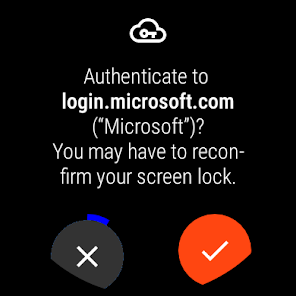
With WearAuthn, your watch can be used as a second factor for many of your online accounts (Google, Microsoft, GitHub, Twitter, ...). Signing in to your accounts will then also require you to confirm a prompt on your watch to ensure it is really you. This offers strong protection against account takeovers and can replace both less secure and less convenient alternatives such as SMS one-time codes.
WearAuthn is based on the widely supported FIDO2 and WebAuthn standards and can be used via Bluetooth and NFC (if supported by your watch). All of this happens fully offline and with no need for mobile reception.
Compatible with:
Bluetooth
* Windows 10 with Chrome, Edge or Firefox
* macOS with Chrome
* Linux with Chrome (may require additional setup)
NFC
* Android with Chrome or Firefox
* iOS 13.3+ with Safari
Passwordless login is possible on login.live.com using Chrome, Edge or Firefox on Windows 10.
WearAuthn is based on the widely supported FIDO2 and WebAuthn standards and can be used via Bluetooth and NFC (if supported by your watch). All of this happens fully offline and with no need for mobile reception.
Compatible with:
Bluetooth
* Windows 10 with Chrome, Edge or Firefox
* macOS with Chrome
* Linux with Chrome (may require additional setup)
NFC
* Android with Chrome or Firefox
* iOS 13.3+ with Safari
Passwordless login is possible on login.live.com using Chrome, Edge or Firefox on Windows 10.
Updated on
Safety starts with understanding how developers collect and share your data. Data privacy and security practices may vary based on your use, region, and age. The developer provided this information and may update it over time.

No data shared with third parties
Learn more about how developers declare sharing

No data collected
Learn more about how developers declare collection
What's new
• Initial CTAP 2.1 support
• User verification is performed before user presence check
• HMAC secret extension takes user verification result into account
• User verification is performed before user presence check
• HMAC secret extension takes user verification result into account