
Sticker widget
Contains adsIn-app purchases

star
4.93K reviews

Everyone
info
500K+
Downloads

Everyone
Learn more


About this app
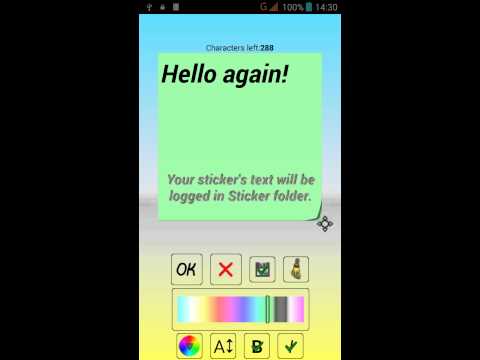
Do you like to use paper stickers to record reminders? This simple application performs the same functions! You can write any text and place it on the screen of your phone or tablet. On the screen you can arrange any number of stickers with different messages, different colors and sizes. Place the widget on the main screen and use it as a notepad for quick notes.
You can add a reminder to the widget for a specific date and time. The time will be notified by a notification, and the background of the sticker will become rumpled.
The entire change history of notes is saved as text files in the phone’s memory, in the Sticker folder. So you will have a backup, which you can open and view at any time in any text editor or in the application itself.
This lightweight app can be turned into a to-do list or shopping list. The completed items from your checklist can be marked directly on the widget without entering the application.
To install the widget, make a long press on an empty space on the screen. Select widgets, then Sticker. Here you can choose between a simple sticker and an advanced one. In a simple widget, nothing extra, type a note and click OK. The font size adjusts automatically to the size of the widget. In advanced, you can control the size and type of the font, the background color, set a reminder, share text with friends and even turn the widget into a checklist (to-do list and shopping).
For normal operation, the application does not need the Internet, that is, it can work offline.
Fill the screen with colorful stickers and you will have an interesting game of colors.
The application can be used as a diary for one day.
To get acquainted with all the functionality, scroll through the short tutorial. The description runs once after installing the application. To start, click on the application icon on the home screen or in the list of applications.
History saving can be disabled in the settings menu.
If you failed to find the Sticker in the list of widgets, try the following:
1. Make sure you are not installing the application on the SD card.
2. reinstall the application
3. Restart the phone (tablet)
You can add a reminder to the widget for a specific date and time. The time will be notified by a notification, and the background of the sticker will become rumpled.
The entire change history of notes is saved as text files in the phone’s memory, in the Sticker folder. So you will have a backup, which you can open and view at any time in any text editor or in the application itself.
This lightweight app can be turned into a to-do list or shopping list. The completed items from your checklist can be marked directly on the widget without entering the application.
To install the widget, make a long press on an empty space on the screen. Select widgets, then Sticker. Here you can choose between a simple sticker and an advanced one. In a simple widget, nothing extra, type a note and click OK. The font size adjusts automatically to the size of the widget. In advanced, you can control the size and type of the font, the background color, set a reminder, share text with friends and even turn the widget into a checklist (to-do list and shopping).
For normal operation, the application does not need the Internet, that is, it can work offline.
Fill the screen with colorful stickers and you will have an interesting game of colors.
The application can be used as a diary for one day.
To get acquainted with all the functionality, scroll through the short tutorial. The description runs once after installing the application. To start, click on the application icon on the home screen or in the list of applications.
History saving can be disabled in the settings menu.
If you failed to find the Sticker in the list of widgets, try the following:
1. Make sure you are not installing the application on the SD card.
2. reinstall the application
3. Restart the phone (tablet)
Yellow paper sticker on your home screen. Simple and useful widget app.
Updated on
Safety starts with understanding how developers collect and share your data. Data privacy and security practices may vary based on your use, region, and age. The developer provided this information and may update it over time.


Ratings and reviews
4.68K reviews

Engie N
- Flag inappropriate
December 6, 2020
Worthless. Lot of adverts. Small space of 300 letters. No pointing or bulletproofing. Slowing down considerably pho es with less memory. Stickers show on screen are small and bearly readable. To remove limit of letters and adds you need pay 6zl/1.30£ for each option. Why would somebody designe app who dont do what should to just get mo ey from you ...this is why big companies win each time...customer service is non existing in this self made stores .not worth my time and money.
6 people found this review helpful

A Google user
- Flag inappropriate
- Show review history
September 20, 2018
Too many Ads with the last upgrade. Uninstalling. Bye,bye
23 people found this review helpful

Murali Mohanarao
- Flag inappropriate
- Show review history
May 26, 2021
It is average but , it is useful to remember anything 👍👍👍
6 people found this review helpful
What’s new
bug fixes
Everyone
Learn moreApp support
About the developer
Andrii Dzyga
apps.dzyga@gmail.com
str.Partyzanska,11
p.Pisochyn
Харківська область
Ukraine
62416