
PDF Creator: Images & Text


Teen
info
500+
Downloads


About this app
Create PDF files from photos and text in minutes—free, private, and fully on your device. This PDF creator is not a basic scan-to-PDF app: build documents from photo blocks and text blocks you can reorder, include or exclude from the export, duplicate, and save as templates.
Make a PDF offline. Your photos, notes, and documents never leave your phone or tablet and are never uploaded to our servers. Optional backups are password-encrypted and import only inside the app. Preview, save, and share via email, WhatsApp, or any share app—only when you choose.
PDF Creator (TaskVerified)—create professional PDFs from images and text without giving up privacy.
CREATE PDF YOUR WAY
• Photos to PDF plus notes and details in one file
• Unlimited photo blocks and text blocks (sections)
• Reorder, rename, and clone blocks; include or exclude each from the final PDF
• Duplicate whole documents as ready-made PDF templates
• Annotate images: crop, arrows, shapes, and text markup
• Digital signatures / client sign-off on your device
• Optional GPS location, date, time, and weather for reports
• PDF preview before you share
• Offline PDF maker—no cloud required for your content
PRIVATE ON-DEVICE PDF MAKER
• On-device PDF generation only—we don’t process your content in the cloud
• No upload or sync of your documents to our servers
• Works fully offline
• Password-encrypted backup; restore only in the app
HOW TO CREATE A PDF
1. Add — Capture photos and write text blocks for each part of your document
2. Build — Reorder blocks, mark up images, toggle include/exclude, fine-tune layout (labels, page breaks)
3. Export — Generate a clean multi-page PDF on your device and share when ready
EVERYDAY PDF USE CASES
School and work files, inventories, receipts with notes, personal records, photo packs with captions, checklists, inspections, and anytime you need a free PDF from pictures and text—fast and private.
FIELD SERVICE & WORK REPORTS
Contractors, technicians, cleaners, landscapers, HVAC, plumbing, electrical, and property managers: create proof-of-work PDF reports with photo evidence, signatures, GPS, and timestamps. Duplicate past jobs as templates to create PDF reports faster and get paid sooner.
PDF CREATOR FEATURES
• Free PDF creator from photos and text (not just a scanner)
• Private, offline document builder
• Built-in photo editor (annotate, crop, resize)
• Dynamic sections with granular PDF controls
• Document & block duplication (templates)
• Digital signature capture
• GPS and timestamps
• Advanced multi-page PDF engine
• Job/document history
• Phone and tablet layouts
• Multi-language app support
Download free. Create PDF from photos and text. Stay private. Share only when you say so.
Make a PDF offline. Your photos, notes, and documents never leave your phone or tablet and are never uploaded to our servers. Optional backups are password-encrypted and import only inside the app. Preview, save, and share via email, WhatsApp, or any share app—only when you choose.
PDF Creator (TaskVerified)—create professional PDFs from images and text without giving up privacy.
CREATE PDF YOUR WAY
• Photos to PDF plus notes and details in one file
• Unlimited photo blocks and text blocks (sections)
• Reorder, rename, and clone blocks; include or exclude each from the final PDF
• Duplicate whole documents as ready-made PDF templates
• Annotate images: crop, arrows, shapes, and text markup
• Digital signatures / client sign-off on your device
• Optional GPS location, date, time, and weather for reports
• PDF preview before you share
• Offline PDF maker—no cloud required for your content
PRIVATE ON-DEVICE PDF MAKER
• On-device PDF generation only—we don’t process your content in the cloud
• No upload or sync of your documents to our servers
• Works fully offline
• Password-encrypted backup; restore only in the app
HOW TO CREATE A PDF
1. Add — Capture photos and write text blocks for each part of your document
2. Build — Reorder blocks, mark up images, toggle include/exclude, fine-tune layout (labels, page breaks)
3. Export — Generate a clean multi-page PDF on your device and share when ready
EVERYDAY PDF USE CASES
School and work files, inventories, receipts with notes, personal records, photo packs with captions, checklists, inspections, and anytime you need a free PDF from pictures and text—fast and private.
FIELD SERVICE & WORK REPORTS
Contractors, technicians, cleaners, landscapers, HVAC, plumbing, electrical, and property managers: create proof-of-work PDF reports with photo evidence, signatures, GPS, and timestamps. Duplicate past jobs as templates to create PDF reports faster and get paid sooner.
PDF CREATOR FEATURES
• Free PDF creator from photos and text (not just a scanner)
• Private, offline document builder
• Built-in photo editor (annotate, crop, resize)
• Dynamic sections with granular PDF controls
• Document & block duplication (templates)
• Digital signature capture
• GPS and timestamps
• Advanced multi-page PDF engine
• Job/document history
• Phone and tablet layouts
• Multi-language app support
Download free. Create PDF from photos and text. Stay private. Share only when you say so.
Create PDF from photos & text. Private on-device. Sign, templates & share.
Updated on
Safety starts with understanding how developers collect and share your data. Data privacy and security practices may vary based on your use, region, and age. The developer provided this information and may update it over time.
- No data shared with third partiesLearn more about how developers declare sharing
- This app may collect these data typesLocation, Personal info and 4 others
- Data is encrypted in transit
- You can request that data be deleted


What’s new
🚀 Version 5.0.0: The Sections Revolution! 🚀
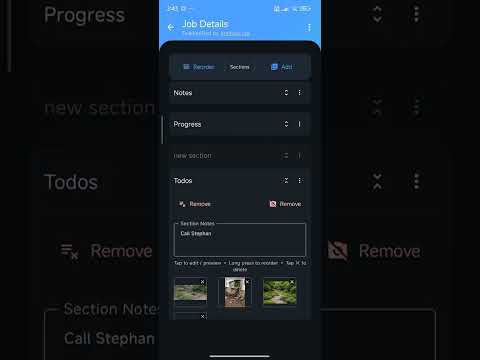
Revolutionize your workflow with our new dynamic Sections system. Create professional PDF reports exactly how you need them: add, rename, reorder, and clone modular sections with photos and field notes. Gain total document control with granular PDF settings: toggle label visibility, inclusion, and forced page breaks for a professional layout. Our advanced PDF Engine 2.0 ensures seamless text flow across pages. Experience the update now!
Revolutionize your workflow with our new dynamic Sections system. Create professional PDF reports exactly how you need them: add, rename, reorder, and clone modular sections with photos and field notes. Gain total document control with granular PDF settings: toggle label visibility, inclusion, and forced page breaks for a professional layout. Our advanced PDF Engine 2.0 ensures seamless text flow across pages. Experience the update now!
App support
About the developer
Abdellah Boutmouzzar
abdellah@boutmouzzar.com
Morocco