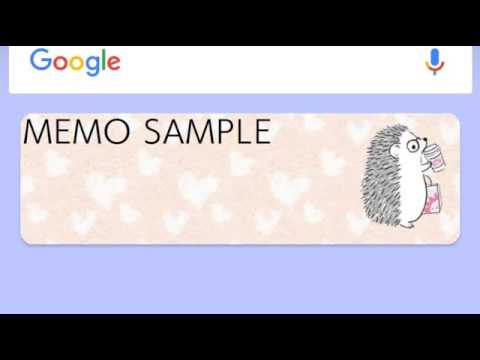

Notes: Animal Life Widget
Contains ads

star
14.7K reviews

Everyone
info
500K+
Downloads

Everyone
Learn more


About this app
The adorable world of "ANIMAL LIFE" is now a handy note-taking app!
Shiba Inu, Hedgehog, Penguin, and Cat... they live just like us, having tea and going shopping. Bring their charming daily scenes to your smartphone!
━━━━━━━━━━━━━━━━━━
🐾 Features of Sticky Note Widgets
━━━━━━━━━━━━━━━━━━
・Sticky Notes on Your Home Screen
Place your favorite animal designs as widgets on your home screen. Check your to-do lists or grocery lists instantly without opening the app!
・Variety of Animal Characters
A wide range of animals including Shiba Inu, Hedgehog, Cat, and Penguin. Customize your notes to match your mood or wallpaper.
・Collect Designs via Free Gacha
Get new memo designs through the daily free Gacha! Collect various scenes of the animals' daily lives and decorate your screen.
・Practical & Quick Tools
Supports pinning notes to the notification bar and voice input. It’s not just cute—it's a high-performance tool for quick reminders.
━━━━━━━━━━━━━━━━━━
🌟 Perfect for These Situations
━━━━━━━━━━━━━━━━━━
・To-Do Lists: Let the Shiba Inu remind you of today's tasks.
・Shopping Lists: Check your items with the help of the Penguin.
・Home Screen Decor: Beautify your screen with Hedgehog sticky notes.
・A Little Relaxation: Smile at the cute, personified animals in their daily life.
━━━━━━━━━━━━━━━━━━
🛠 How to Set Up
━━━━━━━━━━━━━━━━━━
■ How to Add a Sticky Note Widget
・Long-press an empty space on your home screen.
・Select the "Widgets" menu.
・Find this app "Animal Life" and drag your favorite design to the screen.
(*Note: Steps may vary slightly depending on your device or OS version.)
■ Build Your Collection
The designs you win from the Gacha are all special "Animal Life" artworks. Collect them all and create your own lively home screen!
━━━━━━━━━━━━━━━━━━
✨ About ANIMAL LIFE
━━━━━━━━━━━━━━━━━━
A popular Japanese character series featuring Shiba Inu, Hedgehogs, Cats, and Penguins. They live their lives just like humans—sometimes relaxing, sometimes stylish.
We hope these animals on your phone bring a smile to your face during your busy day. 🐾
Official tweets
https://twitter.com/kamiojapan/status/989048929839910918
Powered by ARTSPLANET
Shiba Inu, Hedgehog, Penguin, and Cat... they live just like us, having tea and going shopping. Bring their charming daily scenes to your smartphone!
━━━━━━━━━━━━━━━━━━
🐾 Features of Sticky Note Widgets
━━━━━━━━━━━━━━━━━━
・Sticky Notes on Your Home Screen
Place your favorite animal designs as widgets on your home screen. Check your to-do lists or grocery lists instantly without opening the app!
・Variety of Animal Characters
A wide range of animals including Shiba Inu, Hedgehog, Cat, and Penguin. Customize your notes to match your mood or wallpaper.
・Collect Designs via Free Gacha
Get new memo designs through the daily free Gacha! Collect various scenes of the animals' daily lives and decorate your screen.
・Practical & Quick Tools
Supports pinning notes to the notification bar and voice input. It’s not just cute—it's a high-performance tool for quick reminders.
━━━━━━━━━━━━━━━━━━
🌟 Perfect for These Situations
━━━━━━━━━━━━━━━━━━
・To-Do Lists: Let the Shiba Inu remind you of today's tasks.
・Shopping Lists: Check your items with the help of the Penguin.
・Home Screen Decor: Beautify your screen with Hedgehog sticky notes.
・A Little Relaxation: Smile at the cute, personified animals in their daily life.
━━━━━━━━━━━━━━━━━━
🛠 How to Set Up
━━━━━━━━━━━━━━━━━━
■ How to Add a Sticky Note Widget
・Long-press an empty space on your home screen.
・Select the "Widgets" menu.
・Find this app "Animal Life" and drag your favorite design to the screen.
(*Note: Steps may vary slightly depending on your device or OS version.)
■ Build Your Collection
The designs you win from the Gacha are all special "Animal Life" artworks. Collect them all and create your own lively home screen!
━━━━━━━━━━━━━━━━━━
✨ About ANIMAL LIFE
━━━━━━━━━━━━━━━━━━
A popular Japanese character series featuring Shiba Inu, Hedgehogs, Cats, and Penguins. They live their lives just like humans—sometimes relaxing, sometimes stylish.
We hope these animals on your phone bring a smile to your face during your busy day. 🐾
Official tweets
https://twitter.com/kamiojapan/status/989048929839910918
Powered by ARTSPLANET
Cute Shiba Inu & Hedgehog sticky notes! Decorate your screen with animal widgets
Updated on
Safety starts with understanding how developers collect and share your data. Data privacy and security practices may vary based on your use, region, and age. The developer provided this information and may update it over time.


Ratings and reviews
14.2K reviews

Joni Brooks
- Flag inappropriate
- Show review history
July 28, 2020
It's a really cute and helpful sticky note widget! It's fairly easy to unlock the designs, however, it would be nice if there were more fonts to choose from and I'd the centering of the text could be changed as well. Furthermore, it'll take 3 years to unlock all the designs. This is why I'm rating this 3 stars. The random method of unlocking designs is such a huge turn off.
20 people found this review helpful

A Google user
- Flag inappropriate
October 7, 2019
So, you can totally download a few different ones such as this cute animals one and the flowery kiss and just go wild with designing notes- lists, reminders, even just little ideas and thoughts on the go. You do have to click edit to get full note details, but this is a minor inconvenience when compared to how much use you can get out of these little stickys. Also, the capsules make it fun to keep using because you get more design elements as you go, super fun. 👍
22 people found this review helpful

Shauna Bremenkamp
- Flag inappropriate
December 28, 2020
Great app. Easy to use, fun and adorable. The only issue I have with it is the widget cuts off text that I type in my memo. Also, the widget takes up half the screen even though the actual memo workspace is smaller than the space it occupies. I had to shrink my calendar to have it setup the way I need (seeing memo and calendar on one screen for quick glance).
13 people found this review helpful
What’s new
Revised
Everyone
Learn moreApp support
About the developer
ARTS PLANET, Y.K.
more.apps.info@gmail.com
3-8-16, SHINMACHI
HINO, 東京都 191-0002
Japan
+81 70-3397-7664


