
QDmi


Everyone
info
1K+
Downloads

Everyone
Learn more


About this app
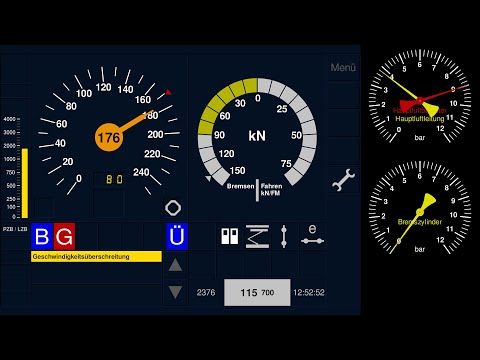
QDmi is a generic display application for the Zusi 3 railway simulator.
The following functions are available:
- Speed
- PZB, LZB, Indusi, and GNT
- ETCS (currently experimental, without planning area)
- Train data input
- Sifa (safety device)
- Traction force
- Speed step indicator
- Door release
- Pantograph
- Main switch
- Brake pressure
- Position on the track
- Slippage
- Sliding
QDmi automatically selects a suitable speedometer scale (140 km/h, 180 km/h, 250 km/h, or 400 km/h).
The force display is self-calibrating to +/- 100%.
For calibration, the maximum values for each train type must be received at least once. These values are saved and retained after a restart.
PZB/LZB text messages can be used manually or automatically.
As a special feature, you can display the LZB control parameters in the ERA-ERTMS style, which are actually intended for ETCS.
In the menu (wrench icon → network symbol), you can enter the IP address of the Zusi computer. The connection is established when you tap the entered address.
The Zusi computer must be on the same network as the smartphone or tablet! You can find the IP address in Zusi 3 under Configuration → Network.
Outlook:
A Planning Area will also be available for ETCS.
The following functions are available:
- Speed
- PZB, LZB, Indusi, and GNT
- ETCS (currently experimental, without planning area)
- Train data input
- Sifa (safety device)
- Traction force
- Speed step indicator
- Door release
- Pantograph
- Main switch
- Brake pressure
- Position on the track
- Slippage
- Sliding
QDmi automatically selects a suitable speedometer scale (140 km/h, 180 km/h, 250 km/h, or 400 km/h).
The force display is self-calibrating to +/- 100%.
For calibration, the maximum values for each train type must be received at least once. These values are saved and retained after a restart.
PZB/LZB text messages can be used manually or automatically.
As a special feature, you can display the LZB control parameters in the ERA-ERTMS style, which are actually intended for ETCS.
In the menu (wrench icon → network symbol), you can enter the IP address of the Zusi computer. The connection is established when you tap the entered address.
The Zusi computer must be on the same network as the smartphone or tablet! You can find the IP address in Zusi 3 under Configuration → Network.
Outlook:
A Planning Area will also be available for ETCS.
Display application for Zusi3
Updated on
Safety starts with understanding how developers collect and share your data. Data privacy and security practices may vary based on your use, region, and age. The developer provided this information and may update it over time.
- No data shared with third partiesLearn more about how developers declare sharing
- No data collectedLearn more about how developers declare collection


What’s new
New:
• Experimental ETCS support, without planning area.
• Indicator lights for skidding and sliding.
Improved:
• In the pressure gauge, 5 bar is now at the top centre.
• When entering train data, old values no longer need to be deleted.
• Sifa indicator light moved to the right-hand side.
• Force gauge now self-calibrating and vehicle-independent.
• Experimental ETCS support, without planning area.
• Indicator lights for skidding and sliding.
Improved:
• In the pressure gauge, 5 bar is now at the top centre.
• When entering train data, old values no longer need to be deleted.
• Sifa indicator light moved to the right-hand side.
• Force gauge now self-calibrating and vehicle-independent.
Everyone
Learn moreApp support
About the developer
Jens Eggert
nonesense@freenet.de
Germany