
ScratchJr

star
39.3K reviews

Everyone
info
10M+
Downloads
Teacher Approved

Everyone
Learn more


About this app
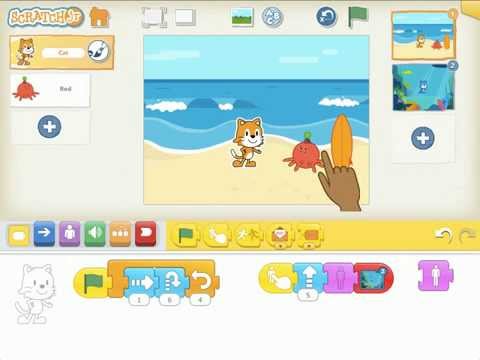
ScratchJr is an introductory programming language that enables young children (ages 5 and up) to create their own interactive stories and games. Children snap together graphical programming blocks to make characters move, jump, dance, and sing. Children can modify characters in the paint editor, add their own voices and sounds, even insert photos of themselves -- then use the programming blocks to make their characters come to life.
ScratchJr was inspired by the popular Scratch programming language (http://scratch.mit.edu), used by millions of young people (ages 8 and up) around the world. In creating ScratchJr, we redesigned the interface and programming language to make them developmentally appropriate for younger children, carefully designing features to match young children's cognitive, personal, social, and emotional development.
We see coding (or computer programming) as a new type of literacy. Just as writing helps you organize your thinking and express your ideas, the same is true for coding. In the past, coding was seen as too difficult for most people. But we think coding should be for everyone, just like writing.
As young children code with ScratchJr, they learn how to create and express themselves with the computer, not just to interact with it. In the process, children learn to solve problems and design projects, and they develop sequencing skills that are foundational for later academic success. They also use math and language in a meaningful and motivating context, supporting the development of early-childhood numeracy and literacy. With ScratchJr, children aren't just learning to code, they are coding to learn.
ScratchJr is a collaboration between the Developmental Technologies group at Tufts University, the Lifelong Kindergarten group at the MIT Media Lab, and the Playful Invention Company. Two Sigma led the implementation of the Android version of ScratchJr. The graphics and illustrations for ScratchJr were created by HvingtQuatre Company and Sarah Thomson.
If you enjoy using this free app, please consider making a donation to the Scratch Foundation (http://www.scratchfoundation.org), a nonprofit organization that provides ongoing support for ScratchJr. We appreciate donations of all sizes, large and small.
This version of ScratchJr works only on tablets that are 7-inches or larger, and running Android 4.2 (Jelly Bean) or higher.
Terms of Use: http://www.scratchjr.org/eula.html
ScratchJr was inspired by the popular Scratch programming language (http://scratch.mit.edu), used by millions of young people (ages 8 and up) around the world. In creating ScratchJr, we redesigned the interface and programming language to make them developmentally appropriate for younger children, carefully designing features to match young children's cognitive, personal, social, and emotional development.
We see coding (or computer programming) as a new type of literacy. Just as writing helps you organize your thinking and express your ideas, the same is true for coding. In the past, coding was seen as too difficult for most people. But we think coding should be for everyone, just like writing.
As young children code with ScratchJr, they learn how to create and express themselves with the computer, not just to interact with it. In the process, children learn to solve problems and design projects, and they develop sequencing skills that are foundational for later academic success. They also use math and language in a meaningful and motivating context, supporting the development of early-childhood numeracy and literacy. With ScratchJr, children aren't just learning to code, they are coding to learn.
ScratchJr is a collaboration between the Developmental Technologies group at Tufts University, the Lifelong Kindergarten group at the MIT Media Lab, and the Playful Invention Company. Two Sigma led the implementation of the Android version of ScratchJr. The graphics and illustrations for ScratchJr were created by HvingtQuatre Company and Sarah Thomson.
If you enjoy using this free app, please consider making a donation to the Scratch Foundation (http://www.scratchfoundation.org), a nonprofit organization that provides ongoing support for ScratchJr. We appreciate donations of all sizes, large and small.
This version of ScratchJr works only on tablets that are 7-inches or larger, and running Android 4.2 (Jelly Bean) or higher.
Terms of Use: http://www.scratchjr.org/eula.html
With ScratchJr, young children (ages 5+) can learn to code -- and code to learn!
Updated on
Safety starts with understanding how developers collect and share your data. Data privacy and security practices may vary based on your use, region, and age. The developer provided this information and may update it over time.


Ratings and reviews
25.9K reviews

Michele Lukes
- Flag inappropriate
May 21, 2022
I like this game! My daughter first started playing this at school, and she has loved it ever since! It is great and very easy to use. There are many blocks, characters,backgrounds etc. The only thing that could be improved, is the parental controls. They use very simple maths like 50+1. But apart from that, it's great and if you're thinking of downloading, definitely do so! Props to the creator(s)!
1,863 people found this review helpful

Alice dingman
- Flag inappropriate
July 5, 2026
That's actually not my name, because I'm on my mom's account. When I tried to make a zombie game, I set some thing's speed to slow, but when I save the game it makes the speed normal. Please fix and update this game right now. Also, can you add animating to the game and make drawing better? It just looks boring without it. We need more parts, and better messages.
51 people found this review helpful

Analecia Qarau-Francis
- Flag inappropriate
October 4, 2020
Very impressed, I got the book from a shop and hadnt realised there was an app to go with it at first. The app seems very good and alongside the book it's the perfect pairing to get my lovely 5 year old that is all about computers and gaming interested in the 0's and 1's as it where, hehe. And the fact it's a free app 👌 can't go wrong.
1,412 people found this review helpful
Everyone
Learn moreApp support
phone
Phone number
+16172539783
About the developer
Scratch Foundation
dev-google@scratch.org
459 Columbus Ave Pmb 1112
New York, NY 10024-5129
United States
+1 857-370-5710


