
Convertit Pro: Media Toolkit

Everyone
info
50+
Downloads

Everyone
Learn more


About this app
Costs less than a burger. Get it once, own it forever.
Convertit Pro is the all-in-one offline media converter and toolkit for Android. Convert audio, video, and images without ads, subscriptions, or your files leaving your device. One purchase. Lifetime access.
Tired of bloated apps that freeze, spam ads, or need a monthly fee? Convertit Pro stays fast, smooth, private, and simple.
AUDIO CONVERTER & MP3 CONVERTER
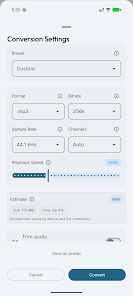
Convert locally with FFmpeg. Input: MP3, FLAC, WAV, AAC, OGG, M4A, OPUS, WMA, MKA, MP4, MKV, AVI, MOV, WEBM, and more. Output: MP3, M4A, AAC, OGG, OPUS, WMA, MKA, SPX, AMR. Examples: FLAC to MP3, WAV to MP3, M4A to MP3, MP3 to M4A or WAV. Bitrate 9-1024 kbps, sample rate 8-192 kHz, speed and pitch, trim with inline preview, CUE split, batch. Hints for output size or time when available.
VIDEO CONVERTER
Offline conversion. Common input: MP4, MKV, AVI, MOV, WEBM, FLV, WMV. Output: MP4, MKV, AVI, MOV, WEBM. Codecs H.264, H.265/HEVC, VP9, AV1; resolution presets; bitrate; trim with inline preview; extract audio; batch.
VIDEO COMPRESSOR
From Home: CRF quality or target output size (H.264 two-pass). Tune resolution, codec, frame rate, audio. Batch mode can share one total size budget across files with clearer summaries.
VIDEO TO GIF
Make GIFs from video locally. No upload, no cloud.
IMAGE CONVERTER
18+ formats: JPG, PNG, WebP, GIF, BMP, TIFF, HEIC, HEIF, AVIF, PDF, SVG, ICO, and more. Quality control. ImageMagick-powered.
AUDIO & VIDEO FILTERS
AI-style noise reduction processed fully on your device: private, no cloud, no upload. Plus normalization and fades. FFmpeg-powered.
METADATA TAG EDITOR
Edit tags without re-encoding: title, artist, album, genre, year, track, comments, cover art. TagLib-powered.
EXIF REMOVER & PRIVACY TOOL
Remove GPS and device metadata from photos or videos; files or folders. Stays local. Exiv2-powered.
MORE TOOLS FROM HOME
One sheet for compression, conversion, video to GIF, EXIF cleanup, denoise, metadata. No cluttered floating menus.
CUSTOMIZATION
- Grouped quick actions on Home
- Custom output folders
- AMOLED black theme
- Dynamic Color (Android 12+)
- Color themes
- Optional bottom tab vibration (off in Settings)
- Simple UI
BACKUP & RESTORE
Export or import app data as a file between installs.
PRIORITY SUPPORT
Pro includes faster, direct help from the developer when you need it.
WHY CONVERTIT PRO?
- All-in-one audio, video, image, and tools
- Fully offline; files stay on device
- No ads, tracking, or subscriptions
- One-time purchase, lifetime access
- Priority support
- Lightweight and fast
- Indie team that listens
Free version: Try Convertit for audio; upgrade to Pro for video, images, batch, and the full toolkit.
Download Convertit Pro: the private offline converter that works.
Convertit Pro is the all-in-one offline media converter and toolkit for Android. Convert audio, video, and images without ads, subscriptions, or your files leaving your device. One purchase. Lifetime access.
Tired of bloated apps that freeze, spam ads, or need a monthly fee? Convertit Pro stays fast, smooth, private, and simple.
AUDIO CONVERTER & MP3 CONVERTER
Convert locally with FFmpeg. Input: MP3, FLAC, WAV, AAC, OGG, M4A, OPUS, WMA, MKA, MP4, MKV, AVI, MOV, WEBM, and more. Output: MP3, M4A, AAC, OGG, OPUS, WMA, MKA, SPX, AMR. Examples: FLAC to MP3, WAV to MP3, M4A to MP3, MP3 to M4A or WAV. Bitrate 9-1024 kbps, sample rate 8-192 kHz, speed and pitch, trim with inline preview, CUE split, batch. Hints for output size or time when available.
VIDEO CONVERTER
Offline conversion. Common input: MP4, MKV, AVI, MOV, WEBM, FLV, WMV. Output: MP4, MKV, AVI, MOV, WEBM. Codecs H.264, H.265/HEVC, VP9, AV1; resolution presets; bitrate; trim with inline preview; extract audio; batch.
VIDEO COMPRESSOR
From Home: CRF quality or target output size (H.264 two-pass). Tune resolution, codec, frame rate, audio. Batch mode can share one total size budget across files with clearer summaries.
VIDEO TO GIF
Make GIFs from video locally. No upload, no cloud.
IMAGE CONVERTER
18+ formats: JPG, PNG, WebP, GIF, BMP, TIFF, HEIC, HEIF, AVIF, PDF, SVG, ICO, and more. Quality control. ImageMagick-powered.
AUDIO & VIDEO FILTERS
AI-style noise reduction processed fully on your device: private, no cloud, no upload. Plus normalization and fades. FFmpeg-powered.
METADATA TAG EDITOR
Edit tags without re-encoding: title, artist, album, genre, year, track, comments, cover art. TagLib-powered.
EXIF REMOVER & PRIVACY TOOL
Remove GPS and device metadata from photos or videos; files or folders. Stays local. Exiv2-powered.
MORE TOOLS FROM HOME
One sheet for compression, conversion, video to GIF, EXIF cleanup, denoise, metadata. No cluttered floating menus.
CUSTOMIZATION
- Grouped quick actions on Home
- Custom output folders
- AMOLED black theme
- Dynamic Color (Android 12+)
- Color themes
- Optional bottom tab vibration (off in Settings)
- Simple UI
BACKUP & RESTORE
Export or import app data as a file between installs.
PRIORITY SUPPORT
Pro includes faster, direct help from the developer when you need it.
WHY CONVERTIT PRO?
- All-in-one audio, video, image, and tools
- Fully offline; files stay on device
- No ads, tracking, or subscriptions
- One-time purchase, lifetime access
- Priority support
- Lightweight and fast
- Indie team that listens
Free version: Try Convertit for audio; upgrade to Pro for video, images, batch, and the full toolkit.
Download Convertit Pro: the private offline converter that works.
Updated on
Safety starts with understanding how developers collect and share your data. Data privacy and security practices may vary based on your use, region, and age. The developer provided this information and may update it over time.

No data shared with third parties
Learn more about how developers declare sharing

No data collected
Learn more about how developers declare collection
What’s new
[FIXED] Conversion sheets: primary buttons stay visible above the bottom of the screen on gesture-nav devices
[FIXED] Conversion dialog: estimated output size and encode time update when format, bitrate, sample rate, channel layout, trim, playback speed, or related conversion options change.
[IMPROVED] Russian: video compressor mode **By Target Size** shortened to «По размеру».
[FIXED] Conversion dialog: estimated output size and encode time update when format, bitrate, sample rate, channel layout, trim, playback speed, or related conversion options change.
[IMPROVED] Russian: video compressor mode **By Target Size** shortened to «По размеру».
Everyone
Learn moreApp support
About the developer
THE BYTE ARRAY LTD
contact@thebytearray.org
124 CITY ROAD
LONDON
EC1V 2NX
United Kingdom
+44 7877 436277


