
Schoolpal Teacher App


Everyone
info
50+
Downloads


About this app
The Teacher View Application for SchoolPal Education System includes these key Components:
User Authentication
User Login: Teachers should be able to log in using their credentials (username/password, email/password, or single sign-on).
Role Verification: Ensure the logged-in user is a teacher and not a student or administrator.
Teacher Dashboard
Overview: A summary of the teacher's classes, students, assignments, and other relevant information.
Class Management: Features to manage classes, add students, and view class schedules.
Student Management: Tools to view student profiles, attendance, and performance.
Assignment Management: Create, assign, and grade assignments.
Communication: Features for sending announcements, messages, or notifications to students and parents.
Content Management
Lesson Plans: Create, edit, and share lesson plans.
Curriculum Alignment: Ensure lesson plans align with the school's curriculum.
Material Sharing: Upload and share teaching materials (e.g., documents, videos, presentations).
Assessment and Grading
Quizzes and Tests: Create and administer assessments.
Grading: Assign grades to students based on assignments and assessments.
Feedback: Provide feedback to students on their performance.
Attendance Tracking
Student Attendance: Record and manage student attendance.
Generate Attendance Reports: Create reports for attendance analysis.
Communication
Messaging: Communicate with students and parents.
Announcements: Send out class or school-wide announcements.
Parent-Teacher Communication: Facilitate communication between teachers and parents.
Integration with Other Systems
Student Information System (SIS): Integrate with the school's SIS for student data.
Learning Management System (LMS): Connect with an LMS for content management and assessment.
Additional Features (Optional):
Timetabling: Manage the teacher's timetable.
Performance Analytics: Track student performance over time.
Parent Portal Integration: Allow teachers to access parent information.
Integration with Payment Systems: For fee management or optional services.
Technology Stack:
Frontend: Flutter for cross-platform compatibility.
Backend: Firebase or other backend services for data storage and management.
Authentication: Firebase Authentication or custom authentication.
Design Considerations:
User Experience: Prioritize user-friendliness and intuitive navigation.
Accessibility: Ensure the app is accessible to users with disabilities.
Data Privacy: Implement robust security measures to protect sensitive student data.
Performance: Optimize the app for smooth performance, especially when handling large datasets.
User Authentication
User Login: Teachers should be able to log in using their credentials (username/password, email/password, or single sign-on).
Role Verification: Ensure the logged-in user is a teacher and not a student or administrator.
Teacher Dashboard
Overview: A summary of the teacher's classes, students, assignments, and other relevant information.
Class Management: Features to manage classes, add students, and view class schedules.
Student Management: Tools to view student profiles, attendance, and performance.
Assignment Management: Create, assign, and grade assignments.
Communication: Features for sending announcements, messages, or notifications to students and parents.
Content Management
Lesson Plans: Create, edit, and share lesson plans.
Curriculum Alignment: Ensure lesson plans align with the school's curriculum.
Material Sharing: Upload and share teaching materials (e.g., documents, videos, presentations).
Assessment and Grading
Quizzes and Tests: Create and administer assessments.
Grading: Assign grades to students based on assignments and assessments.
Feedback: Provide feedback to students on their performance.
Attendance Tracking
Student Attendance: Record and manage student attendance.
Generate Attendance Reports: Create reports for attendance analysis.
Communication
Messaging: Communicate with students and parents.
Announcements: Send out class or school-wide announcements.
Parent-Teacher Communication: Facilitate communication between teachers and parents.
Integration with Other Systems
Student Information System (SIS): Integrate with the school's SIS for student data.
Learning Management System (LMS): Connect with an LMS for content management and assessment.
Additional Features (Optional):
Timetabling: Manage the teacher's timetable.
Performance Analytics: Track student performance over time.
Parent Portal Integration: Allow teachers to access parent information.
Integration with Payment Systems: For fee management or optional services.
Technology Stack:
Frontend: Flutter for cross-platform compatibility.
Backend: Firebase or other backend services for data storage and management.
Authentication: Firebase Authentication or custom authentication.
Design Considerations:
User Experience: Prioritize user-friendliness and intuitive navigation.
Accessibility: Ensure the app is accessible to users with disabilities.
Data Privacy: Implement robust security measures to protect sensitive student data.
Performance: Optimize the app for smooth performance, especially when handling large datasets.
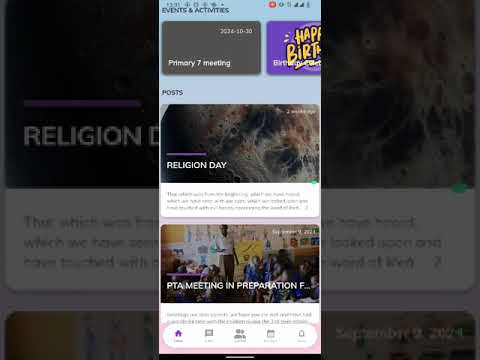
This is our teacher view application for the schoolpal education system.
Updated on
Safety starts with understanding how developers collect and share your data. Data privacy and security practices may vary based on your use, region, and age. The developer provided this information and may update it over time.


App support
phone
Phone number
+256760369839
About the developer
Shane Senyonga
dev@schoolpal.education
Uganda