
PXPlay: Remote Play

star
23.3K reviews

Everyone
info
100K+
Downloads

Everyone
Learn more


About this app
Introduction
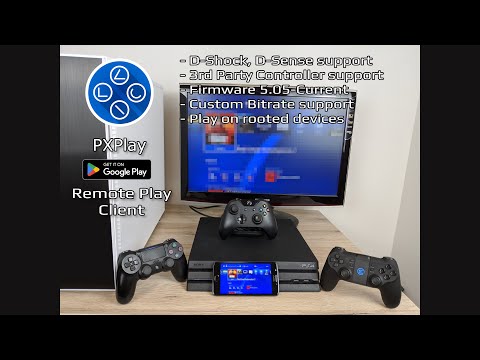
PXPlay offers you the possibility to remote control your gaming device without limitations. You can play your favorite games remotely while you are away (more information below*). PXPlay has been optimized to provide streaming experiences with the lowest possible latency. Third-Party controllers and mobile data connections are supported.
Key features
• Enhance video quality with FSR upscaling and sharpening
• 3rd Party controller support for all Android devices
• PXPlay allows to use mobile data*
• Supports Android TV devices
• Supports gamepad button mapping
• You can register multiple profiles
• Supports customization of onscreen gamepad layout
• PXPlay supports rooted devices
• You can use PXPlay as virtual controller
• Supports older firmware from 5.05 and newer
• Picture-In-Picture mode (requires Android 8.0 or newer)
• Multi-Window support (requires Android 7.0 or newer)
• Recording and capturing your screen is allowed *(3rd Party app required)
Hardware recommendations
• Dual core CPU highly recommended
• 2 GB or more of RAM
• 1024 × 768 or higher display resolution
• A wired internet connection for your gaming device is strongly recommended
• Your device should be connected to a 5GHz WiFi for minimum delays
• A high-speed internet connection with upload and download speeds of at least 15 Mbps
PXPlay allows you to remote control any game which supports Remote Play. Or just use PXPlay as virtual controller gamepad for your gaming device.
Main Features
- Easy Connection Setup
- Streaming from your gaming device with low latency
- 3rd Party controller support for all Android devices
- Use PXPlay as virtual controller
Community
- https://streamingdv.com/pxplay/community
Demonstration video
- https://youtu.be/34sYCwNaYyM (<- subscribe to these guys :D)
- https://youtu.be/H-OgY4qdPsw
❗
Problems with the Account login
❗This problem only affects users with firmware 7.0 or later where a account login must be performed to get your Account ID. Recently, some users reported problems when performing the login. More information here:
https://streamingdv.github.io/pxplay/index#line8
All information about PXPlay can be found here:
https://streamingdv.github.io/pxplay/index.html
Attention
PXPlay works with the latest firmware. Please do not upgrade to a newer firmware version if available until it is proven that PXPlay is still working. However, if you have updated and PXPlay has stopped working, it will take some time for me to fix the problems. So please keep that in mind.
*Please note: if you want to play over the internet, follow these instructions:
https://streamingdv.github.io/pxplay/index#line5
Disclaimer: all possible mentioned trademarks cited here are the property of their respective owners.
Remote Play with FSR upscaling, low latency & full controller support
Updated on
Safety starts with understanding how developers collect and share your data. Data privacy and security practices may vary based on your use, region, and age. The developer provided this information and may update it over time.
- No data shared with third partiesLearn more about how developers declare sharing
- No data collectedLearn more about how developers declare collection


Ratings and reviews
19.2K reviews

Mike Keiper
- Flag inappropriate
- Show review history
May 4, 2026
After a few back and forths with the developer, I was finally able to sync up my PlayStation with the app. The issues with hooking up my PS through my PSN account, not having to go through a bunch of extra steps including having to put my IP address in, I can't give it a 5, but I can give it a strong 4. I thought the connection was pretty stable, only cutting at odd times, probably not fault or the app. There's a good amount of settings, which is nice. I definitely recommend this app
3 people found this review helpful
GF Frame Technologies (Streaming Dev)
April 30, 2026
I can't offer support here as my answer length is limited to 350 characters and the rating section isn't here for providing support. Please either use the PSPlay subreddit or write me an email at streamingdv@outlook.com

John Corley
- Flag inappropriate
July 26, 2026
Instantly 1000 times better than Sony's app. Worth paying for. The Sony app constantly lagged, froze, was riddled with artifacts, and disconnected regardless of my settings, proximity to my router, and more than capable hardware. This app started strong and was near perfect with just a few minor settings tweaks. It starts the remote connection much faster, too.
5 people found this review helpful

One & Only
- Flag inappropriate
- Show review history
March 22, 2022
Everything works very well. You will have to tinker with the settings to find that sweet spot for less/no frame-rate drop... 1 major thing I'm still figuring out: I couldn't play with friends. I have access to online, yes. But when it comes to actually inviting someone to join, they couldn't join. This is currently only on "Elden Ring", so I'll test out other games. 👍🏾
34 people found this review helpful
What’s new
• Modern Android & Android TV UI with dark mode
• Video upscaling with configurable sharpening
• Home widgets, console wake button, and improved console cards
• Compact stream mode, more aspect ratios, and performance overlay
• Better button mapping, auto remote registration, DualSense improvements, and stability updates
• 8.1.1: Bug fixes/ Improvements
• Video upscaling with configurable sharpening
• Home widgets, console wake button, and improved console cards
• Compact stream mode, more aspect ratios, and performance overlay
• Better button mapping, auto remote registration, DualSense improvements, and stability updates
• 8.1.1: Bug fixes/ Improvements
Everyone
Learn moreApp support
About the developer
GF Frame Technologies GmbH
streamingdv@outlook.com
Haidenweg 14
3631 Ottenschlag
Austria
+43 681 20247196


