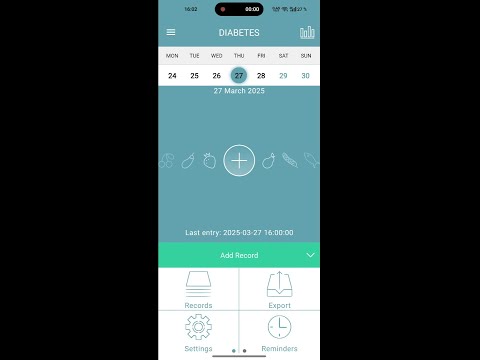

Diabetes
In-app purchases

star
3.06K reviews

Everyone
info
100K+
Downloads


About this app
DIABETES® is a diabetes app, diabetes logbook and diabetic diary for everyday diabetes self management. Use it as a blood sugar tracker, glucose tracker, blood glucose diary, insulin tracker, insulin diary, food diary and blood pressure tracker for type 1 diabetes and type 2 diabetes.
Created with practicing doctors and positively reviewed by medical professors and diabetes care experts, DIABETES® combines professional diabetes management tools with a simple daily diary for real life.
Keep your diabetes data in one place: blood sugar, glucose, blood glucose, meals, Bread Units (BU), carbs, proteins, fats, calories, insulin, medication, weight and blood pressure. The app helps reduce manual calculations, prepare doctor reports and understand daily glucose control.
FREE version:
• Blood sugar tracker, blood glucose tracker, glucose diary and diabetes tracker log
• Daily glucose entry, blood sugar log, blood glucose log and post meal glucose records
• Blood sugar check and glucose check reminders
• Diabetes diary and diabetes health tracker for type 1 and type 2 diabetes
• Auto-calculation of Bread Units (BU), proteins, fats, carbs, calories and insulin dose based on entered data and personal settings
• Fractional insulin support for pens with 0.01, 0.1 and 0.5 unit steps, and pump records
• Insulin log, insulin diary, insulin correction notes and insulin reminders
• Personal insulin sensitivity settings by time of day
• Physical activity accounting for flexible insulin therapy
• Warnings for hypoglycemia, hyperglycemia, daily insulin limits and overdose risk control
• Hypo control and hyperglycemia risk control with an easy color scale
• Reminders to warm insulin, take medication, end pauses and check glucose after meals
• Bread Unit Calculator (BU), carb tracker and nutrition diary
• Food diary with calories, proteins, fats, carbohydrates and macro calculation
• Database of 4,000+ food products plus your own dishes
• Glucose statistics, glucose variability, charts and HbA1c estimate
• Statistics for Bread Units (BU), calories, macros, insulin, blood pressure, weight and risk indicators
• Export diabetes logbook reports for doctors in PDF/XLS
• Share reports by email or messenger
• Ad-free experience
• Community support with the developer and experienced users
• Diabetes School educational lessons
• Wear OS companion app for quick glucose, carbs and insulin entry
PRO version:
• 12,000+ additional food products from Open Food Facts, USDA and English FatSecret
• Cloud sync and cloud database export
• Manage one diabetes logbook from different phones, including patient and observer mode
• Pump support on Android
• Auto-reading and glucose meter sync with compatible Bluetooth devices
• Sync with selected blood glucose monitor devices, glucometers and blood pressure monitors
• Compatible glucose meters: Contour Plus One, OneTouch Select Plus Flex, OneTouch Verio Reflect, Arkray GlucoCard Σ+Link, Satellite Online, Diacont Connect, Accu-Chek Instant
• Blood pressure monitor support: SberZdorovye and Omron
• ECG device support: CardioQvark
• Integrations with xDrip, Nightscout, AndroidAPS, Ottai, Juggluco, LibreLinkUp, Dexcom Share, Syai App, Aidex, Diabox, Glimp, Glunovo, Intelligo, Poctech, WatchDrip+ and more
Whether you need a free diabetes app for daily glucose entry or an advanced diabetes management app with insulin tracking, blood sugar charts, glucose statistics, doctor reports, glucometer sync and blood sugar and pressure tracking, DIABETES® helps keep your diabetes routine organized without turning self monitoring into paperwork.
Important: the app does not measure blood sugar by itself and is not a fingerprint blood sugar test app. It records values entered by the user or received from compatible external devices and integrations. DIABETES® is not a medical device and does not diagnose, treat, cure or prevent any condition. Consult a qualified healthcare professional for medical advice and insulin dose decisions.
Created with practicing doctors and positively reviewed by medical professors and diabetes care experts, DIABETES® combines professional diabetes management tools with a simple daily diary for real life.
Keep your diabetes data in one place: blood sugar, glucose, blood glucose, meals, Bread Units (BU), carbs, proteins, fats, calories, insulin, medication, weight and blood pressure. The app helps reduce manual calculations, prepare doctor reports and understand daily glucose control.
FREE version:
• Blood sugar tracker, blood glucose tracker, glucose diary and diabetes tracker log
• Daily glucose entry, blood sugar log, blood glucose log and post meal glucose records
• Blood sugar check and glucose check reminders
• Diabetes diary and diabetes health tracker for type 1 and type 2 diabetes
• Auto-calculation of Bread Units (BU), proteins, fats, carbs, calories and insulin dose based on entered data and personal settings
• Fractional insulin support for pens with 0.01, 0.1 and 0.5 unit steps, and pump records
• Insulin log, insulin diary, insulin correction notes and insulin reminders
• Personal insulin sensitivity settings by time of day
• Physical activity accounting for flexible insulin therapy
• Warnings for hypoglycemia, hyperglycemia, daily insulin limits and overdose risk control
• Hypo control and hyperglycemia risk control with an easy color scale
• Reminders to warm insulin, take medication, end pauses and check glucose after meals
• Bread Unit Calculator (BU), carb tracker and nutrition diary
• Food diary with calories, proteins, fats, carbohydrates and macro calculation
• Database of 4,000+ food products plus your own dishes
• Glucose statistics, glucose variability, charts and HbA1c estimate
• Statistics for Bread Units (BU), calories, macros, insulin, blood pressure, weight and risk indicators
• Export diabetes logbook reports for doctors in PDF/XLS
• Share reports by email or messenger
• Ad-free experience
• Community support with the developer and experienced users
• Diabetes School educational lessons
• Wear OS companion app for quick glucose, carbs and insulin entry
PRO version:
• 12,000+ additional food products from Open Food Facts, USDA and English FatSecret
• Cloud sync and cloud database export
• Manage one diabetes logbook from different phones, including patient and observer mode
• Pump support on Android
• Auto-reading and glucose meter sync with compatible Bluetooth devices
• Sync with selected blood glucose monitor devices, glucometers and blood pressure monitors
• Compatible glucose meters: Contour Plus One, OneTouch Select Plus Flex, OneTouch Verio Reflect, Arkray GlucoCard Σ+Link, Satellite Online, Diacont Connect, Accu-Chek Instant
• Blood pressure monitor support: SberZdorovye and Omron
• ECG device support: CardioQvark
• Integrations with xDrip, Nightscout, AndroidAPS, Ottai, Juggluco, LibreLinkUp, Dexcom Share, Syai App, Aidex, Diabox, Glimp, Glunovo, Intelligo, Poctech, WatchDrip+ and more
Whether you need a free diabetes app for daily glucose entry or an advanced diabetes management app with insulin tracking, blood sugar charts, glucose statistics, doctor reports, glucometer sync and blood sugar and pressure tracking, DIABETES® helps keep your diabetes routine organized without turning self monitoring into paperwork.
Important: the app does not measure blood sugar by itself and is not a fingerprint blood sugar test app. It records values entered by the user or received from compatible external devices and integrations. DIABETES® is not a medical device and does not diagnose, treat, cure or prevent any condition. Consult a qualified healthcare professional for medical advice and insulin dose decisions.
Diabetes tracker: blood sugar, glucose, insulin, Bread Units, reminders, reports
Updated on
Safety starts with understanding how developers collect and share your data. Data privacy and security practices may vary based on your use, region, and age. The developer provided this information and may update it over time.
- This app may share these data types with third partiesLocation, App info and performance, and Device or other IDs
- No data collectedLearn more about how developers declare collection
- Data is encrypted in transit
- Data can’t be deleted


Ratings and reviews
3.02K reviews

A Google user
- Flag inappropriate
- Show review history
March 29, 2019
nice app. please - add the synchronization possibility - pull product base from myfitnesspal or so (whiich are bigger) with barcode scanning
9 people found this review helpful
Hint Solutions
April 29, 2019
Спасибо! Спасибо что дождались обновления) Сегодня обновление с новой базой продуктов! С возможностью синхронизации) Читайте описание, там все изменения - очень много!

Denise Shepherd
- Flag inappropriate
December 3, 2025
A very easy to use app and would recommend to all Diabetics to give it a try.
5 people found this review helpful
Hint Solutions
December 3, 2025
Thanks)

Alta De Milander Gerber
- Flag inappropriate
September 28, 2025
i am new to the app I struggle to set up every thing
1 person found this review helpful
What’s new
We've fixed some bugs and made the app faster!
App support
About the developer
Igor Barinov
hintsolutions@proton.me
2606, Banyan tree residences bluewaters dubai
Bluewaters Island, Dubai 53627
إمارة دبيّ
United Arab Emirates


