
Blend Me Photo Editor
Contains ads

star
13.8K reviews

Everyone
info
5M+
Downloads

Everyone
Learn more


About this app
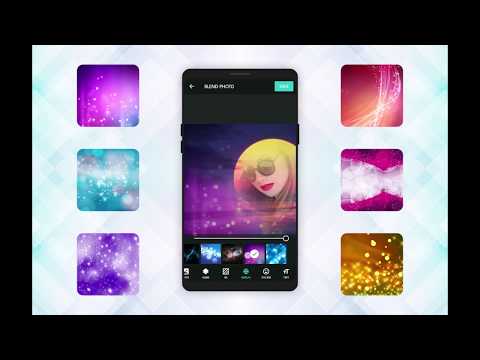
Blend Me Photo Editor is an advanced auto photo blend and the ultimate photo mixer that allows you to blend two or more images and create photo collages. Use unlimited blend effect, bokeh effect, mirror effect, shape overlays, and dozens of other tools to create iconic INSTA-ready images and blend collage.
Functions:
1. Blend two or more images over free HD backgrounds to create awesome blend photos
2. Image Combine multiple pictures with collage maker to create a photo collage and blend collage
3. Edit and crop your pic with advanced photo editor, blur, double exposer, overlays, colors, and other effects
4. Create MirrorPic or Twin effect with the mirror photo collage maker
5. Use blend camera to create live blend photos and collage
6. Quick photo editing templates for one-click photo collage maker
7. No crop photo editors for instagram & social sharing
---------- Main features ----------
▸ Photo blend & mirror
Create blend collage and photo collage with the ultimate blend me photo blend and mixer. With the double exposer image editor, you can easily edit and combine multiple pictures to create eye-catching graphics. Add multiple images into a single photo frame. Or blend pictures over HD background.
▸ Edit Photo
Dozens of built-in tools to edit and enhance your pictures. Adjust brightness, contrast, hue, saturation, etc. Apply pre-built color filters and beautify your selfies. Blur background (in multiple shapes). Crop images. Apply wallpapers. And a lot more. It’s all pro features combined into one.
▸ Collage maker
Combine multiple images to create a beautiful photo collage and blend collage. Add text and stickers to your collage or images. The ultimate blend me photo editor and collage maker comes with unlimited access. You only need to get creative and discover new ways to make your pictures pop.
▸ Mirror photo editor & collage maker
Turn your selfies and images into stunning MirrorPic or 3D Mirror Collage with a single tap. It’s the same twin effect that you’ve seen online. You can try multiple settings, effects, collage templates, and filters that are available within the mirror photo editor.
▸ Blend camera
Create double exposer camera effect on the live camera preview. You can blend your live images over a free HD background and merge photos into a one layer photo frame. The blend camera supports live preview, auto blend, auto beautify, and live merge of photos to create picturesque photo collage right from your camera.
Why choose Blend Me Photo Editor?
- 100% Free
- Unlimited edits and pro features
- Smooth functioning
- Edit photos and create eye-catching imagery with ease
- Free HD backgrounds for blend collage
- Blend me camera feature and live blend
- 100K+ downloads
Blend Me Photo Editor equips you with the best tools to create the square blur photo of your dreams. Download now and get set to show your creativity to the universe.
We hope you will have fun and fell in love with your new Blend Me Photo Editor. Keep your apps updated to access the upcoming exciting features. And don’t forget to give a good rating if you like this application.
We cannot wait to see the images and pictures that you will create with this tool.
Let’s get creative and blend images. Together.
Functions:
1. Blend two or more images over free HD backgrounds to create awesome blend photos
2. Image Combine multiple pictures with collage maker to create a photo collage and blend collage
3. Edit and crop your pic with advanced photo editor, blur, double exposer, overlays, colors, and other effects
4. Create MirrorPic or Twin effect with the mirror photo collage maker
5. Use blend camera to create live blend photos and collage
6. Quick photo editing templates for one-click photo collage maker
7. No crop photo editors for instagram & social sharing
---------- Main features ----------
▸ Photo blend & mirror
Create blend collage and photo collage with the ultimate blend me photo blend and mixer. With the double exposer image editor, you can easily edit and combine multiple pictures to create eye-catching graphics. Add multiple images into a single photo frame. Or blend pictures over HD background.
▸ Edit Photo
Dozens of built-in tools to edit and enhance your pictures. Adjust brightness, contrast, hue, saturation, etc. Apply pre-built color filters and beautify your selfies. Blur background (in multiple shapes). Crop images. Apply wallpapers. And a lot more. It’s all pro features combined into one.
▸ Collage maker
Combine multiple images to create a beautiful photo collage and blend collage. Add text and stickers to your collage or images. The ultimate blend me photo editor and collage maker comes with unlimited access. You only need to get creative and discover new ways to make your pictures pop.
▸ Mirror photo editor & collage maker
Turn your selfies and images into stunning MirrorPic or 3D Mirror Collage with a single tap. It’s the same twin effect that you’ve seen online. You can try multiple settings, effects, collage templates, and filters that are available within the mirror photo editor.
▸ Blend camera
Create double exposer camera effect on the live camera preview. You can blend your live images over a free HD background and merge photos into a one layer photo frame. The blend camera supports live preview, auto blend, auto beautify, and live merge of photos to create picturesque photo collage right from your camera.
Why choose Blend Me Photo Editor?
- 100% Free
- Unlimited edits and pro features
- Smooth functioning
- Edit photos and create eye-catching imagery with ease
- Free HD backgrounds for blend collage
- Blend me camera feature and live blend
- 100K+ downloads
Blend Me Photo Editor equips you with the best tools to create the square blur photo of your dreams. Download now and get set to show your creativity to the universe.
We hope you will have fun and fell in love with your new Blend Me Photo Editor. Keep your apps updated to access the upcoming exciting features. And don’t forget to give a good rating if you like this application.
We cannot wait to see the images and pictures that you will create with this tool.
Let’s get creative and blend images. Together.
Photo editor to create INSTA-ready photo blend, mirror and merge photos
Updated on
Safety starts with understanding how developers collect and share your data. Data privacy and security practices may vary based on your use, region, and age. The developer provided this information and may update it over time.


Ratings and reviews
13.4K reviews

Christy Cridlebaugh
- Flag inappropriate
June 17, 2025
all ads! I couldn't figure out how to use it! I accidentally pushed am ad and downloaded something that I'm going to have to uninstall! There were 2 ads at ALL times, and i couldn't see how to use this! I wanted to put 2 pics in the same frame, but I couldn't find that! UNINSTALLING!!!
4 people found this review helpful

Lulu
- Flag inappropriate
October 7, 2021
It used to be really good. It was my favorite app to edit my pics. Now you can't even save your edits even though it says it saved to your camera roll but nothing is there. Waste of time now. Highly disappointed!
403 people found this review helpful

A Google user
- Flag inappropriate
April 10, 2019
The first time using this app. it's great! There is 1 thing tho, everytime you choose a different photo, an ad pops up, but no worries, I just skip out of it and I'm right back where I left off. 👍
311 people found this review helpful
What’s new
Bug Fixed.
Improve Performance.
change in all UI/UX.
Add New Concept AI Cut.
New Template Concept.
Improve Performance.
change in all UI/UX.
Add New Concept AI Cut.
New Template Concept.
Everyone
Learn moreApp support
About the developer
NITABEN ASHISHBHAI PATOLIYA
signitivesoft@gmail.com
India


