NT Calculator
4.5star
3.02K reviews
100K+
Downloads

Everyone
info


About this app
Dear you,
This Extensive Calculator app allows you to easily handle all the calculations necessary for everyday life with a single application. A Calculator app with a simple interface and practical functions! It can replace your default calculator.
This calculator app don't require ANY PERMISSION on your phone. And it is light and fast.
With Extensive Calculator Pro on your Android, you do not need to bring your calculator anymore. This calculator app serves you everything from A - Z.
List of calculators currently supported:
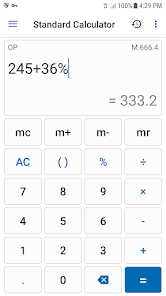
1. Standard Calculator
• Quick and easy.
• Basic features such as: %, +, -, x, /, 0 - 9, ( and ).
• Memory function such as: M+, M-, MR, MC.
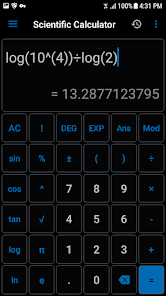
2. Scientific Calculator
• All features such as: sin, cos, tan, %, !, 0-9, (, ), RAD and DEG, log, ln, Mod, +, -, x, /, SQRT, SQR, signed,...
• You can use EXP is E (sam as 10 ^ ) to calculate large decimal number. If you need to get previous result of calculator, you can use ANS button.
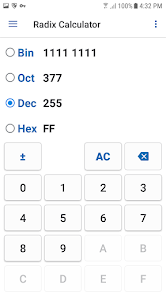
3. Radix Calculator
• Covert from one thing to the other things is very simple.
• Base 2, 8 ,10, 16
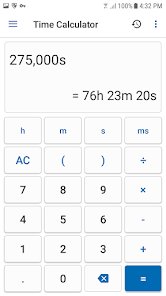
4. Time Calculator
• Three primary function is hour (h), minute (m), second (s), millisecond (s) with basic features such as: %, +, -, x, /, 0 - 9, ( and ).
• History available. And you can reuse by pressing calculation history (this feature is available in standard, scientific and time calculator).
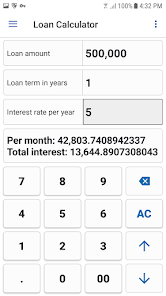
5. Loan Calculator
• Suitable for car, bank loan
• Three primary input are loan amount, interest rate, loan term.
6. Date Calculator
• Calculate difference between of two date.
• Add and subtract days
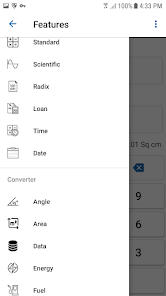
7. Unit Converter
Supports many Unit of measurement commonly used in everyday life such as:
• Weight converter: kg to st, lbs to grams, lbs to kilograms, ...
• Length converter: size converter, meters to kilometers, ...
• Speed converter: km/h, cm/s, m/s, m/s to km/h, ...
• Temperature converter: c to f, f to c, c to kelvin, ...
• Angle converter: degree to radian, convert radians to degrees, ...
• Data converter: byte to bit, bit to byte, ...
• Area converter: km2 to m2, 1 hectare to km2, cm2 to m2, ...
• Time converter: minute to second, year to second, ...
• Energy converter: joule, kwh, ...
• Pressure converter: atmospheres, bars, kilopascals, pascals, ...
• Volume converter: gallons to qts, teaspoon, cups, liters, cubic feet, ...
• Fuel Converter: many units,...
8. Support function in this calculator
• Format number type: 1,234.56 or 1.234,56.
• Percentage method calculation:
- 100 + 5% = 105 and 100 x 5% = 500.
- 100 + 5% = 100.5 and 100 x 5% = 5.
- 100 + 5% = 100.05 and 100 x 5% = 5.
• Rounding number: from 0 to 10.
• Operation priority:
- 2 + 2 x 2 = 6 (OP).
- 2 + 2 x 2 = 8 (WOP).
Thank you for using the Calculator app, if you have questions I am always ready to answer you. I think you will find this app useful and use it with pleasure.
The list will be increased!
See privacy policy: https://kineita.github.io/privacy_policy.html
This Extensive Calculator app allows you to easily handle all the calculations necessary for everyday life with a single application. A Calculator app with a simple interface and practical functions! It can replace your default calculator.
This calculator app don't require ANY PERMISSION on your phone. And it is light and fast.
With Extensive Calculator Pro on your Android, you do not need to bring your calculator anymore. This calculator app serves you everything from A - Z.
List of calculators currently supported:
1. Standard Calculator
• Quick and easy.
• Basic features such as: %, +, -, x, /, 0 - 9, ( and ).
• Memory function such as: M+, M-, MR, MC.
2. Scientific Calculator
• All features such as: sin, cos, tan, %, !, 0-9, (, ), RAD and DEG, log, ln, Mod, +, -, x, /, SQRT, SQR, signed,...
• You can use EXP is E (sam as 10 ^ ) to calculate large decimal number. If you need to get previous result of calculator, you can use ANS button.
3. Radix Calculator
• Covert from one thing to the other things is very simple.
• Base 2, 8 ,10, 16
4. Time Calculator
• Three primary function is hour (h), minute (m), second (s), millisecond (s) with basic features such as: %, +, -, x, /, 0 - 9, ( and ).
• History available. And you can reuse by pressing calculation history (this feature is available in standard, scientific and time calculator).
5. Loan Calculator
• Suitable for car, bank loan
• Three primary input are loan amount, interest rate, loan term.
6. Date Calculator
• Calculate difference between of two date.
• Add and subtract days
7. Unit Converter
Supports many Unit of measurement commonly used in everyday life such as:
• Weight converter: kg to st, lbs to grams, lbs to kilograms, ...
• Length converter: size converter, meters to kilometers, ...
• Speed converter: km/h, cm/s, m/s, m/s to km/h, ...
• Temperature converter: c to f, f to c, c to kelvin, ...
• Angle converter: degree to radian, convert radians to degrees, ...
• Data converter: byte to bit, bit to byte, ...
• Area converter: km2 to m2, 1 hectare to km2, cm2 to m2, ...
• Time converter: minute to second, year to second, ...
• Energy converter: joule, kwh, ...
• Pressure converter: atmospheres, bars, kilopascals, pascals, ...
• Volume converter: gallons to qts, teaspoon, cups, liters, cubic feet, ...
• Fuel Converter: many units,...
8. Support function in this calculator
• Format number type: 1,234.56 or 1.234,56.
• Percentage method calculation:
- 100 + 5% = 105 and 100 x 5% = 500.
- 100 + 5% = 100.5 and 100 x 5% = 5.
- 100 + 5% = 100.05 and 100 x 5% = 5.
• Rounding number: from 0 to 10.
• Operation priority:
- 2 + 2 x 2 = 6 (OP).
- 2 + 2 x 2 = 8 (WOP).
Thank you for using the Calculator app, if you have questions I am always ready to answer you. I think you will find this app useful and use it with pleasure.
The list will be increased!
See privacy policy: https://kineita.github.io/privacy_policy.html
Updated on
Safety starts with understanding how developers collect and share your data. Data privacy and security practices may vary based on your use, region, and age. The developer provided this information and may update it over time.

No data shared with third parties
Learn more about how developers declare sharing

No data collected
Learn more about how developers declare collection
Ratings and reviews
4.5
2.96K reviews

Ken Wilkins
- Flag inappropriate
June 23, 2023
Brillant, and free, with lots of preprogrammed options. What would be beneficial would be the option to add fixed calculations of our own that could be recalled from memory by name. Remembering the figures, sequence, and brackets for a particular method can be problematic. Otherwise, not a lot of room for improvement.
5 people found this review helpful

Anthony C
- Flag inappropriate
- Show review history
April 18, 2024
Nice app. Like to suggest *Divide with remainder. **Using press & hold to copy the result. The copy looks like this: = 1,234.56 Using that copy result to paste in other apps won't work. To have the copy result functional, suggest the following: Add a third Format number type choice 1234.56 (no separator). Remove the = so the final copy looks like this 1234.56
2 people found this review helpful

User X
- Flag inappropriate
June 1, 2024
Thank you for the great calculator. Please add body mass index calculation (with the option to choose values in both metric and imperial units).
What's new
Thank you for choosing this app <3 What's new:
1. Add vibration option in app settings.
2. Add Arabic, Hebrew language.
3. New UI date picker.
4. Fix bugs and improve performance.
1. Add vibration option in app settings.
2. Add Arabic, Hebrew language.
3. New UI date picker.
4. Fix bugs and improve performance.
App support
About the developer
Le Tran Ngoc Thanh
letranngocthanh49@gmail.com
237/22/19 Phạm Văn Chiêu
Thành phố Hồ Chí Minh
Vietnam
undefined


