2.5star
5.89K reviews
100K+
Downloads

Everyone
info

About this app
Mega Bank Mobile Banking. Take your mobile phone with you and take the bank with you.
Features
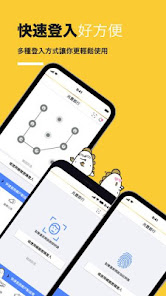
【Quick login】
Use fingerprint, face or graphic password verification to quickly log in to the App without entering your account password.
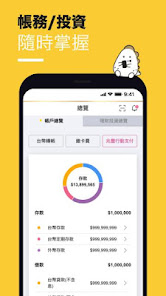
[Complete accounting/financial management information]
Real-time detailed inquiry services for Taiwan/foreign currency deposits, credit cards, funds/financial products, loans, etc., and
Interest rate/exchange rate notice price, gold passbook price inquiry
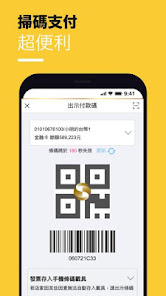
【Cardless Withdrawal】
It is very convenient to collect money with your mobile phone. You can set up the cardless withdrawal service online and withdraw cash at the ATM without inserting a debit card.
When you use the Android version of mobile banking services, you are required to provide your username and password, and may need to have individual access rights to the following items with your permission:
1. Photo/multimedia/file permissions: Credit card replacement function, loan replacement function and Mega Mobile Payment QR code scanning function are used.
2. Camera permissions: Mobile security code scanning QR Code, Mega mobile payment scanning code, credit card replacement and loan replacement functions are used
3. Front camera permissions: quick login (face recognition), scan code for Mega Mobile Payment and present payment code for Mega Mobile Payment.
4. Fingerprint recognition permissions: quick login (fingerprint recognition), scan code for Mega Mobile Payment and present payment code for Mega Mobile Payment.
5. Network connection information permissions (Wi-Fi connection information, network connection access, view network connection): used to detect network conditions.
6. Notification acceptance permission: Use to receive push notifications.
7. Set shortcuts: Mega Mobile creates scan code/payment code shortcut functions for use.
8. GPS location permission: Use of positioning push message function.
9. Bluetooth permissions: Check the security of applications and device environments.
10. Telephone permission: Use the phone communication status to verify the use of telecom SIM card number information.
11. Device security detection permission: detect the device APP and confirm the APP security.
Please use a mobile phone with an unhacked system, download Mega Bank through the official software store, install genuine anti-virus software and update to the latest operating system version to ensure the security of the environment when using Mega Mobile Banking.
Mega Bank 24-hour customer service hotline 0800-016-168
Features
【Quick login】
Use fingerprint, face or graphic password verification to quickly log in to the App without entering your account password.
[Complete accounting/financial management information]
Real-time detailed inquiry services for Taiwan/foreign currency deposits, credit cards, funds/financial products, loans, etc., and
Interest rate/exchange rate notice price, gold passbook price inquiry
【Cardless Withdrawal】
It is very convenient to collect money with your mobile phone. You can set up the cardless withdrawal service online and withdraw cash at the ATM without inserting a debit card.
When you use the Android version of mobile banking services, you are required to provide your username and password, and may need to have individual access rights to the following items with your permission:
1. Photo/multimedia/file permissions: Credit card replacement function, loan replacement function and Mega Mobile Payment QR code scanning function are used.
2. Camera permissions: Mobile security code scanning QR Code, Mega mobile payment scanning code, credit card replacement and loan replacement functions are used
3. Front camera permissions: quick login (face recognition), scan code for Mega Mobile Payment and present payment code for Mega Mobile Payment.
4. Fingerprint recognition permissions: quick login (fingerprint recognition), scan code for Mega Mobile Payment and present payment code for Mega Mobile Payment.
5. Network connection information permissions (Wi-Fi connection information, network connection access, view network connection): used to detect network conditions.
6. Notification acceptance permission: Use to receive push notifications.
7. Set shortcuts: Mega Mobile creates scan code/payment code shortcut functions for use.
8. GPS location permission: Use of positioning push message function.
9. Bluetooth permissions: Check the security of applications and device environments.
10. Telephone permission: Use the phone communication status to verify the use of telecom SIM card number information.
11. Device security detection permission: detect the device APP and confirm the APP security.
Please use a mobile phone with an unhacked system, download Mega Bank through the official software store, install genuine anti-virus software and update to the latest operating system version to ensure the security of the environment when using Mega Mobile Banking.
Mega Bank 24-hour customer service hotline 0800-016-168
Updated on
Safety starts with understanding how developers collect and share your data. Data privacy and security practices may vary based on your use, region, and age. The developer provided this information and may update it over time.

No data shared with third parties
Learn more about how developers declare sharing

This app may collect these data types
App activity and Device or other IDs

Data is encrypted in transit

Data can’t be deleted
Ratings and reviews
2.4
5.84K reviews

A Google user
- Flag inappropriate
- Show review history
December 23, 2019
TL:DR Looks modern and has English First impression: A vast improvement over the archaic previous app. A better use of screen real estate, far less taps to show you what you want. Language choice (though some of the "terms and conditions" are still Chinese). Certainly a lot more user friendly. Exactly the kind of progress you want to see in a new app. Well done. Will update if it starts bugging out Update: barcode widget is a little slow to open
9 people found this review helpful
Mega International Commercial Bank
February 11, 2020
謝謝您的支持。

Claire Pella
- Flag inappropriate
January 22, 2022
This app has a lot of different functions, allowing you to do things like transfer money between your accounts, buy foreign currency, and buy investments. It's also available in English. However, the English translation is poor quality, which makes the overall experience of using it very frustrating. I keep having to refer back to the Chinese version to figure out what the English one is trying to say - NOT ideal, especially if language is a major factor in your choice of bank.
6 people found this review helpful
Mega International Commercial Bank
February 9, 2022
您好,如有使用上有任何問題,請來電 0800-016168並留下聯絡方式或於本行官網聯絡信箱留言,將由專人為您服務。

Wagner Oliver
- Flag inappropriate
August 14, 2020
I want to give 5 stars because this APP provides many important functions all in English and everything works pretty smooth and most importantly it feels very safe. It still has some hiccups but these are very minor issues. Let's not be overcritical. This is a great tool to make a foreigner's life more convenient in Taiwan.
2 people found this review helpful
Mega International Commercial Bank
August 20, 2020
Thank you.
What's new
修正WebView部分版本閃退問題


