Touch Calendar F
In-app purchases
3.8star
5.84K reviews
1M+
Downloads

Everyone
info




About this app
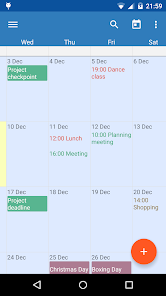
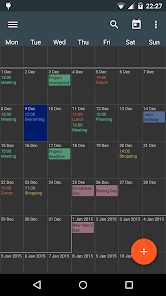
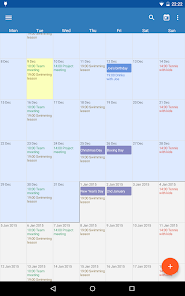
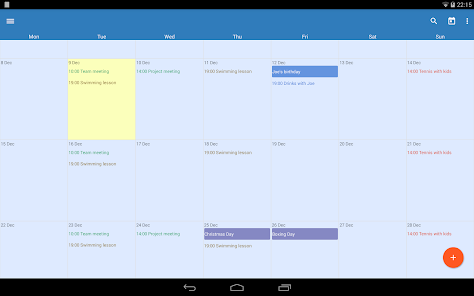
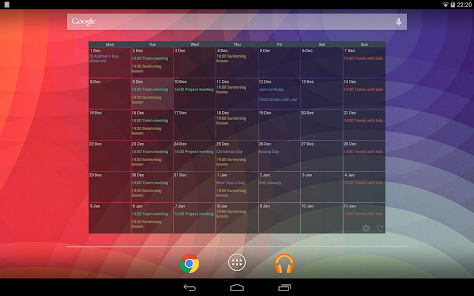
No more flipping between different calendar views. Touch Calendar does it all from one zoomable and scrollable view. Now with a beautiful Material Design interface.
Rated 95% by reghardware.com and 9/10 by WIRED ( http://goo.gl/lLPoa ).
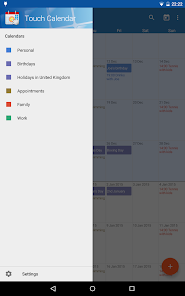
Touch Calendar works with Google Calendar and any other calendars your phone supports.
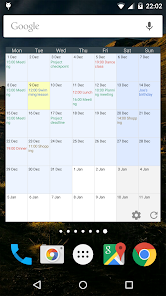
This is the free version, that can be upgraded with a one-off purchase to get widgets to show your calendar directly on your phone's home screen.
Also features calendar search and custom repeating events (e.g. biweekly, bimonthly).
Touch Calendar is easy to use:
- pinch-zoom to zoom in
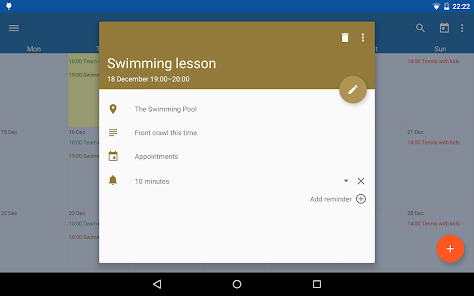
- tap an event to see its details
- tap-and-hold on a date to add a new event
- touch to scroll the calendar as much as you want, both forwards and backwards
- jump to today, or to any date from the menu
- calendar search
- set the font size and default zoom level from the Settings
- widgets so you can see your calendar on the home screen
Zoom and scroll your calendar with complete freedom!
Note: Text colour for events comes from the calendar colour. Set up different calendar colours in Google Calendar and they'll appear in Touch Calendar automatically.
Rated 95% by reghardware.com and 9/10 by WIRED ( http://goo.gl/lLPoa ).
Touch Calendar works with Google Calendar and any other calendars your phone supports.
This is the free version, that can be upgraded with a one-off purchase to get widgets to show your calendar directly on your phone's home screen.
Also features calendar search and custom repeating events (e.g. biweekly, bimonthly).
Touch Calendar is easy to use:
- pinch-zoom to zoom in
- tap an event to see its details
- tap-and-hold on a date to add a new event
- touch to scroll the calendar as much as you want, both forwards and backwards
- jump to today, or to any date from the menu
- calendar search
- set the font size and default zoom level from the Settings
- widgets so you can see your calendar on the home screen
Zoom and scroll your calendar with complete freedom!
Note: Text colour for events comes from the calendar colour. Set up different calendar colours in Google Calendar and they'll appear in Touch Calendar automatically.
Updated on
Safety starts with understanding how developers collect and share your data. Data privacy and security practices may vary based on your use, region, and age. The developer provided this information and may update it over time.

No data shared with third parties
Learn more about how developers declare sharing

No data collected
Learn more about how developers declare collection
Ratings and reviews
3.8
5.66K reviews

Rebecca Wilkerson
- Flag inappropriate
January 14, 2021
It's perfect! I have been using this calendar for years and LOVE it. The views and customization are top notch. The scrolling ability is better than any other I've seen. It doesn't just jump to where you can only see one month at a time. The zoom in feature is handy when you have multiple events on one date. It works seamlessly with my google calendar on my desktop, too. I upgraded to the paid version a long time ago. It's so worth it!
7 people found this review helpful

David Smith
- Flag inappropriate
- Show review history
February 17, 2023
I have always loved this app. However, where did the settings menu go? I see only a list of my current calendars, but no settings menu, and no way to add a calendar, change colors, etc. Please advise. 2/15/2023 update. The app works great now on my new Android 12 phone. It seems that the "settings" controls were being hidden by the three navigation buttons on my old phone. They were on the new phone as well until I changed the navigation to "swipe gestures". Nice to have full functionality!
5 people found this review helpful

A Google user
- Flag inappropriate
March 11, 2019
Nice calendar, graphics and colors. After I used the settings once, the top bar with the setting and other icons is gone. No way to change the views, just to scroll months endlessly up and down. Adding new event does not work when tapping a date. Have to use the + button, then it opens an event window for the current day and from the one has to navigate to whatever date is needed.
15 people found this review helpful
What's new
Hi everyone! I know it's been a while, but here's a new version with some fixes to bring the app more up to date:
- Support runtime permissions
- Fix back gesture closing app when event is open
- Fix time shown wrong when event is edited (by closing event info screen instead)
- Fix UI not filling the screen
- Support runtime permissions
- Fix back gesture closing app when event is open
- Fix time shown wrong when event is edited (by closing event info screen instead)
- Fix UI not filling the screen


