DYMO® LetraTag® Connect
3.0star
495 reviews
100K+
Downloads

Everyone
info

About this app
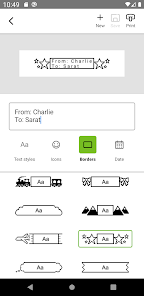
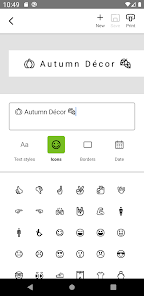
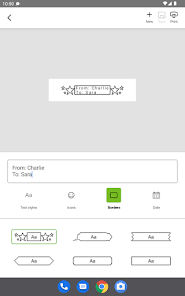
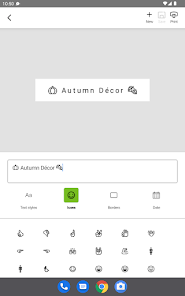
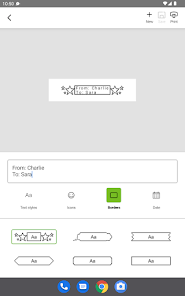
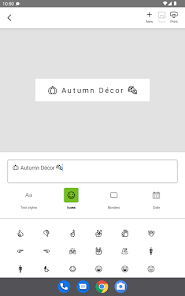
Customize labels with options including 5 font sizes, 15 box styles, 100+ icons, and the ability to underline, create multiple lines of text, or insert a date.
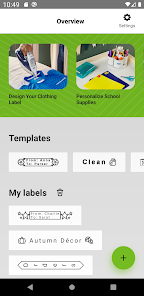
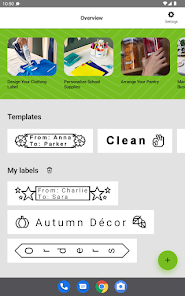
Home screen includes 8 pre-saved templates, helpful tips and tricks and the option to create and save personalized labels.
Automatic Bluetooth (v4.12 or higher) connection between LetraTag® Connect app and LetraTag 200B means labels are printed in seconds.
Compatible with Android (10 or later) and iPhone (13 or later) operating systems.
DYMO® LetraTag® Connect will only pair with the LetraTag® 200B in range - no confusion with other Bluetooth devices nearby
Connect from up to 10 meters/33 feet
Easily insert today's date in 10 different formats
Print two stacked lines of text, ideal for gift labels and more
DYMO® LetraTag® labels come in paper, plastic, metallic, and iron-on
Home screen includes 8 pre-saved templates, helpful tips and tricks and the option to create and save personalized labels.
Automatic Bluetooth (v4.12 or higher) connection between LetraTag® Connect app and LetraTag 200B means labels are printed in seconds.
Compatible with Android (10 or later) and iPhone (13 or later) operating systems.
DYMO® LetraTag® Connect will only pair with the LetraTag® 200B in range - no confusion with other Bluetooth devices nearby
Connect from up to 10 meters/33 feet
Easily insert today's date in 10 different formats
Print two stacked lines of text, ideal for gift labels and more
DYMO® LetraTag® labels come in paper, plastic, metallic, and iron-on
Updated on
Safety starts with understanding how developers collect and share your data. Data privacy and security practices may vary based on your use, region, and age. The developer provided this information and may update it over time.

No data shared with third parties
Learn more about how developers declare sharing

No data collected
Learn more about how developers declare collection
Ratings and reviews
3.0
467 reviews

billi frankenberger
- Flag inappropriate
March 8, 2024
Really excited when I got it to find how much it changed from the 80s. Could have more fonts. I think what I'd like to see is how to size it to better fit the tape. For as much tape as it uses to create the label there's alot of wasted space and no way to make the print larger to make it take up more space. Overall I still like it, it's still better then what we had in the 80s.
2 people found this review helpful

Shelly Richards
- Flag inappropriate
January 13, 2024
The app works fine, but I'm shocked with how LITTLE you can do with it. Almost 20 years ago there was more functionality in a basic handheld first generation panel maker. I would expect to see more fonts, the ability to print double lined labels, the ability to shorten the lead and end portion of the label to have less blank space. Even the number of border options are limited. If I had the money to spend again, I'd just buy the handheld.
5 people found this review helpful

Eric Forman
- Flag inappropriate
October 28, 2023
The printer and app work exactly as advertised, very simple to connect, very imple to create and print labels. But come on, it's 2023! The app can only contain two fonts that are incredibly similar to each other? There is no reason that the app could not have a lot more functionality. The font is a function of the app, not the printer. EVen if you wanted to charge a couple bucks for downloadable fonts, there's obviously a market for them.
18 people found this review helpful
What's new
With this update, we've added FIVE new fonts so you can customize your labels. Try out the original DYMO embossing font, now available for LetraTag 200B! You'll also enjoy new and updated icons, and feature improvements for faster and easier label creation. Happy labeling!