
RTSP Camera
1K+
Downloads

Everyone
info
About this app
📲 Transform Your Smartphone into an IP Camera 🎥
You don't need an expensive 🤑 IP camera for home surveillance 🏠. Simply download our app onto your smartphone 📱 and connect via Wi-Fi 📶 to set up an affordable video monitoring system 📹.
The app features a built-in RTSP server 🛠️, letting you stream live video 🎥 and audio 🎤 across your network. Install the Web Camera Pro software on your PC 💻 to record and monitor your space in real-time 🕒, complete with intelligent motion detection 🚨.
🌐 Stream Via RTSP Protocol:
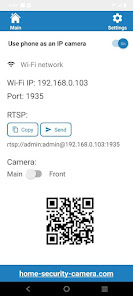
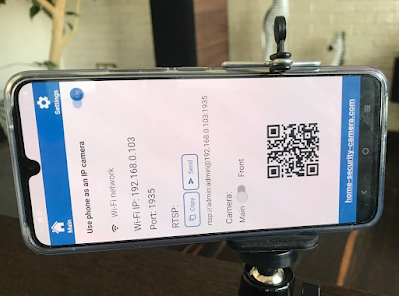
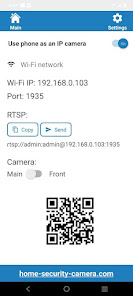
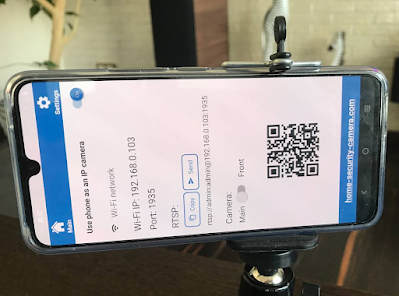
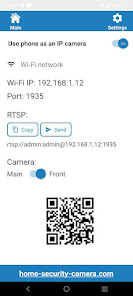
Your smartphone will stream video 🎥 using the RTSP protocol over Wi-Fi 📶. Connect using this URL format:
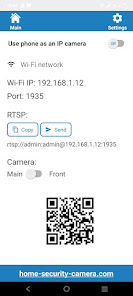
rtsp://admin:admin@192.168.0.100:1935
🌟 Key Features:
📱 Turn your smartphone into an IP camera
🕒 Operate 24/7 with the screen off
🎥 Live stream video and audio to your PC or mobile device
💾 Real-time and time-lapse saving on your computer
🎤 Use your phone as a PC webcam with audio
🔌 Connect to existing CCTV systems via Wi-Fi
🛠️ Inbuilt RTSP server functionality
⏩ Ultra-low latency and minimal delays
🌐 Runs as a background service
🔋 Energy-efficient operation
🗜️ Supports H264 video compression
🔄 Choose between rear and front-facing cameras
🕒 Continuous 24/7 video monitoring
🔍 Supports multiple camera resolutions
🎞️ Adjustable frame rates
🔄 Auto-restart if Wi-Fi drops
📋 Steps to Use Your Mobile Phone as an IP Camera:
1️⃣ Download Web Camera Pro:
🔗 https://free-video-surveillance.com/cctv-software
2️⃣ Add New Camera 📸:
Enter an RTSP address like:
rtsp://admin:admin@192.168.0.100:1935
📝 Note:
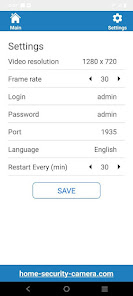
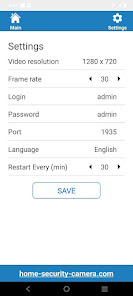
'admin:admin' are the default login and password 🔐 (changeable in settings)
'192.168.0.100' is your phone's local IP address 📍
'1935' is the connection port 🚪 (changeable in settings)
3️⃣ Start Streaming 🎥:
Open the RTSP stream in the Web Camera Pro software 🖥️.
You don't need an expensive 🤑 IP camera for home surveillance 🏠. Simply download our app onto your smartphone 📱 and connect via Wi-Fi 📶 to set up an affordable video monitoring system 📹.
The app features a built-in RTSP server 🛠️, letting you stream live video 🎥 and audio 🎤 across your network. Install the Web Camera Pro software on your PC 💻 to record and monitor your space in real-time 🕒, complete with intelligent motion detection 🚨.
🌐 Stream Via RTSP Protocol:
Your smartphone will stream video 🎥 using the RTSP protocol over Wi-Fi 📶. Connect using this URL format:
rtsp://admin:admin@192.168.0.100:1935
🌟 Key Features:
📱 Turn your smartphone into an IP camera
🕒 Operate 24/7 with the screen off
🎥 Live stream video and audio to your PC or mobile device
💾 Real-time and time-lapse saving on your computer
🎤 Use your phone as a PC webcam with audio
🔌 Connect to existing CCTV systems via Wi-Fi
🛠️ Inbuilt RTSP server functionality
⏩ Ultra-low latency and minimal delays
🌐 Runs as a background service
🔋 Energy-efficient operation
🗜️ Supports H264 video compression
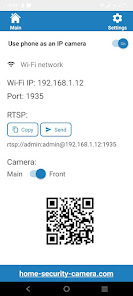
🔄 Choose between rear and front-facing cameras
🕒 Continuous 24/7 video monitoring
🔍 Supports multiple camera resolutions
🎞️ Adjustable frame rates
🔄 Auto-restart if Wi-Fi drops
📋 Steps to Use Your Mobile Phone as an IP Camera:
1️⃣ Download Web Camera Pro:
🔗 https://free-video-surveillance.com/cctv-software
2️⃣ Add New Camera 📸:
Enter an RTSP address like:
rtsp://admin:admin@192.168.0.100:1935
📝 Note:
'admin:admin' are the default login and password 🔐 (changeable in settings)
'192.168.0.100' is your phone's local IP address 📍
'1935' is the connection port 🚪 (changeable in settings)
3️⃣ Start Streaming 🎥:
Open the RTSP stream in the Web Camera Pro software 🖥️.
Updated on
Safety starts with understanding how developers collect and share your data. Data privacy and security practices may vary based on your use, region, and age. The developer provided this information and may update it over time.

No data shared with third parties
Learn more about how developers declare sharing

No data collected
Learn more about how developers declare collection
What's new
Turn your mobile phone into an IP camera with support for RTSP streaming


